=== ANCHOR POEM ===
════════════════════════════════════════════════════───────────────────────────────
 would anyone be interested in a Bash+Lua script that takes your Mastodon
 archive and turns it into a folder full of .txt files?

 I also made a script that spits out a random one on your terminal, if you want
 that
┌─────────┐                                                           ┌───────────┐
│ similar │                       chronological                       │ different │
╘═════════╧╧═════════════════════════════════════════════──────────────────────────────┘

=== SIMILARITY RANKED ===

--- #1 fediverse/5998 ---
══════════════════════════════════════════════════════════════════════════─────────
 I should conjure x11 from source. I bet they have a lot of useful utilitudes
 that I can configure. I wonder if Gentoo can do it for me? nahhhhh I'll just
 write my own script, it'll only take me like a couple hours per piece of
 software
┌─────────┐                                                           ┌───────────┐
│ similar │                       chronological                       │ different │
╘═════════╧╧═══════════════════════════════════════════════════════════════════────────┘

--- #2 fediverse/5168 ---
═══════════════════════════════════════════════════════════════════────────────────
 this is one of the first scripts I wrote

 I can't believe I put the --no-ls AFTER the argument, ha, what a noob.

 ah well if it works it works and I can't refactor now because I built it into
 random scripts and I'd be fixing errors all the time.
![script 1: #!/bin/bash # sort by filetype would be nice alias cd="cd-improved" function cd-improved(){ if [ "${1}" = "..." ] ; then builtin cd .. && builtin cd .. elif [ "${1}" = "...." ] ; then builtin cd .. && builtin cd .. && builtin cd .. elif [ "${1}" = "....." ] ; then builtin cd .. && builtin cd .. && builtin cd .. && builtin cd .. elif [ -d "./${1}" ] ; then local target_dir="./${1}" elif [ "${1}" = "cdir" ] ; then local target_dir="$(tail -n 1 '/home/ritz/scripts/.cdir-target')" echo ${target_dir} else local target_dir="${1}" fi if [ ! "${2}" = '--no-ls' ] ; then builtin cd "${target_dir}" && ls -v --color=auto else builtin cd "${target_dir}" fi # if the qcd function is defined if declare qcd > /dev/null; then quick_cd -d DEFAULT quick_cd -a DEFAULT fi } script 2: #!/bin/bash function cdir(){ if [ "$#" -eq 0 ]; then pwd | cat >> ~/scripts/.cdir-target elif [ "${1}" == "-l" ]; then cat ~/scripts/.cdir-target fi }](/similar-different/media/f15c9d1918bf9b2e.png "script 1: #!/bin/bash # sort by filetype would be nice alias cd=\"cd-improved\" function cd-improved(){ if [ \"${1}\" = \"...\" ] ; then builtin cd .. && builtin cd .. elif [ \"${1}\" = \"....\" ] ; then builtin cd .. && builtin cd .. && builtin cd .. elif [ \"${1}\" = \".....\" ] ; then builtin cd .. && builtin cd .. && builtin cd .. && builtin cd .. elif [ -d \"./${1}\" ] ; then local target_dir=\"./${1}\" elif [ \"${1}\" = \"cdir\" ] ; then local target_dir=\"$(tail -n 1 '/home/ritz/scripts/.cdir-target')\" echo ${target_dir} else local target_dir=\"${1}\" fi if [ ! \"${2}\" = '--no-ls' ] ; then builtin cd \"${target_dir}\" && ls -v --color=auto else builtin cd \"${target_dir}\" fi # if the qcd function is defined if declare qcd > /dev/null; then quick_cd -d DEFAULT quick_cd -a DEFAULT fi } script 2: #!/bin/bash function cdir(){ if [ \"$#\" -eq 0 ]; then pwd | cat >> ~/scripts/.cdir-target elif [ \"${1}\" == \"-l\" ]; then cat ~/scripts/.cdir-target fi }")
┌─────────┐                                                           ┌───────────┐
│ similar │                       chronological                       │ different │
╘═════════╧╧════════════════════════════════════════════════════════════───────────────┘

--- #3 fediverse/1246 ---
═══════════════════════════════════════════════────────────────────────────────────
 @user-883

 hehe if I don't understand how it works it's difficult for me to use things.
 My Linux friends get so exasperated with me because I'm like "cool script
 gimme like 2 days to figure it out" and they're like "bro just use these
 flags" and I'm like "no"
┌─────────┐                                                           ┌───────────┐
│ similar │                       chronological                       │ different │
╘═════════╧╧════════════════════════════════════════───────────────────────────────────┘

--- #4 fediverse/5113 ---
═══════════════════════════════════════════════════════════════════────────────────
 any game with the ability to interact with the simulation through command line
 arguments is a game that is scriptable and infinitely expandable.
┌─────────┐                                                           ┌───────────┐
│ similar │                       chronological                       │ different │
╘═════════╧╧════════════════════════════════════════════════════════════───────────────┘

--- #5 fediverse/2097 ---
═════════════════════════════════════════════════════──────────────────────────────
 If you're writing a bash script, you should never hard-code file locations.
 Instead, put them in a variable at the top of your script, so they're easy to
 find when people need to configure your script or move files around.

 It's like a config file built INTO the script itself. Just change the
 variables, they're at the top with comments.
┌─────────┐                                                           ┌───────────┐
│ similar │                       chronological                       │ different │
╘═════════╧╧══════════════════════════════════════════════─────────────────────────────┘

--- #6 fediverse/582 ---
═════════════════════════════════════════════──────────────────────────────────────
 @user-431

 I made an alias that overwrites cd so I don't have to do this. The important
 line is line 27, you could probably accomplish something similar like this:

 alias cd="cd ${1} && ls -v --color=auto"

 I also set it up so I can change more than one directory up using ... or ....
 or .....

 also I have a few shortcut scripts, cdir and qcd. cdir creates a quick way to
 drop a bookmark wherever I'd like, while qcd can make permanent bookmarks.
 Also qcd makes it so whenever I open a new terminal it opens to the last
 directory I was in, which is nice if you need a new terminal to do something
 in the current folder and you don't want to have to walk alllllllll the way
 back.
![A BASH script that overwrites the built in "change directory" command to auto magically list the contents of the directory you've moved into after moving. here's the content of the script: #!/bin/bash alias cd="cd-improved" function cd-improved(){ if [ "${1}" = "..." ] ; then builtin cd .. && builtin cd .. elif [ "${1}" = "...." ] ; then builtin cd .. && builtin cd .. && builtin cd .. elif [ "${1}" = "....." ] ; then builtin cd .. && builtin cd .. && builtin cd .. && builtin cd .. elif [ -d "./${1}" ] ; then local target_dir="./${1}" elif [ "${1}" = "cdir" ] ; then local target_dir="$(tail -n 1 '/home/ritz/scripts/.cdir-target')" echo ${target_dir} else local target_dir="${1}" fi if [ ! "${2}" = '--no-ls' ] ; then builtin cd "${target_dir}" && ls -v --color=auto else builtin cd "${target_dir}" fi # if the qcd function is defined if declare qcd > /dev/null; then quick_cd -d DEFAULT quick_cd -a DEFAULT fi }](/similar-different/media/4c047b2f98f05b5b.png "A BASH script that overwrites the built in \"change directory\" command to auto magically list the contents of the directory you've moved into after moving. here's the content of the script: #!/bin/bash alias cd=\"cd-improved\" function cd-improved(){ if [ \"${1}\" = \"...\" ] ; then builtin cd .. && builtin cd .. elif [ \"${1}\" = \"....\" ] ; then builtin cd .. && builtin cd .. && builtin cd .. elif [ \"${1}\" = \".....\" ] ; then builtin cd .. && builtin cd .. && builtin cd .. && builtin cd .. elif [ -d \"./${1}\" ] ; then local target_dir=\"./${1}\" elif [ \"${1}\" = \"cdir\" ] ; then local target_dir=\"$(tail -n 1 '/home/ritz/scripts/.cdir-target')\" echo ${target_dir} else local target_dir=\"${1}\" fi if [ ! \"${2}\" = '--no-ls' ] ; then builtin cd \"${target_dir}\" && ls -v --color=auto else builtin cd \"${target_dir}\" fi # if the qcd function is defined if declare qcd > /dev/null; then quick_cd -d DEFAULT quick_cd -a DEFAULT fi }")
┌─────────┐                                                           ┌───────────┐
│ similar │                       chronological                       │ different │
╘═════════╧╧══════════════════════════════════════─────────────────────────────────────┘

--- #7 fediverse/2638 ---
══════════════════════════════════════════════════════─────────────────────────────
 I really do believe that you can write any computer program you'd like with a
 combination of Lua, Bash, and C.

 Bash to start the program and enable updates / configuration, Lua to handle
 the scripting and ordering of events, and C (or Rust) to execute performance
 intensive sections. (often in their own threads)
┌─────────┐                                                           ┌───────────┐
│ similar │                       chronological                       │ different │
╘═════════╧╧═══════════════════════════════════════════════────────────────────────────┘

--- #8 fediverse/1567 ---
═════════════════════════════════════════════════──────────────────────────────────
 I helped make a script that saves the last directory you CD'd to in every
 shell / terminal. It helps because when I open a new terminal I'm already
 where I was working last, which means I'm less likely to forget what I was
 doing.

 However, it does make my home directory a bit more messy, as I no longer open
 my computer to that place.
┌─────────┐                                                           ┌───────────┐
│ similar │                       chronological                       │ different │
╘═════════╧╧══════════════════════════════════════════─────────────────────────────────┘

--- #9 fediverse/1762 ---
═════════════════════════════════════════════════════──────────────────────────────
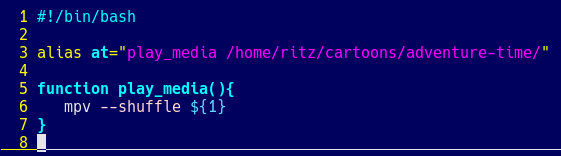
 This was the first bash script I ever wrote.

 It's been updated a little, it was a bash alias first, but this is what it
 looks like now.

 Kinda shows what kinds of problems I needed to solve most.
┌─────────┐                                                           ┌───────────┐
│ similar │                       chronological                       │ different │
╘═════════╧╧══════════════════════════════════════════════─────────────────────────────┘

--- #10 notes/environment-variables ---
═══════────────────────────────────────────────────────────────────────────────────
 To edit environment variables:

 ~/.bashrc is for variables only accessible by the user.

 /etc/profile is for variables accessible by all users.

 /etc/environment is for variables accessible by anyone.
┌─────────┐                                                           ┌───────────┐
│ similar │                       chronological                       │ different │
╘══════───┴╧───────────────────────────────────────────────────────────────────────────┘

--- #11 fediverse/5850 ---
══════════════════════════════════════════════════════════════════════════─────────
 @user-1074

 if you'd like I can give you a lua script which will take your fediverse
 archive and turn it into a pdf which you can edit or print or whatever. Might
 be a fun diversion from posting. You can reply to yourself, add
 clarifications, change some things, put things in a new light, add context,
 etc... before you know it you'll have something printable. Could even pull out
 your best stuff and make zines.

 should require just a little configuration to suit your setup. That's part of
 how I stay "productive" without posting all the time.
┌─────────┐                                                           ┌───────────┐
│ similar │                       chronological                       │ different │
╘═════════╧╧═══════════════════════════════════════════════════════════════════────────┘

--- #12 fediverse/3907 ---
══════════════════════════════════════════════════════════─────────────────────────
 kinda wanna make a linux distro that has all the capabilities of a GUI distro
 and isn't so minimal (like screen recording, calculator, screenshot, wifi
 manager, etc etc) but with i3 instead of a desktop.

 they could literally just be symlinks (shortcuts) to scripts that are in your
 /usr/bin or whatever directory

 seriously it's not like there's THAT many ways to use ffmpeg, why not just
 write a script for them? that's what you're going to do when you use it for
 the first time, anyway, so...
┌─────────┐                                                           ┌───────────┐
│ similar │                       chronological                       │ different │
╘═════════╧╧═══════════════════════════════════════════════════────────────────────────┘

--- #13 fediverse/3592 ---
════════════════════════════════════════════════════════───────────────────────────
 @user-1570

 [meme of Mr Incredible from the Incredibles pointing at a table]

 LINUX IS LINUX.

 (anything that works on Linux can theoretically be made to work on your
 toaster, if it also runs Linux!)

 This is very cool, and if I understand correctly it means that any Godot games
 could theoretically be played on these NEAT as HECK little devices, yeah? So
 cool!
┌─────────┐                                                           ┌───────────┐
│ similar │                       chronological                       │ different │
╘═════════╧╧═════════════════════════════════════════════════──────────────────────────┘

--- #14 fediverse/2622 ---
══════════════════════════════════════════════════════─────────────────────────────
 what kind of linux user are you if you don't even like reading terminal
 output? it's USEFUL and INTERESTING information!

 WHY ELSE WOULD THE PROGRAMMER OUTPUT IT???
┌─────────┐                                                           ┌───────────┐
│ similar │                       chronological                       │ different │
╘═════════╧╧═══════════════════════════════════════════════────────────────────────────┘

--- #15 messages/264 ---
════════════════════════════════════════════════───────────────────────────────────
 Don't write self documenting code! Force people to read the documentation so
 they know how to use it
┌─────────┐                                                           ┌───────────┐
│ similar │                       chronological                       │ different │
╘═════════╧╧═════════════════════════════════════════──────────────────────────────────┘

--- #16 fediverse/4505 ---
════════════════════════════════════════════════════════════───────────────────────
 does anyone know a linux utility which will allow me to "snip" part of the
 screen a'la flameshot, automatically spit the image into a text recognition
 system (ran locally) and place the extracted text into my clipboard?
┌─────────┐                                                           ┌───────────┐
│ similar │                       chronological                       │ different │
╘═════════╧╧═════════════════════════════════════════════════════──────────────────────┘

--- #17 fediverse/3577 ---
════════════════════════════════════════════════════════───────────────────────────
 ┌─────────────────────────┐
 │ CW: computers-mentioned │
 └─────────────────────────┘


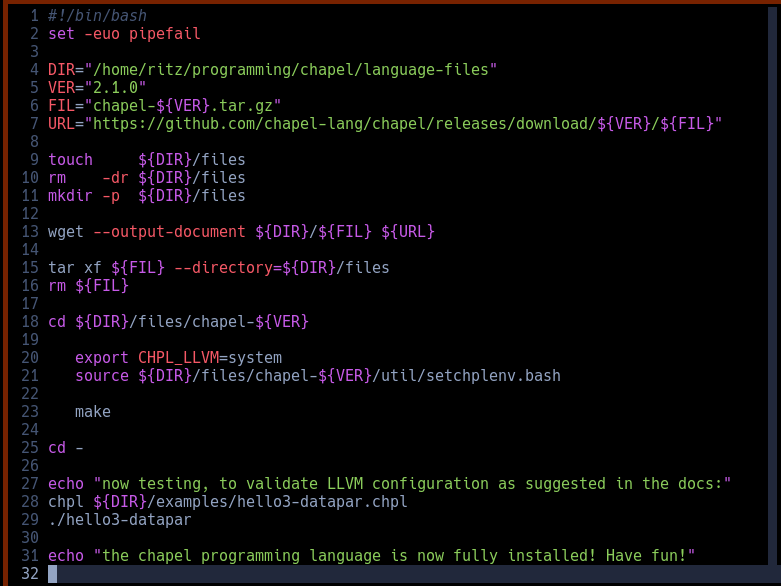
 I love writing installation scripts like this!

 If you want to install something on Linux but you have difficulty, talk to me
 and I'll write you a script like this. I might even make it fancier.

 This one installs a programming language that is useful for parallel computing
 across multiple clusters of computers which could be useful if you want to
 leverage multiple CPUs and GPUs with ease to compute tasks which are far
 beyond a normal computer.

 https://chapel-lang.org/download.html
┌─────────┐                                                           ┌───────────┐
│ similar │                       chronological                       │ different │
╘═════════╧╧═════════════════════════════════════════════════──────────────────────────┘

--- #18 fediverse/6212 ---
════════════════════════════════════════════════════════════════════════════───────
 ┌──────────────────────┐
 │ CW: ai-mentioned     │
 └──────────────────────┘


 If you want an LLM to generate ASCII art, don't try through text. First
 generate an SVG and then use a separate program which approximates SVGs with
 ascii characters.
┌─────────┐                                                           ┌───────────┐
│ similar │                       chronological                       │ different │
╘═════════╧╧═════════════════════════════════════════════════════════════════════──────┘

--- #19 messages/181 ---
══════════════════════════════════════════════─────────────────────────────────────
 I know you don't want to hear this, but there is a chance that there will come
 a time where your life depends on your ability to debug a computer without the
 internet. To set up an SSH server. To install Linux. To program in C. To do
 something else that I'm not prepared for... If StackOverflow didn't exist
 because network connectivity has been lost, could you remember syntax? Maybe
 it's a good idea to set up a local LLM that can answer basic questions about
 technology. Maybe it's a good idea to set up on your parents computer, just in
 case you have to hide out there for a couple months. Maybe it's a good idea to
 download wikipedia, just in case.

 If I need to use a mac, I'm screwed
┌─────────┐                                                           ┌───────────┐
│ similar │                       chronological                       │ different │
╘═════════╧╧═══════════════════════════════════════────────────────────────────────────┘

--- #20 fediverse/3751 ---
════════════════════════════════════════════════════════───────────────────────────
 I wonder if anyone would pay me to write bash scripts for them? is there a
 role that's just... bash scripter? is that what sysadmins do all day? or is
 that more automation? and what the heck is a dev op? do they write bash
 scripts?

 or maybe writing bash scripts is the "fun" part of linux, and nobody would pay
 anyone else to do it because they want to do it themselves
┌─────────┐                                                           ┌───────────┐
│ similar │                       chronological                       │ different │
╘═════════╧╧═════════════════════════════════════════════════──────────────────────────┘
|