 -> file: fediverse/1934
═════════════════════════════════════════════════──────────────────────────────────
 @user-1109

 do it in a random color each time! Here's my implementation for viewing txt
 files colorfully:
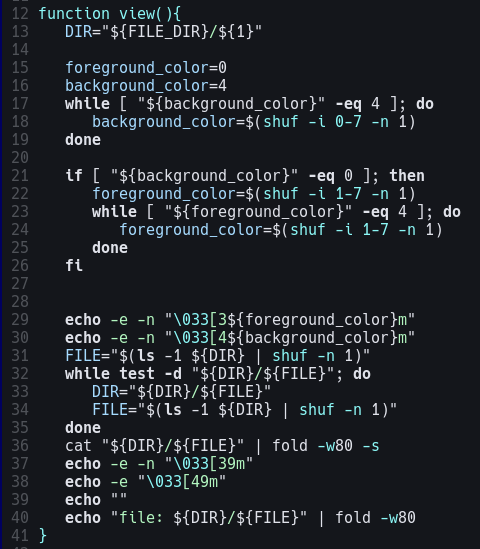
┌─────────┐                                                           ┌───────────┐
│ similar │                                                           │ different │
╘═════════╧══════════════════════════════════════─────────────────────┴───────────┘

 -> file: fediverse/1935
═════════════════════════════════════════════════──────────────────────────────────
 @user-28

 because "deserving money" to a reasonable person sounds like "deserving access
 to the goods and services that a pittance might afford"

 but to them "deserving money" means "did they earn those luxuries with their
 own luck and effort like me, a person who works very hard and definitely has
 earned everything I have"

 basically, a "blood sweat and tears" tax before you can have nice things like
 roofs and clothes and nourishment

 thing is... life is hard for people who need dollars. Their judgement reflects
 a lack of understanding of what people who lack resources go through.
┌─────────┐                                                           ┌───────────┐
│ similar │                                                           │ different │
╘═════════╧══════════════════════════════════════─────────────────────┴───────────┘

 -> file: fediverse/1936
═════════════════════════════════════════════════──────────────────────────────────
 "Ugh, policing AI agents as they interact with the internet and run our economy
 for us is soooooo boring. hey I have an idea! Let's automate it!"
┌─────────┐                                                           ┌───────────┐
│ similar │                                                           │ different │
╘═════════╧══════════════════════════════════════─────────────────────┴───────────┘

 -> file: fediverse/1937
╔═════════════════════════════════════════════════─────────────────────────────────┐
║ The best tip I have for people new to Linux is every time you solve a problem,   │
║ put the solution in a script. In addition, put the operations necessary to undo  │
║ the operation you just performed into a separate script (or function in the      │
║ same script)                                                                     │
║                                                                                  │
║ It's not hard. It's very easy. Its basically just typing things into a text      │
║ document instead of entering them one-by-one in your terminal. But now if you    │
║ ever need to solve the same problem twice, you just need to look through all     │
║ the scripts you've written instead of trying to relearn how to fix the thing     │
║ you're working on.                                                               │
║                                                                                  │
║ Plus, if you ever need to disable what you did, well there it is, you're good    │
║ to go. You can use chatGPT for things like text parsing or whatever, like "hey   │
║ can you write me a sed command that does this exact thing that I'm going to      │
║ enumerate and spell out for you" followed up by "that didn't quite work, the     │
║ desired behavior was this, but when I ran the script provided it did this" boom  │
║ you're a Linux administrator now, heres your rubber duck.                        │
╟─────────┐                                                            ┌───────────┤
║ similar │                                                            │ different │
╚═════════╧══════════════════════════════════════──────────────────────┴───────────┘

 -> file: fediverse/1938
═════════════════════════════════════════════════──────────────────────────────────
 ┌──────────────────────┐
 │ CW: food-mentioned   │
 └──────────────────────┘


 American ingredient lists be like:thing-that-you're-eatingsugarcane sugarcorn
 syruphigh-fructose corn syrupdextrosesucralosenatural flavorsartifical coloring
┌─────────┐                                                           ┌───────────┐
│ similar │                                                           │ different │
╘═════════╧══════════════════════════════════════─────────────────────┴───────────┘

 -> file: fediverse/1939
═════════════════════════════════════════════════──────────────────────────────────
 @user-579

 OMG I've never met someone who also uses Void - it's the best distro for my
 purposes!
┌─────────┐                                                           ┌───────────┐
│ similar │                                                           │ different │
╘═════════╧══════════════════════════════════════─────────────────────┴───────────┘

 -> file: fediverse/1940
═════════════════════════════════════════════════──────────────────────────────────
 @user-579

 Yeah if there isn't a package in the package manager XBPS then I usually just
 install it from source. Which is ALSO something you can automate with a quick
 and easy script! Just put all the notes from the README on Github or whatever
 into a file named "update" and put that one level above the project directory!

 For any installed program my file hierarchy usually looks like:

 program-name
 - run (script)
 - update (script)
 - files (directory to clone into)
 - configs (point the program here)

 I find that this kind of organization makes it MUCH easier to keep my packages
 configured and installed as I'd like. Using a package manager is hard because
 they're all specific per distro, but using this distro-agnostic approach always
 seems to work better 9/10 times I find.

 And if another program needs a library that you manually installed, just
 symlink where it's looking to point to where you're installed! Or vice versa I
 guess.

 I use DWM so I don't have a desktop like KDE or anything like that
┌─────────┐                                                           ┌───────────┐
│ similar │                                                           │ different │
╘═════════╧══════════════════════════════════════─────────────────────┴───────────┘
|