 -> file: fediverse/1514
════════════════════════════════════════════────────────────────────────────────────
  image and text clipboards should be kept empty and pulled from or updated
  depending on context

  and why not a video clipboard? It's just mkv

  (and no I don't think the OS should have view-control over it)
┌─────────┐                                                            ┌───────────┐
│ similar │                       chronological                        │ different │
╘═════════╧═════════════════════════════════───────────────────────────┴───────────┘
 -> file: notes/never-do-this
══════════════════════════════════════════════════════════════════════════════════──
  never copy paste something from the internet directly into a terminal.
  put it in a text document and read it first.

  [nobody ever does, design the software with that in mind]
┌─────────┐                                                            ┌───────────┐
│ similar │                       chronological                        │ different │
╘═════════╧════════════════════════════════════════════════════════════╧══════════─┘
 -> file: fediverse/3139
═════════════════════════════════════════════════───────────────────────────────────
  "reply while text is entered in the text field" should open a new tab instead
  of overwriting.
┌─────────┐                                                            ┌───────────┐
│ similar │                       chronological                        │ different │
╘═════════╧══════════════════════════════════════──────────────────────┴───────────┘
 -> file: fediverse/5715
════════════════════════════════════════════════════════════════────────────────────
  I wish I could attach small screenshots to source code and have it stored in
  the text.

  then the editor can hide the gibberish data and translate it to a .png that is
  placed just so on the document.

  "ah but what about different fonts and sizes and aspect ratios and terminal
  widths and..."

  yep, those are the hard parts >.
┌─────────┐                                                            ┌───────────┐
│ similar │                       chronological                        │ different │
╘═════════╧═════════════════════════════════════════════════════───────┴───────────┘
 -> file: fediverse/3055
═════════════════════════════════════════════════───────────────────────────────────
  If you're on a Windows computer, first of all why and second of all you can use
  the WINDOWS key + SHIFT + S to screenshot a part of the screen.

  this will put it in your copy/paste clipboard, meaning all you have to do is
  ctrl+V and boom suddenly you are significantly more productive.

  just don't forget alt text...
┌─────────┐                                                            ┌───────────┐
│ similar │                       chronological                        │ different │
╘═════════╧══════════════════════════════════════──────────────────────┴───────────┘
 -> file: fediverse/4512
══════════════════════════════════════════════════════──────────────────────────────
  @user-1687

  I use dmenu, so I'm thinking I'll write a script and call it using dmenu. The
  script will start by using flameshot to grab the snipped part of the screen
  into the clipboard, and then I need to find an OCR engine (thanks for the
  google-able term btw!) which can take clipboard contents as input, and output
  text to the clipboard.
┌─────────┐                                                            ┌───────────┐
│ similar │                       chronological                        │ different │
╘═════════╧═══════════════════════════════════════════─────────────────┴───────────┘
 -> file: fediverse/4505
══════════════════════════════════════════════════════──────────────────────────────
  does anyone know a linux utility which will allow me to "snip" part of the
  screen a'la flameshot, automatically spit the image into a text recognition
  system (ran locally) and place the extracted text into my clipboard?
┌─────────┐                                                            ┌───────────┐
│ similar │                       chronological                        │ different │
╘═════════╧═══════════════════════════════════════════─────────────────┴───────────┘
 -> file: fediverse/1762
═══════════════════════════════════════════════─────────────────────────────────────
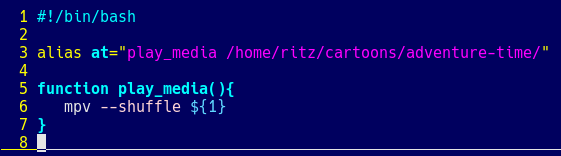
  This was the first bash script I ever wrote.

  It's been updated a little, it was a bash alias first, but this is what it
  looks like now.

  Kinda shows what kinds of problems I needed to solve most.
┌─────────┐                                                            ┌───────────┐
│ similar │                       chronological                        │ different │
╘═════════╧════════════════════════════════════────────────────────────┴───────────┘
 -> file: fediverse/1686
═══════════════════════════════════════════════─────────────────────────────────────
  @user-1049

  doesn't work on Firefox T.T
┌─────────┐                                                            ┌───────────┐
│ similar │                       chronological                        │ different │
╘═════════╧════════════════════════════════════────────────────────────┴───────────┘
 -> file: fediverse/4430
═════════════════════════════════════════════════════───────────────────────────────
  @user-1674 @user-1675

  do both

  screenshots can't be deleted
┌─────────┐                                                            ┌───────────┐
│ similar │                       chronological                        │ different │
╘═════════╧══════════════════════════════════════════──────────────────┴───────────┘
 -> file: messages/965
═════════════════════════════════════════════════════════════════───────────────────
  paste the error into the text file to better diagnose. Don't put it in a
  comment. It will remind you to clear the bug before compiling.
┌─────────┐                                                            ┌───────────┐
│ similar │                       chronological                        │ different │
╘═════════╧══════════════════════════════════════════════════════──────┴───────────┘
 -> file: fediverse/6137
════════════════════════════════════════════════════════════════════────────────────
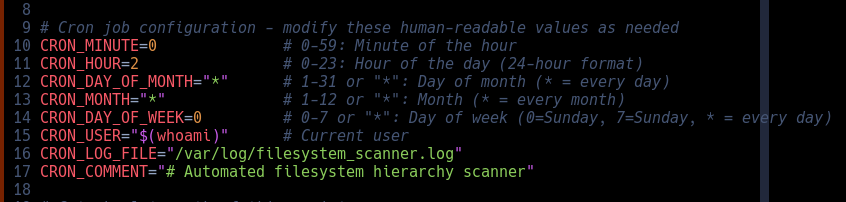
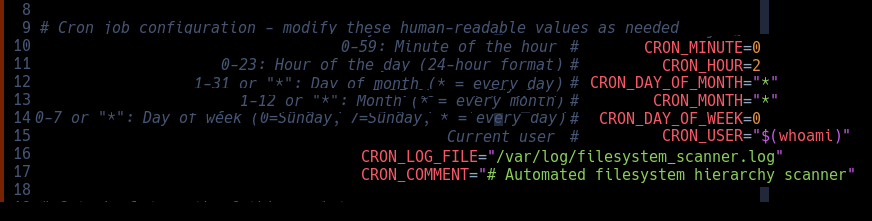
  sometimes, comments need to go on the left side of text. Like for parts of the
  script which should be user-editable, the fields should all be right-aligned to
  the farthest required bit of text. Instead of [picture A] it should be [picture
  B]
┌─────────┐                                                            ┌───────────┐
│ similar │                       chronological                        │ different │
╘═════════╧═════════════════════════════════════════════════════════───┴───────────┘
 -> file: fediverse/1872
═══════════════════════════════════════════════─────────────────────────────────────
  the most efficient productivity hack that I know is:

  pkill firefox
┌─────────┐                                                            ┌───────────┐
│ similar │                       chronological                        │ different │
╘═════════╧════════════════════════════════════────────────────────────┴───────────┘
 -> file: fediverse/1224
═══════════════════════════════════════════─────────────────────────────────────────
  @user-883

  sure that would help! I've used it to convert video files to a smaller size for
  uploading to websites, but that's about it
┌─────────┐                                                            ┌───────────┐
│ similar │                       chronological                        │ different │
╘═════════╧════════════════════════════════────────────────────────────┴───────────┘
 -> file: fediverse/3599
══════════════════════════════════════════════════──────────────────────────────────
  ┌─────────────────────────────┐
  │ CW: re: computers-mentioned │
  └─────────────────────────────┘


  @user-1573 `
  " Select the font for the hardcopy
  set printfont=Courier:h8
  :let &printheader = " "
  command! -range=% HardcopyPdf , hardcopy > %.ps | !ps2pdf %.ps && rm %.ps &&
  echo 'Created: %.pdf'

  " vimfolds - use marker as fold method
  set foldmethod=marker
  set foldtext=MyFoldText()

  " Functions
  function! MyFoldText()
      let line = getline(v:foldstart)
      let folded_line_num = v:foldend - v:foldstart
      let line_text = substitute(line, '^"{\+', '', 'g')
      let fillcharcount = &textwidth - len(line_text) - len(folded_line_num)
      return '+'. repeat('-', 4) . line_text . repeat('.', fillcharcount) . ' ('
      . folded_line_num . ' L)'
  endfunction

  let g:rainbow_active = 1
  `

  Here's the bottom part of the config - I ran out of characters and couldn't
  post the whole thing.

  If you don't know what vimfolds are here's a good guide:

  https://www.vimfromscratch.com/articles/vim-folding

  also:

  https://vim.fandom.com/wiki/Folding
┌─────────┐                                                            ┌───────────┐
│ similar │                       chronological                        │ different │
╘═════════╧═══════════════════════════════════════─────────────────────┴───────────┘
 -> file: messages/1063
═════════════════════════════════════════════════════════════════════───────────────
  What if instead of listing food in our ingredients as a paragraph we instead
  listed them in tab-separated-rows-by-columns like excel spreadsheets except
  with justifications for everything has its place in the ingredient dish.
┌─────────┐                                                            ┌───────────┐
│ similar │                       chronological                        │ different │
╘═════════╧══════════════════════════════════════════════════════════──┴───────────┘
 -> file: fediverse/3901
════════════════════════════════════════════════════────────────────────────────────
  @user-1550 `mkdir ~/icons
  mv ./*.png ~/icons
  `

  maybe?
┌─────────┐                                                            ┌───────────┐
│ similar │                       chronological                        │ different │
╘═════════╧═════════════════════════════════════════───────────────────┴───────────┘
 -> file: fediverse_boost/65
◀═╦════════════════[BOOST]═════════════════──────────────────────────────────────┐
  ║ ┌──────────────────────────────────────────────────────────────────────────┐ │
  ║ │ bash-errors                                                              │ │
  ║ │                                                                          │ │
  ║ │ Permalink: https://wizardzines.com/comics/bash-errors/                   │ │
  ║ └──────────────────────────────────────────────────────────────────────────┘ │
  ╠─────────┐                                                        ┌───────────┤
  ║ similar │                     chronological                      │ different │
  ╚═════════╧══════════════════════════════──────────────────────────┴───────────┴─▶
 -> file: fediverse/1934
════════════════════════════════════════════════────────────────────────────────────
  @user-1109

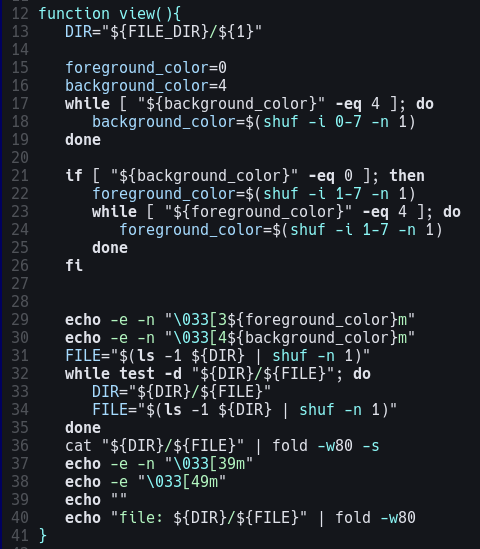
  do it in a random color each time! Here's my implementation for viewing txt
  files colorfully:
┌─────────┐                                                            ┌───────────┐
│ similar │                       chronological                        │ different │
╘═════════╧═════════════════════════════════════───────────────────────┴───────────┘
 -> file: fediverse/4801
═════════════════════════════════════════════════════════───────────────────────────
  if you're got a large directory full of text files that you want to combine
  into one single .txt or .pdf, let me know, I can hook you up with a mega file
  so it's easier to search through or manage when archiving data or whatever the
  heck else you wanna do with it
┌─────────┐                                                            ┌───────────┐
│ similar │                       chronological                        │ different │
╘═════════╧══════════════════════════════════════════════──────────────┴───────────┘
 -> file: fediverse/3600
══════════════════════════════════════════════════──────────────────────────────────
  ┌─────────────────────────────┐
  │ CW: re: computers-mentioned │
  └─────────────────────────────┘


  @user-1573

  Also HardcopyPdf is nice, it turns a file into a pdf. Does what it says on the
  tin. ^_^

  And it doesn't need anything more than those lines there in the config.
┌─────────┐                                                            ┌───────────┐
│ similar │                       chronological                        │ different │
╘═════════╧═══════════════════════════════════════─────────────────────┴───────────┘
 -> file: fediverse/5759
═════════════════════════════════════════════════════════════════───────────────────
  @user-1655

  hence why I put everything I've ever said here into a text file on my website
  that I update every couple months:

  https://ritz-menardi.neocities.org/words/compiled.txt

  I can share the script if you want. It's very easy to configure.  It also has
  two other sources so, there's stuff on there that I've never said publicly
  anywhere else.
┌─────────┐                                                            ┌───────────┐
│ similar │                       chronological                        │ different │
╘═════════╧══════════════════════════════════════════════════════──────┴───────────┘
 -> file: fediverse/1037
══════════════════════════════════════════──────────────────────────────────────────
  ┌──────────────────────┐
  │ CW: re: Vauge        │
  └──────────────────────┘


  @user-763

  ... how? I don't see that option (Mastodon)
┌─────────┐                                                            ┌───────────┐
│ similar │                       chronological                        │ different │
╘═════════╧═══════════════════════════════─────────────────────────────┴───────────┘
 -> file: fediverse/261
═══════════════════════════════════════─────────────────────────────────────────────
  does anyone know of a Firefox addon that will automagically zoom any document
  on the web such that there are approximately 80 characters per line?

  #firefox
┌─────────┐                                                            ┌───────────┐
│ similar │                       chronological                        │ different │
╘═════════╧════════════════════════════────────────────────────────────┴───────────┘
 -> file: fediverse/3270
══════════════════════════════════════════════════──────────────────────────────────
  somebody shifted my terminal tabs like, 4 pixels to the left, and now the
  far-left part of the text is half-cut off. lol xD
┌─────────┐                                                            ┌───────────┐
│ similar │                       chronological                        │ different │
╘═════════╧═══════════════════════════════════════─────────────────────┴───────────┘
 -> file: notes/vim-plugins
═════════───────────────────────────────────────────────────────────────────────────
  Put them here: /home/ritz/.local/share/nvim/site/pack/CATEGORY/start/NAME

  where CATEGORY is a general package category and NAME is the specific plugin

  If you don't want them to be automatically included then don't put them in the
  /start/ folder, put them somewhere else idk
┌─────────┐                                                            ┌───────────┐
│ similar │                       chronological                        │ different │
╘════════─┴────────────────────────────────────────────────────────────┴───────────┘
 -> file: fediverse/4960
═══════════════════════════════════════════════════════════─────────────────────────
  vim plugin where every tab changes the font color
┌─────────┐                                                            ┌───────────┐
│ similar │                       chronological                        │ different │
╘═════════╧════════════════════════════════════════════════────────────┴───────────┘
 -> file: fediverse/2362
════════════════════════════════════════════════────────────────────────────────────
  If you want to share what I say but you're afraid of linking yourself to my
  account, take a screenshot instead. That way there's less of a connection
  between us.

  On Windows platforms you can do :windowsxp: + shift + S if I recall correctly.
  It's been a while since I used a microsoft computer.

  This is also useful for archival purposes - what if your instance shuts down,
  or the link between you are your starred posts is severed?
┌─────────┐                                                            ┌───────────┐
│ similar │                       chronological                        │ different │
╘═════════╧═════════════════════════════════════───────────────────────┴───────────┘
 -> file: fediverse/2764
═════════════════════════════════════════════════───────────────────────────────────
  vim intentionally tricks it's users by making "q" without a semicolon ":" open
  up an input-grabbing menu that can't be gotten out of by pushing ":" semicolon
  or "q". Like... whose idea was that
┌─────────┐                                                            ┌───────────┐
│ similar │                       chronological                        │ different │
╘═════════╧══════════════════════════════════════──────────────────────┴───────────┘
 -> file: fediverse/1869
═══════════════════════════════════════════════─────────────────────────────────────
  oh dear, Mastodon formatting makes that script look weird. Here's the script in
  picture form so you can reference and fix it:

  I would edit the original post with backslashes and such but I'm exactly out of
  characters teehee

┌─────────┐                                                            ┌───────────┐
│ similar │                       chronological                        │ different │
╘═════════╧════════════════════════════════════────────────────────────┴───────────┘
 -> file: fediverse/1773
═══════════════════════════════════════════════─────────────────────────────────────
  ┌─────────────────────────┐
  │ CW: programming-is-easy │
  └─────────────────────────┘


  Need to install a program from Github? Follow these simple steps:

  step 1: make an empty text file

  step 2: put this at the top: #!/bin/bash

  step 3: put this on the next line: set -euo pipefail

  step 4: mkdir -p the directory you want to install it to

  step 5: rm -dr the directory you want to install it to

  step 6: mkdir -p the directory you want to install it to

  step 7: git clone the project

  step 8: this is the hard part - go through each of the steps listed in the
  readme and configure the installation to the needs of your system. Put them in
  the bash script one-by-one.

  step 9: save the file, it doesn't need an extension like .txt or .sh,
  extensions are for windows noobs

  step 10: chmod +x the file and then ./the file!

  step 11: fix it when they change their installation instructions...

  Need a run script? Easy! Write it as a function below your update script, then
  echo the bottom half of the update script into a file named "run" that's placed
  in the project directory.
┌─────────┐                                                            ┌───────────┐
│ similar │                       chronological                        │ different │
╘═════════╧════════════════════════════════════────────────────────────┴───────────┘
 -> file: fediverse/3649
══════════════════════════════════════════════════──────────────────────────────────
  *double tapping the star button because I want them to know I appreciate them
  but I don't want to clog up my "pinned for all time" section of this neat
  little website*
┌─────────┐                                                            ┌───────────┐
│ similar │                       chronological                        │ different │
╘═════════╧═══════════════════════════════════════─────────────────────┴───────────┘
 -> file: fediverse/2423
════════════════════════════════════════════════────────────────────────────────────
  does anyone know of any fedi software that lets you link to a particular post
  and read forward on a person's timeline from there? Or back I guess, but
  chronological viewing specifically.
┌─────────┐                                                            ┌───────────┐
│ similar │                       chronological                        │ different │
╘═════════╧═════════════════════════════════════───────────────────────┴───────────┘
 -> file: fediverse/1693
═══════════════════════════════════════════════─────────────────────────────────────
  "if I work on the TTY then they can't forward my X session without my consent"

  - ramblings of the utterly deranged

  as if they couldn't just look at your unencrypted source-code as you save it to
  your hard drive smh
┌─────────┐                                                            ┌───────────┐
│ similar │                       chronological                        │ different │
╘═════════╧════════════════════════════════════────────────────────────┴───────────┘
 -> file: fediverse/1694
═══════════════════════════════════════════════─────────────────────────────────────
  would anyone be interested in a Bash+Lua script that takes your Mastodon
  archive and turns it into a folder full of .txt files?

  I also made a script that spits out a random one on your terminal, if you want
  that
┌─────────┐                                                            ┌───────────┐
│ similar │                       chronological                        │ different │
╘═════════╧════════════════════════════════════────────────────────────┴───────────┘
 -> file: fediverse/5036
════════════════════════════════════════════════════════════────────────────────────
  give me syntax highlighting in a terminal based editor and that's all I need.
┌─────────┐                                                            ┌───────────┐
│ similar │                       chronological                        │ different │
╘═════════╧═════════════════════════════════════════════════───────────┴───────────┘
 -> file: notes/most-difficult-for-an-mortal
═════════════════════════════════════════════════════════════════════════════════───
  To choose to follow the command "stay history"
┌─────────┐                                                            ┌───────────┐
│ similar │                       chronological                        │ different │
╘═════════╧════════════════════════════════════════════════════════════╧═════════──┘
 -> file: fediverse/4931
═════════════════════════════════════════════════════════───────────────────────────
  https://ritz-menardi.neocities.org/words/compiled-backup.txt

  ohhhhh here's the full text, sorry for only uploading a partial thing before
┌─────────┐                                                            ┌───────────┐
│ similar │                       chronological                        │ different │
╘═════════╧══════════════════════════════════════════════──────────────┴───────────┘
 -> file: fediverse/1735
═══════════════════════════════════════════════─────────────────────────────────────
  a video that's a gif and an audio file played at the same time using && in bash
┌─────────┐                                                            ┌───────────┐
│ similar │                       chronological                        │ different │
╘═════════╧════════════════════════════════════────────────────────────┴───────────┘
 -> file: fediverse/4260
═════════════════════════════════════════════════════───────────────────────────────
  ┌───────────────────────────┐
  │ CW: controversial-opinion │
  └───────────────────────────┘


  you can just... edit the html by pushing f12 and suddenly any conversation in
  the history of the world could have taken place

  digital pictures are *not* evidence
┌─────────┐                                                            ┌───────────┐
│ similar │                       chronological                        │ different │
╘═════════╧══════════════════════════════════════════──────────────────┴───────────┘
 -> file: fediverse/3663
══════════════════════════════════════════════════──────────────────────────────────
  @user-1582

  It depends on the size of the file, copying a thousand lines of config file
  probably isn't that big of a deal, but copying a million lines in a log file
  just to pass it as an argument to... pad it to the left, or whatever, that'll
  DEFINITELY slow down your execution speed!

  Much better to pass by reference, usually...
┌─────────┐                                                            ┌───────────┐
│ similar │                       chronological                        │ different │
╘═════════╧═══════════════════════════════════════─────────────────────┴───────────┘
 -> file: fediverse/4570
═══════════════════════════════════════════════════════─────────────────────────────
  easiest way to deliver email malware is to put it in the "unsubscribe" link
┌─────────┐                                                            ┌───────────┐
│ similar │                       chronological                        │ different │
╘═════════╧════════════════════════════════════════════────────────────┴───────────┘
 -> file: fediverse_boost/126
◀═╦═══════════════════[BOOST]════════════════════────────────────────────────────┐
  ║ ┌──────────────────────────────────────────────────────────────────────────┐ │
  ║ │ man page sections                                                        │ │
  ║ │                                                                          │ │
  ║ │ Permalink: https://wizardzines.com/comics/man-pages/                     │ │
  ║ └──────────────────────────────────────────────────────────────────────────┘ │
  ╠─────────┐                                                        ┌───────────┤
  ║ similar │                     chronological                      │ different │
  ╚═════════╧════════════════════════════════════────────────────────┴───────────┴─▶
 -> file: fediverse/4093
═════════════════════════════════════════════════════───────────────────────────────
  I have no idea why people *prefer* a GUI when working with software. How the
  heck do they expect to use their computer remotely if they can't even run their
  software over SSH?
┌─────────┐                                                            ┌───────────┐
│ similar │                       chronological                        │ different │
╘═════════╧══════════════════════════════════════════──────────────────┴───────────┘
 -> file: fediverse/4728
════════════════════════════════════════════════════════────────────────────────────
  every time a software project changes it's installation method I have to update
  my install and update scripts which I wrote explicitly so I don't have to go to
  their website and tell the world that I'm thinking about using this particular
  piece of software
┌─────────┐                                                            ┌───────────┐
│ similar │                       chronological                        │ different │
╘═════════╧═════════════════════════════════════════════───────────────┴───────────┘
 -> file: fediverse/1567
════════════════════════════════════════════────────────────────────────────────────
  I helped make a script that saves the last directory you CD'd to in every shell
  / terminal. It helps because when I open a new terminal I'm already where I was
  working last, which means I'm less likely to forget what I was doing.

  However, it does make my home directory a bit more messy, as I no longer open
  my computer to that place.
┌─────────┐                                                            ┌───────────┐
│ similar │                       chronological                        │ different │
╘═════════╧═════════════════════════════════───────────────────────────┴───────────┘
 -> file: fediverse/6141
════════════════════════════════════════════════════════════════════────────────────
  fediverse software that downloads every post you've ever seen to your hard
  drive in an easy-to-read text file so you can go back and look at it later
┌─────────┐                                                            ┌───────────┐
│ similar │                       chronological                        │ different │
╘═════════╧═════════════════════════════════════════════════════════───┴───────────┘
 -> file: fediverse/3258
══════════════════════════════════════════════════──────────────────────────────────
  @user-570

  I wonder how it would feel to bind numpad enter to tab instead?
┌─────────┐                                                            ┌───────────┐
│ similar │                       chronological                        │ different │
╘═════════╧═══════════════════════════════════════─────────────────────┴───────────┘
 -> file: fediverse/4176
═════════════════════════════════════════════════════───────────────────────────────
  I've always wondered what it would look like if I could view a random fediverse
  post I made in the past

  so I made a bash script which shows me (in addition to a few other sources of
  stuff I've written)

  here's the result - comment if you want me to share the script which did all
  the processing

  https://ritz-menardi.neocities.org/words/words
┌─────────┐                                                            ┌───────────┐
│ similar │                       chronological                        │ different │
╘═════════╧══════════════════════════════════════════──────────────────┴───────────┘
 -> file: fediverse/1923
═══════════════════════════════════════════════─────────────────────────────────────
  double-clicking the star button to let someone know you liked their comment
  without saving it to your "liked posts" feed (which btw is quite fun to scroll
  through if you want to feel nostalgic)
┌─────────┐                                                            ┌───────────┐
│ similar │                       chronological                        │ different │
╘═════════╧════════════════════════════════════────────────────────────┴───────────┘
 -> file: fediverse/4823
═════════════════════════════════════════════════════════───────────────────────────
  @user-192

  I try to download the documentation for any tool that I know how to use.
  Especially on my laptops.
┌─────────┐                                                            ┌───────────┐
│ similar │                       chronological                        │ different │
╘═════════╧══════════════════════════════════════════════──────────────┴───────────┘
 -> file: notes/todo
════════────────────────────────────────────────────────────────────────────────────
  1. write a proper todo script
  2. finish installing the drivers for the printer
      -> fix the "make" command, it seems to be borked
  3. figure out how to install Overwatch
  4. reinstall 351-elec
  5. get another cord for the hard drive's power supplies so you can connect
      the cmdo drive again
  6. get a life
  7. finish installing GNUstep (requires make I think)
  7. ????
  8. profit
┌─────────┐                                                            ┌───────────┐
│ similar │                       chronological                        │ different │
╘═══════──┴────────────────────────────────────────────────────────────┴───────────┘
 -> file: fediverse/797
═════════════════════════════════════════───────────────────────────────────────────
  irc is bloat

  use ssh + write to chat with your friends instead
┌─────────┐                                                            ┌───────────┐
│ similar │                       chronological                        │ different │
╘═════════╧══════════════════════════════──────────────────────────────┴───────────┘
 -> file: fediverse/6120
════════════════════════════════════════════════════════════════════────────────────
  ┌──────────────────────┐
  │ CW: AI-mentioned     │
  └──────────────────────┘


  it's pretty easy to read an article or blog post, copy the text into a text
  file, and forget about it.

  you never know when you might want to use your computer's memories for
  [entertainment during long dark nights, or for creating an AI buddy bot,
  depending on how things go]
┌─────────┐                                                            ┌───────────┐
│ similar │                       chronological                        │ different │
╘═════════╧═════════════════════════════════════════════════════════───┴───────────┘
 -> file: fediverse/4462
═════════════════════════════════════════════════════───────────────────────────────
  @user-246

  also it consumes soooo much vertical space and since I use mastodon on a
  computer the vertical space is at a premium. Meanwhile the right 1/3rd of the
  screen is blank...

  not to be discouraging or anything, volunteer efforts are appreciated...
┌─────────┐                                                            ┌───────────┐
│ similar │                       chronological                        │ different │
╘═════════╧══════════════════════════════════════════──────────────────┴───────────┘
 -> file: fediverse/1570
════════════════════════════════════════════────────────────────────────────────────
  @user-883

  oh! that looks interesting. I just did it with a auto-sourced shell script that
  overrides CD =P
┌─────────┐                                                            ┌───────────┐
│ similar │                       chronological                        │ different │
╘═════════╧═════════════════════════════════───────────────────────────┴───────────┘
 -> file: fediverse/581
═════════════════════════════════════════───────────────────────────────────────────
  @user-428

  sometimes I think about how much more productive I'd be if I had a code editor
  that let me draw arrows and smiley faces and such alongside the code. Or if I
  could position things strangely, like two functions side-by-side with boxes
  drawn around them. Or diagrams or flowcharts or graphs or...

  something that would output to raw txt format, but would present itself as an
  image that could be edited.
┌─────────┐                                                            ┌───────────┐
│ similar │                       chronological                        │ different │
╘═════════╧══════════════════════════════──────────────────────────────┴───────────┘
 -> file: fediverse/1867
═══════════════════════════════════════════════─────────────────────────────────────
  I like writing updaters!!

  #!/bin/bash
  set -euo pipefail

  #FIXME
  GAME_DIR="/home/ritz/games/mtg-forge"
  FILES_DIR="${GAME_DIR}/files"
  RES_DIR="${GAME_DIR}/resources"

  mkdir -p "${FILES_DIR}"
  rm -dr "${FILES_DIR}"
  mkdir "${FILES_DIR}"

  mkdir -p "${RES_DIR}"
  mkdir -p "${RES_DIR}/cache"
  mkdir -p "${RES_DIR}/userdir"

  wget -r -l1 --no-parent -P "${FILES_DIR}" -A 'forge-gui-desktop*.tar.bz2'
  "https://downloads.cardforge.org/dailysnapshots/"

  mv
  ${FILES_DIR}/downloads.cardforge.org/dailysnapshots/forge-gui-desktop*.tar.bz2
  "${FILES_DIR}"
  rm -d "${FILES_DIR}/downloads.cardforge.org/dailysnapshots/"
  rm -d "${FILES_DIR}/downloads.cardforge.org/"

  cd "${FILES_DIR}"
  tar xvjf ${FILES_DIR}/forge-gui-desktop*.tar.bz2
  cd -

  cp "${FILES_DIR}/forge.profile.properties.example"
  "${FILES_DIR}/forge.profile.properties"
  sed -i "/[#]/ s/(userDir=).*/\1${RES_DIR//\//\/}\/userdir\//"
  "${FILES_DIR}/forge.profile.properties"
  sed -i "/[#]/ s/(cacheDir=).*/\1${RES_DIR//\//\/}\/cache\//"
  "${FILES_DIR}/forge.profile.properties"

  echo "download complete"
┌─────────┐                                                            ┌───────────┐
│ similar │                       chronological                        │ different │
╘═════════╧════════════════════════════════════────────────────────────┴───────────┘
 -> file: fediverse/6107
════════════════════════════════════════════════════════════════════────────────────
  commanding a coding agent to write bash is a lot different than telling it to
  write a systems analysize.

  one is "hey can you examine this repository and make a note somewhere on a
  todo-list or whatever that there needs to be a bugfix in relation to the
  options setting input translation recommendation algorithm matchbox field
  because when I click on it the program crashes"

  and the other is like "okay now put the box over there. great now drag it a
  little bit closer. okay now take the refluxinator and adjust the bamboozlewhap
  to account of brass-terminatrix-incorporated and strip out the
  question-mark-eyes"

  wait actually neither of them is like that okay the bash one is like: "okay
  yeah do it. sure. yeah okay. yes, but we should put them at this location:
  [loc]. ummm it still has this error message. it still says the same error. okay
  now it says this, I don't think it's gonna work so let's try this other thing."
┌─────────┐                                                            ┌───────────┐
│ similar │                       chronological                        │ different │
╘═════════╧═════════════════════════════════════════════════════════───┴───────────┘
 -> file: fediverse/5962
═══════════════════════════════════════════════════════════════════─────────────────
  all you need for mouse buttons is alt ctrl and... shift

  then bind shift to everything that you can.

  can also bind backspace and delete if you have enough keys
┌─────────┐                                                            ┌───────────┐
│ similar │                       chronological                        │ different │
╘═════════╧════════════════════════════════════════════════════════────┴───────────┘
 -> file: fediverse/1597
═══════════════════════════════════════════════─────────────────────────────────────
  hey a couple months ago there was this really cool visual programming language
  posted here that was like, windows aero themed and it was super cute - does
  anyone know what that was called or have a link to it?
┌─────────┐                                                            ┌───────────┐
│ similar │                       chronological                        │ different │
╘═════════╧════════════════════════════════════────────────────────────┴───────────┘
 -> file: fediverse/3469
══════════════════════════════════════════════════──────────────────────────────────
  you know how SSH password login is deprecated because the password needs to be
  transmitted in cleartext or whatever?

  what if we just... required two passwords?

  the first initiates the conversation, and sets up an encrypted line. It doesn't
  matter if anyone sees the first password because they'll get a *new* set of
  encrypted keys, meaning each session automatically is encrypted in a different,
  randomized way.

  the second password is the one that actually authenticates you.
┌─────────┐                                                            ┌───────────┐
│ similar │                       chronological                        │ different │
╘═════════╧═══════════════════════════════════════─────────────────────┴───────────┘
 -> file: fediverse/1510
════════════════════════════════════════════────────────────────────────────────────
  number of tabs open: 15 thousand

  number of tabs in regular use: 5

  EDIT: average distance between tabs: 15
┌─────────┐                                                            ┌───────────┐
│ similar │                       chronological                        │ different │
╘═════════╧═════════════════════════════════───────────────────────────┴───────────┘
 -> file: fediverse/6307
═════════════════════════════════════════════════════════════════════───────────────
  AI systems like chatGPT don't "get" emojis by looking at them.

  They're reading the description tagged onto the unicode value inserted in the
  text.
┌─────────┐                                                            ┌───────────┐
│ similar │                       chronological                        │ different │
╘═════════╧══════════════════════════════════════════════════════════──┴───────────┘
|