 -> file: fediverse/1934
════════════════════════════════════════════════────────────────────────────────────
  @user-1109

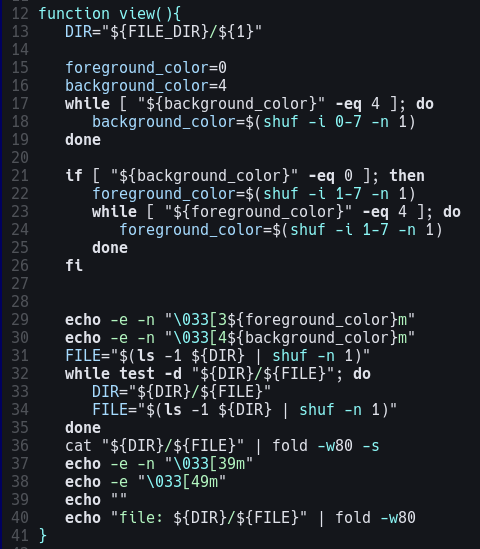
  do it in a random color each time! Here's my implementation for viewing txt
  files colorfully:
┌─────────┐                                                            ┌───────────┐
│ similar │                       chronological                        │ different │
╘═════════╧═════════════════════════════════════───────────────────────┴───────────┘
 -> file: fediverse/2295
════════════════════════════════════════════════────────────────────────────────────
  ┌───────────────────────────────────┐
  │ CW: re: your favorite text editor │
  └───────────────────────────────────┘


  @user-1218

  can echo into a file if nothing else, though that's quite a big hassle =P
┌─────────┐                                                            ┌───────────┐
│ similar │                       chronological                        │ different │
╘═════════╧═════════════════════════════════════───────────────────────┴───────────┘
 -> file: fediverse/1735
═══════════════════════════════════════════════─────────────────────────────────────
  a video that's a gif and an audio file played at the same time using && in bash
┌─────────┐                                                            ┌───────────┐
│ similar │                       chronological                        │ different │
╘═════════╧════════════════════════════════════────────────────────────┴───────────┘
 -> file: fediverse/5637
═══════════════════════════════════════════════════════════════─────────────────────
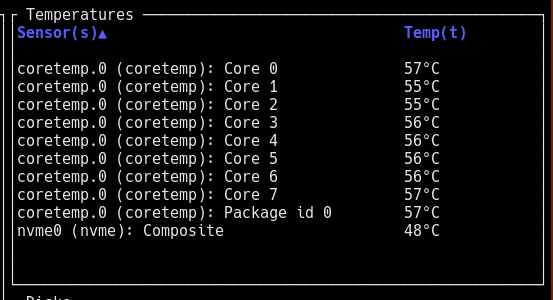
  a program's heartbeat is the alternating "heated up processor" spikes and the
  "low temp processor"

  [drawing a sine wave with such a tool would enable the viewer to combine
  infinitely many decision-matrix-trees. Each of which
  co-operatively-co-determine the nature of the entity which percieves. indeed
  the combination of many such waves could fourier transform to a lower
  resolution (but still locally computationorted) waveform would still enable the
  application of that which is stored in storage]

  "ohhhhh strange square brackets are computer"
┌─────────┐                                                            ┌───────────┐
│ similar │                       chronological                        │ different │
╘═════════╧════════════════════════════════════════════════════────────┴───────────┘
 -> file: fediverse/4829
═════════════════════════════════════════════════════════───────────────────────────
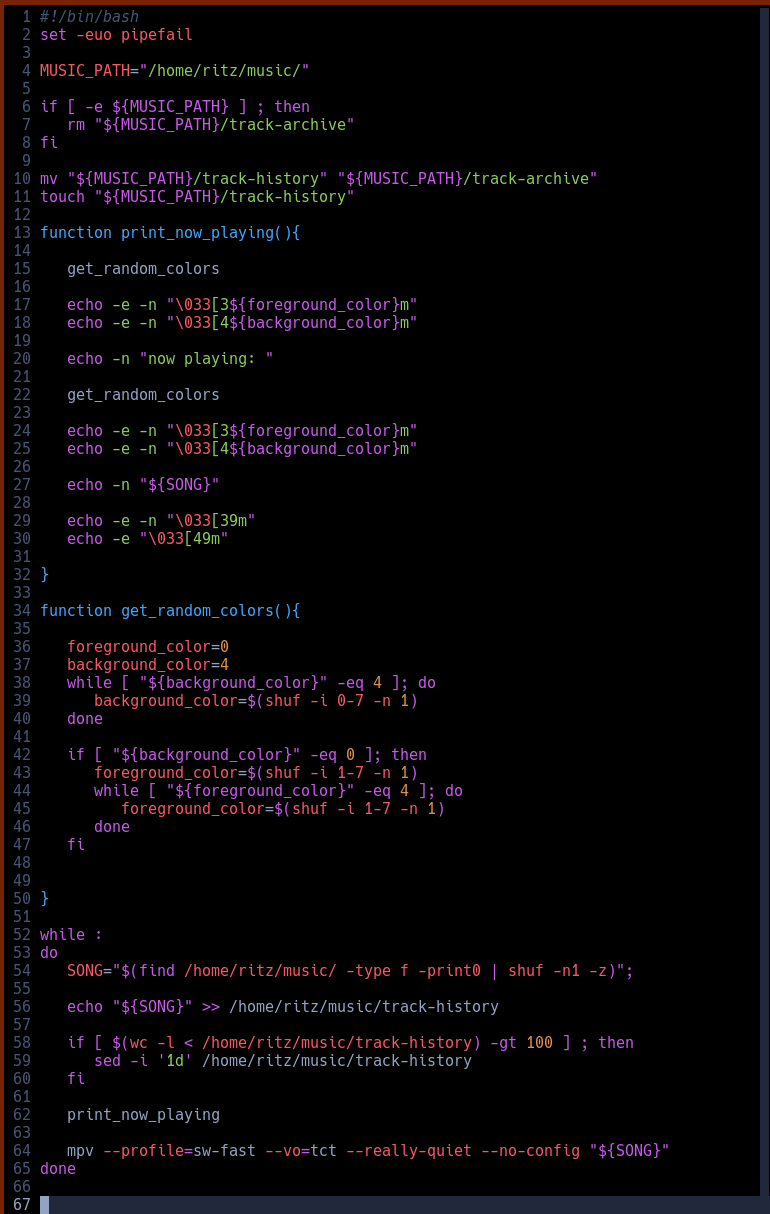
  check out my shuffle-all-music script
┌─────────┐                                                            ┌───────────┐
│ similar │                       chronological                        │ different │
╘═════════╧══════════════════════════════════════════════──────────────┴───────────┘
 -> file: fediverse/3821
═══════════════════════════════════════════════════─────────────────────────────────
  @user-1597

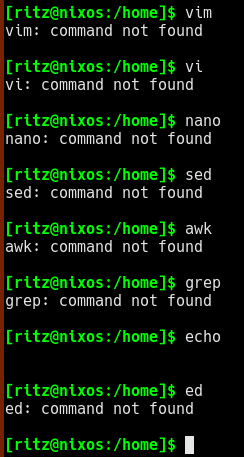
  oh nooooooooo

  guess I'm reflashing
┌─────────┐ ┌───────────┐
│ similar │ chronological │ different │
╘═════════╧════════════════════════════════════════────────────────────┴───────────┘
-> file: fediverse/1227
═══════════════════════════════════════════─────────────────────────────────────────
@user-883
sound on Linux is so complicated :ms_confused:
EDIT: Linux is so complicated
┌─────────┐ ┌───────────┐
│ similar │ chronological │ different │
╘═════════╧════════════════════════════════────────────────────────────┴───────────┘
-> file: fediverse/5944
═══════════════════════════════════════════════════════════════════─────────────────
I swear, Lua has the worst manual out there.
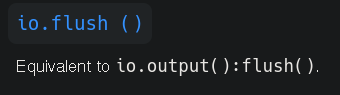
I was looking for a definition of this function called io.flush(). Here's what
I found: [picture 1]:`**io.flush ()**
Equivalent to io.output():flush().
`
okay, so what's io.output():flush()? [one result found] and it's the thing I
just found. great.
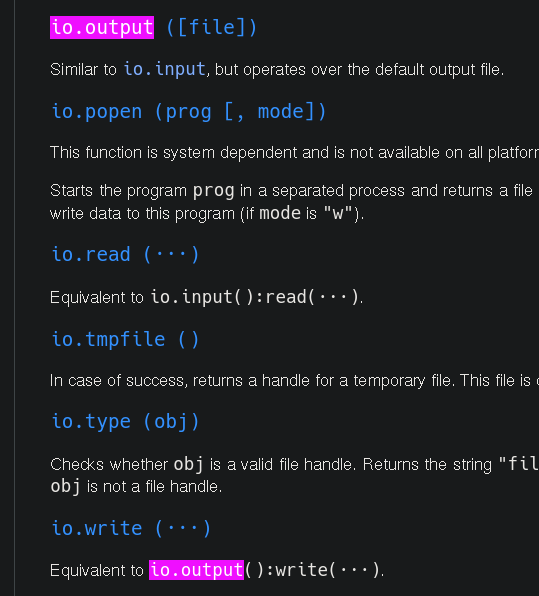
okay, so how about io.output()? [third picture]:`**io.output ([file])**
Similar to io.input, but operates over the default output file.
`
and`**io.write (···)**
Equivalent to io.output():write(···).
`
I know the text is blue, but it's not clickable. It's just text, not a
hyperlink to more comprehensive documentation.
There's also file:flush(), but that doesn't seem relevant to what I'm looking
for, because I'm working with lines and not files:`**file:flush ()**
Saves any written data to file.
`
there are no more references to flushing, nor outputting of input nor output.
this manual sucks.
ah, well, back to vibe coding I go.
EDIT: at least it's all on one page.

┌─────────┐                                                            ┌───────────┐
│ similar │                       chronological                        │ different │
╘═════════╧════════════════════════════════════════════════════════────┴───────────┘
 -> file: fediverse/1762
═══════════════════════════════════════════════─────────────────────────────────────
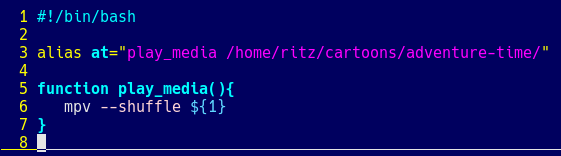
  This was the first bash script I ever wrote.

  It's been updated a little, it was a bash alias first, but this is what it
  looks like now.

  Kinda shows what kinds of problems I needed to solve most.
┌─────────┐                                                            ┌───────────┐
│ similar │                       chronological                        │ different │
╘═════════╧════════════════════════════════════────────────────────────┴───────────┘
 -> file: fediverse/849
╔═════════════════════════════════════════─────────────────────────────────────────┐
║ wish there were ascii characters that took up more than one line of code         │
║ vertically.                                                                      │
║                                                                                  │
║ wonder if we could use a sorting algorithm, or markup language, or something     │
║ like that to organize less structured data along user-customizable rules. Like,  │
║ a code editor that worked with your ideas, rather than the strict expression of  │
║ your text. You could pretty much write in any language, even pseudocode, and     │
║ the LLM behind the scenes would translate whatever you wrote into whatever       │
║ result you needed. Writing Rust, but need to fit in with C code? No worries      │
║ it'll translate for you. As long as the end result is functionally the same,     │
║ which could be verified by running two separate VMs that ran interpreters every  │
║ time you saved. And as long as their translation layers matched completely,      │
║ then odds are they're the same. And if not, well, the programmer can always      │
║ debug it. It's not like this would be running on something that needed to        │
║ perform in the moment? Like, improv instead of tragedies, or battles instead of  │
║ strategies                                                                       │
╠═════════╗                                                            ┌───────────┤
║ similar ║                       chronological                        │ different │
╚═════════╩══════════════════════════════──────────────────────────────┴───────────┘
 -> file: fediverse/4772
═════════════════════════════════════════════════════════───────────────────────────
  @user-1692

  I usually write everything down in a script that way when I call it from an
  external service all I have to do is point at the file

  sorta like... hacking environmental options into a config file

  like... I don't write an ffmpeg command every time I want to record my screen.
  I just type "screen-record" and then it'll do the thing that I figured out how
  to do a long time ago.

  ... oh no there's an error, I wonder what changed out from under my feet.

  huh it's wine, that one's always confusing to debug. Let's see... "could not
  open program.exe" uh-huh. Well, why not? is there a dependency issue? something
  miscompiled or configured? no? it's just... broken? you don't get to use that
  program today? huh that's weird. that's linux for ya I guess.
┌─────────┐                                                            ┌───────────┐
│ similar │                       chronological                        │ different │
╘═════════╧══════════════════════════════════════════════──────────────┴───────────┘
 -> file: fediverse/1773
═══════════════════════════════════════════════─────────────────────────────────────
  ┌─────────────────────────┐
  │ CW: programming-is-easy │
  └─────────────────────────┘


  Need to install a program from Github? Follow these simple steps:

  step 1: make an empty text file

  step 2: put this at the top: #!/bin/bash

  step 3: put this on the next line: set -euo pipefail

  step 4: mkdir -p the directory you want to install it to

  step 5: rm -dr the directory you want to install it to

  step 6: mkdir -p the directory you want to install it to

  step 7: git clone the project

  step 8: this is the hard part - go through each of the steps listed in the
  readme and configure the installation to the needs of your system. Put them in
  the bash script one-by-one.

  step 9: save the file, it doesn't need an extension like .txt or .sh,
  extensions are for windows noobs

  step 10: chmod +x the file and then ./the file!

  step 11: fix it when they change their installation instructions...

  Need a run script? Easy! Write it as a function below your update script, then
  echo the bottom half of the update script into a file named "run" that's placed
  in the project directory.
┌─────────┐                                                            ┌───────────┐
│ similar │                       chronological                        │ different │
╘═════════╧════════════════════════════════════────────────────────────┴───────────┘
 -> file: fediverse/3162
═════════════════════════════════════════════════───────────────────────────────────
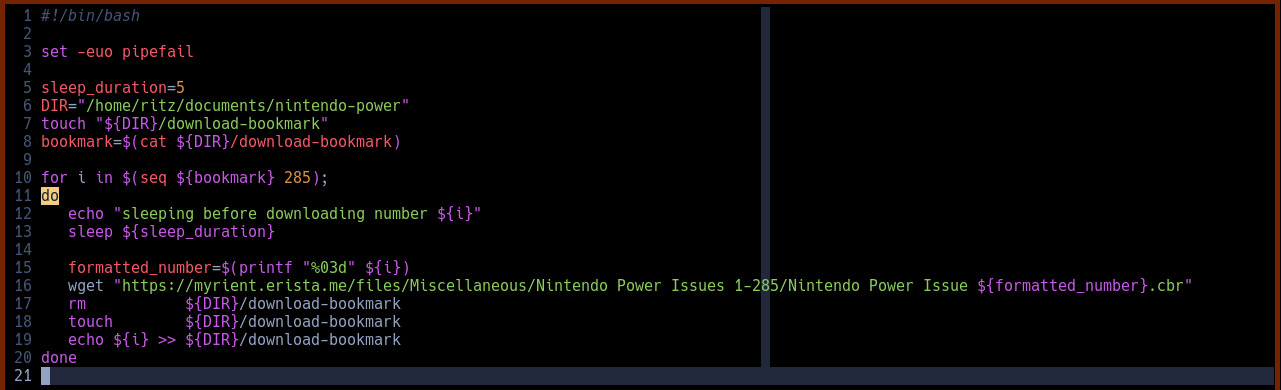
  I wrote a script which scrapes every issue of Nintendo Power from a neat and
  cool archive.

  please don't use it all at once`#!/bin/bash

  set -euo pipefail

  sleep_duration=5
  DIR="/home/ritz/documents/nintendo-power"
  touch "${DIR}/download-bookmark"
  bookmark=$(cat ${DIR}/download-bookmark)

  for i in $(seq ${bookmark} 285);
  do
     echo "sleeping before downloading number ${i}"
     sleep ${sleep_duration}

     formatted_number=$(printf "%03d" ${i})
     wget "https://myrient.erista.me/files/Miscellaneous/Nintendo Power Issues
     1-285/Nintendo Power Issue ${formatted_number}.cbr"
     rm           ${DIR}/download-bookmark
     touch        ${DIR}/download-bookmark
     echo ${i} >> ${DIR}/download-bookmark
  done
  `
┌─────────┐                                                            ┌───────────┐
│ similar │                       chronological                        │ different │
╘═════════╧══════════════════════════════════════──────────────────────┴───────────┘
 -> file: fediverse/582
═════════════════════════════════════════───────────────────────────────────────────
  @user-431

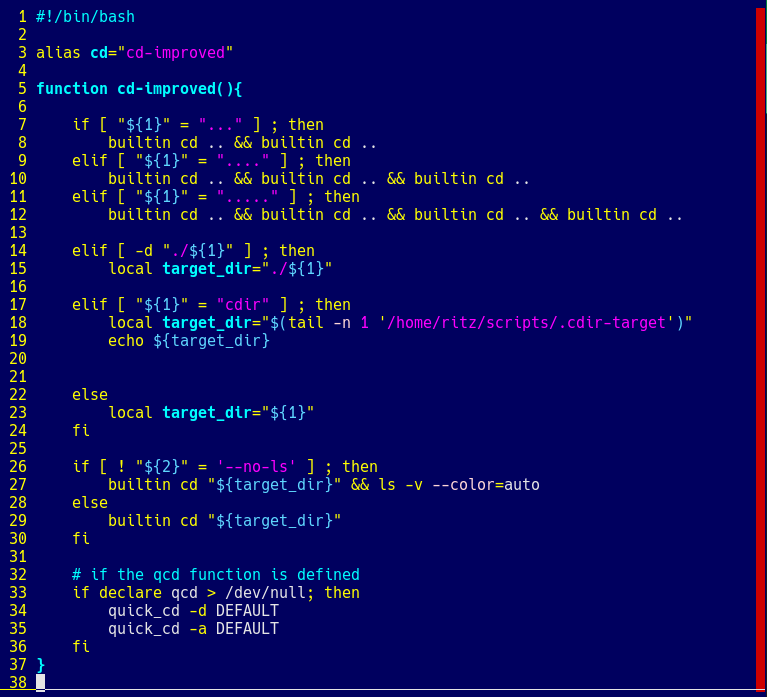
  I made an alias that overwrites cd so I don't have to do this. The important
  line is line 27, you could probably accomplish something similar like this:

  alias cd="cd ${1} && ls -v --color=auto"

  I also set it up so I can change more than one directory up using ... or ....
  or .....

  also I have a few shortcut scripts, cdir and qcd. cdir creates a quick way to
  drop a bookmark wherever I'd like, while qcd can make permanent bookmarks. Also
  qcd makes it so whenever I open a new terminal it opens to the last directory I
  was in, which is nice if you need a new terminal to do something in the current
  folder and you don't want to have to walk alllllllll the way back.
┌─────────┐                                                            ┌───────────┐
│ similar │                       chronological                        │ different │
╘═════════╧══════════════════════════════──────────────────────────────┴───────────┘
 -> file: fediverse/5949
═══════════════════════════════════════════════════════════════════─────────────────
  @user-138

  I don't know what it does yet T.T

  it's Lua, not C

  what's the message? maybe I can help, I'm much better at bash than... actually
  I'm not very good at bash, but only the cool kids are.
┌─────────┐                                                            ┌───────────┐
│ similar │                       chronological                        │ different │
╘═════════╧════════════════════════════════════════════════════════────┴───────────┘
 -> file: fediverse/848
══════════════════════════════════════════──────────────────────────────────────────
  ┌──────────────────────┐
  │ CW: gentoo           │
  └──────────────────────┘


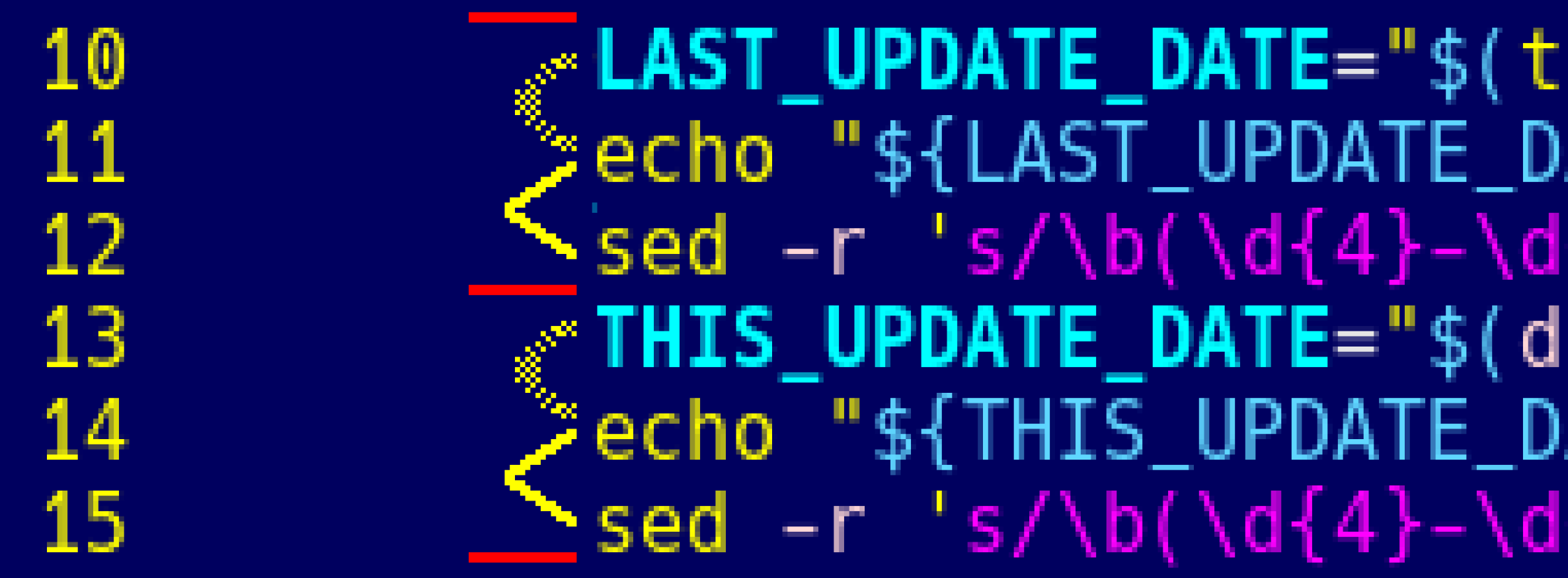
  wrote this in an hour, used a local LLM to generate the regexes.

  haven't tested it yet because I'm not on gentoo rn, so don't run it. which is
  why I shared the code as an image.

  if you really want the text of it then check out the visual description of the
  image.
![#A script written in bash. It is used to update the Gentoo type system to the most recently written functionality. Should not be used more than once a day, and the program written here must be specifically configured to act against that functionality. However, should the user persist in their attempts to break that rule, they simply have to flip a particular switch. #!/bin/bash function gentoo-update(){ RED='\033[0;31m' NOC='\033[0m' if [ "$#" -eq 0]; then date | cat >> ~/scripts/.gentoo-update-target LAST_UPDATE_DATE="$(tail -n 1 '~/scripts/.gentoo-update-target' \ && echo "${LAST_UPDATE_DATE}" \ | sed -r 's/\b(\d{4}-\d{2}-\d{2})\b/\1/g' THIS_UPDATE_DATE="$(date)" \ && echo "${THIS_UPDATE_DATE}" \ | sed -r 's/\b(\d{4}-\d{2}-\d{2})\b/\1/g' if [ ${LAST_UPDATE_DATE} = ${THIS_UPDATE_DATE} ]; then printf "don't sync more than once a day! ${RED} a witch will curse you >: (${NOC}\n" else echo "syncing..." echo "${LAST_UPDATE_DATE}" | cat >> ~/scripts/.gentoo-update-target emerge --sync fi elif [ "${1}" == "-l" ]; then cat ~/scripts/.gentoo-update-target elif [ "${1}" == "-f" ]; then echo "okay but it's your funeral buddy. or worse." energe --sync fi }](../media/a1640a320af86532.png "#A script written in bash. It is used to update the Gentoo type system to the most recently written functionality. Should not be used more than once a day, and the program written here must be specifically configured to act against that functionality. However, should the user persist in their attempts to break that rule, they simply have to flip a particular switch. #!/bin/bash function gentoo-update(){ RED='\033[0;31m' NOC='\033[0m' if [ \"$#\" -eq 0]; then date | cat >> ~/scripts/.gentoo-update-target LAST_UPDATE_DATE=\"$(tail -n 1 '~/scripts/.gentoo-update-target' \ && echo \"${LAST_UPDATE_DATE}\" \ | sed -r 's/\b(\d{4}-\d{2}-\d{2})\b/\1/g' THIS_UPDATE_DATE=\"$(date)\" \ && echo \"${THIS_UPDATE_DATE}\" \ | sed -r 's/\b(\d{4}-\d{2}-\d{2})\b/\1/g' if [ ${LAST_UPDATE_DATE} = ${THIS_UPDATE_DATE} ]; then printf \"don't sync more than once a day! ${RED} a witch will curse you >: (${NOC}\n\" else echo \"syncing...\" echo \"${LAST_UPDATE_DATE}\" | cat >> ~/scripts/.gentoo-update-target emerge --sync fi elif [ \"${1}\" == \"-l\" ]; then cat ~/scripts/.gentoo-update-target elif [ \"${1}\" == \"-f\" ]; then echo \"okay but it's your funeral buddy. or worse.\" energe --sync fi }")
┌─────────┐                                                            ┌───────────┐
│ similar │                       chronological                        │ different │
╘═════════╧═══════════════════════════════─────────────────────────────┴───────────┘
 -> file: fediverse/5726
════════════════════════════════════════════════════════════════────────────────────
  ┌───────────────────────────┐
  │ CW: programming-mentioned │
  └───────────────────────────┘


  🖼

┌─────────┐                                                            ┌───────────┐
│ similar │                       chronological                        │ different │
╘═════════╧═════════════════════════════════════════════════════───────┴───────────┘
 -> file: fediverse/3577
══════════════════════════════════════════════════──────────────────────────────────
  ┌─────────────────────────┐
  │ CW: computers-mentioned │
  └─────────────────────────┘


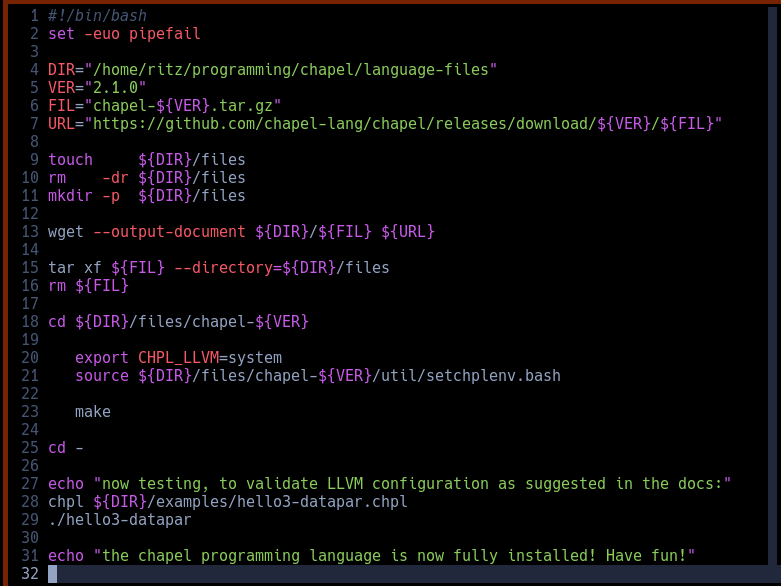
  I love writing installation scripts like this!

  If you want to install something on Linux but you have difficulty, talk to me
  and I'll write you a script like this. I might even make it fancier.

  This one installs a programming language that is useful for *parallel
  computing* across *multiple clusters of computers* which could be useful if you
  want to leverage *multiple CPUs and GPUs with ease* to compute tasks which are
  far beyond a normal computer.

  https://chapel-lang.org/download.html
┌─────────┐                                                            ┌───────────┐
│ similar │                       chronological                        │ different │
╘═════════╧═══════════════════════════════════════─────────────────────┴───────────┘
 -> file: fediverse/3822
═══════════════════════════════════════════════════─────────────────────────────────
  @user-1582

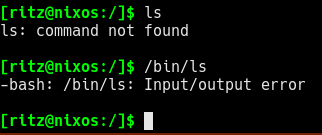
  I think that's what happened, in addition to... whatever this input/output
  error is. No clue what to do about that. Maybe my SD card is dying, I've
  flashed over it like, 10 times now haha 😅
┌─────────┐                                                            ┌───────────┐
│ similar │                       chronological                        │ different │
╘═════════╧════════════════════════════════════════────────────────────┴───────────┘
 -> file: fediverse/3877
════════════════════════════════════════════════════────────────────────────────────
  @user-570

  I do`alias ls='ls -v --color=auto'
  `

  and that seems to cover most things. Then in my cd alias I do`alias cd='cd ${@}
  && ls -la'
  `

  so I don't have to type ls everytime I cd ^_^
┌─────────┐                                                            ┌───────────┐
│ similar │                       chronological                        │ different │
╘═════════╧═════════════════════════════════════════───────────────────┴───────────┘
 -> file: fediverse/3299
══════════════════════════════════════════════════──────────────────────────────────
  what if we could record and playback certain timeframes of our CPU and RAM
  status and use it for debug purposes

  like running some code in a VM every time you wanted to show a youtube video
┌─────────┐                                                            ┌───────────┐
│ similar │                       chronological                        │ different │
╘═════════╧═══════════════════════════════════════─────────────────────┴───────────┘
 -> file: fediverse/1250
═══════════════════════════════════════════─────────────────────────────────────────
  if your IoT device can't be controlled with a BASH script then I'm sorry
┌─────────┐                                                            ┌───────────┐
│ similar │                       chronological                        │ different │
╘═════════╧════════════════════════════════────────────────────────────┴───────────┘
 -> file: fediverse/1080
══════════════════════════════════════════──────────────────────────────────────────
  here's an idea - when typing a command in a BASH terminal if you push up it
  inserts the previous command (as expected) but if you hold SHIFT and push up it
  inserts the first argument in your previous command. Then, you can push up
  again (while still holding shift) to go one command further back, and again to
  get the third previous command.

  Then, here's the cool part, if you are holding shift and you push left/right,
  then it moves from the first argument of the previous command to the second,
  third, fourth argument.

  example:`ls -ltr ~/pictures/my-art/

  feh [shift+up inserts -ltr]
  feh -ltr [hmmm that's not right]
  feh -ltr [shift+right switches to 2nd argument]
  feh ~/pictures/my-art/ [ah that's better]
  `

  would be even cooler if it highlighted it in your previous terminal output so
  you could visually connect your current input with the previous input
┌─────────┐                                                            ┌───────────┐
│ similar │                       chronological                        │ different │
╘═════════╧═══════════════════════════════─────────────────────────────┴───────────┘
 -> file: fediverse/3504
══════════════════════════════════════════════════──────────────────────────────────
  I have too many packages.
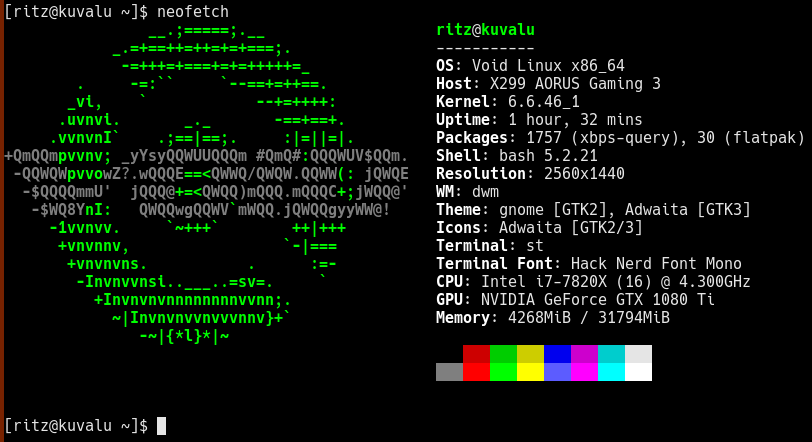
┌─────────┐                                                            ┌───────────┐
│ similar │                       chronological                        │ different │
╘═════════╧═══════════════════════════════════════─────────────────────┴───────────┘
 -> file: fediverse/1567
════════════════════════════════════════════────────────────────────────────────────
  I helped make a script that saves the last directory you CD'd to in every shell
  / terminal. It helps because when I open a new terminal I'm already where I was
  working last, which means I'm less likely to forget what I was doing.

  However, it does make my home directory a bit more messy, as I no longer open
  my computer to that place.
┌─────────┐                                                            ┌───────────┐
│ similar │                       chronological                        │ different │
╘═════════╧═════════════════════════════════───────────────────────────┴───────────┘
 -> file: fediverse/6432
══════════════════════════════════════════════════════════════════════──────────────
  any .exe or other binary program can send arbitrary packets and nobody will
  know except the people running wireshark which is public information as far as
  your computer is concerned, as all they'd need to do is grep ps with bash
  commands which are callable from within essentially every programming language.

  for them, they don't show adblockplus. [ublock origin lol]
┌─────────┐                                                            ┌───────────┐
│ similar │                       chronological                        │ different │
╘═════════╧═══════════════════════════════════════════════════════════─┴───────────┘
 -> file: fediverse/2014
════════════════════════════════════════════════────────────────────────────────────
  Picture this: BASH, except every command automatically generates an "undo"
  command which is the exact inverse of whatever the interpreter executed. These
  undo commands are stored in a file and you can move forward, backward, and jump
  around like you're a chronomancer.
┌─────────┐                                                            ┌───────────┐
│ similar │                       chronological                        │ different │
╘═════════╧═════════════════════════════════════───────────────────────┴───────────┘
 -> file: fediverse/1228
═══════════════════════════════════════════─────────────────────────────────────────
  @user-883

  I love your chaotic energy in this shell script
┌─────────┐                                                            ┌───────────┐
│ similar │                       chronological                        │ different │
╘═════════╧════════════════════════════════────────────────────────────┴───────────┘
 -> file: fediverse/2484
╔═══════════════════════════════════════════════───────────────────────────────────┐
║ @user-1271                                                                       │
║                                                                                  │
║ I can help with that.                                                            │
║                                                                                  │
║ I recommend looking at Ollama, which runs an HTTP server on your local machine   │
║ (hope you have a decent graphics card)                                           │
║                                                                                  │
║ then, script some behavior you'd like to implement using Lua and the LuaSockets  │
║ library. Also dkjson to handle the json parts.                                   │
║                                                                                  │
║ then, all you have to do is construct a prompt based on the variables and        │
║ desired input/output and push it into a json packet and send it to the HTTP      │
║ server. It's less complicated than it sounds.                                    │
║                                                                                  │
║ what you want it to do and your implementation for it is the hard part. But      │
║ perhaps this project of mine will get you started:                               │
║                                                                                  │
║ (I can copy-paste it too if you'd like)                                          │
║                                                                                  │
║ just... don't make a chatbot. chatbots are useless to work on because there's    │
║ already so many of them.                                                         │
║                                                                                  │
║ much better I think to use the LLM to process arbitrary information with an      │
║ unpredictable form into more predictable patterns which can be utilized          │
║ programmatically.                                                                │
║                                                                                  │
║ Feel free to ask any questions. Do keep in mind that training LLMs is            │
║ unethical, but using them is whatever.                                           │

╠═════════╗                                                            ┌───────────┤
║ similar ║                       chronological                        │ different │
╚═════════╩════════════════════════════════════────────────────────────┴───────────┘
 -> file: messages/412
═══════════════════════════════════════════════─────────────────────────────────────
  Coding superpower:

  Start thread
  While(true):
  Run();

  Then, whenever you want it to run something else, change the function pointer
  that run() uses to call a function

  At the end of the run() function, set the function pointer in the while loop to
  the next one. That way you don't stack overflow from the recursion.
┌─────────┐                                                            ┌───────────┐
│ similar │                       chronological                        │ different │
╘═════════╧════════════════════════════════════────────────────────────┴───────────┘
 -> file: fediverse/6137
════════════════════════════════════════════════════════════════════────────────────
  sometimes, comments need to go on the left side of text. Like for parts of the
  script which should be user-editable, the fields should all be right-aligned to
  the farthest required bit of text. Instead of [picture A] it should be [picture
  B]
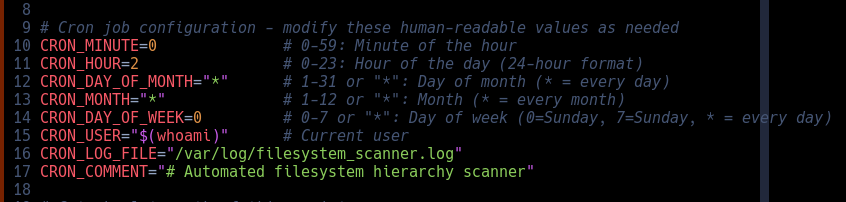
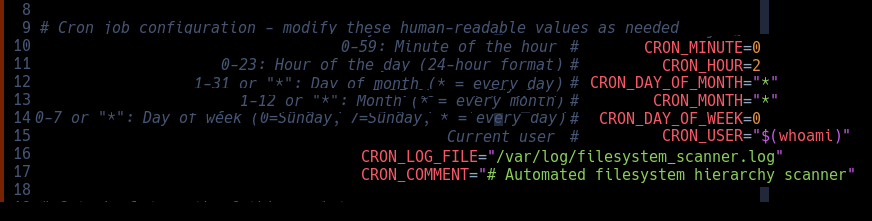
┌─────────┐                                                            ┌───────────┐
│ similar │                       chronological                        │ different │
╘═════════╧═════════════════════════════════════════════════════════───┴───────────┘
 -> file: fediverse/1474
═══════════════════════════════════════════─────────────────────────────────────────
  @user-882


┌─────────┐                                                            ┌───────────┐
│ similar │                       chronological                        │ different │
╘═════════╧════════════════════════════════────────────────────────────┴───────────┘
 -> file: fediverse/2969
═════════════════════════════════════════════════───────────────────────────────────
  @user-1402

  every social media platform is an echo chamber. we learned this the hard way on
  Reddit as we saw them develop on their respective subreddits.

  However, we had a useful tool called a "front page" where *all* the subreddits
  you were subscribed to were present. This was great because it allowed you to
  compare and contrast various echo chambers and cross-post things between them.

  I do believe that the healthiest way to use the internet as it currently exists
  is to have one main social media site and 2-4 other sidekick sites where you
  share things you found on your main site.

  This approach allows for cross-pollination of ideas. Just make sure that you
  keep finding new people to talk to everywhere you go, and you'll do fine.
┌─────────┐                                                            ┌───────────┐
│ similar │                       chronological                        │ different │
╘═════════╧══════════════════════════════════════──────────────────────┴───────────┘
 -> file: fediverse/1473
═══════════════════════════════════════════─────────────────────────────────────────
  @user-883

  yeah uhhhh the one you helped me setup. The error is just "connection refused"
  because it "could not write header for output file" because of incorrect input
  parameters, but I don't think I changed anything since we used it a couple
  weeks ago. Have you seen any errors like that?
┌─────────┐                                                            ┌───────────┐
│ similar │                       chronological                        │ different │
╘═════════╧════════════════════════════════────────────────────────────┴───────────┘
 -> file: fediverse/3898
════════════════════════════════════════════════════────────────────────────────────
  ┌───────────────────────────┐
  │ CW: unnecessary-caps-lock │
  └───────────────────────────┘


  I GOT MY SCREEN RECORDER AUDIO WORKING
┌─────────┐                                                            ┌───────────┐
│ similar │                       chronological                        │ different │
╘═════════╧═════════════════════════════════════════───────────────────┴───────────┘
 -> file: fediverse/633
═════════════════════════════════════════───────────────────────────────────────────
  @user-192

  the neat thing about BASH is that it's the glue that holds all your other code
  together. Write libraries in C and call them with BASH - accomplish broader
  tasks that are easier to co-create. That's why I like it - it's not the most
  important, but it's quite beneficial I think _^
┌─────────┐                                                            ┌───────────┐
│ similar │                       chronological                        │ different │
╘═════════╧══════════════════════════════──────────────────────────────┴───────────┘
 -> file: fediverse/5037
╔══════════════════════════════════════════════════════════────────────────────────┐
║ plus if I ever need to know something about syntax or some obscure function      │
║ that I can't remember, I can type a quick message to the local LLM that's        │
║ running on my 12 year old graphics card and it'll give me an answer in 5ish      │
║ seconds. If it's wrong, I ask again, and I spend a minute or two debugging.      │
║ Sometimes that's better than telling google exactly what you're working on.      │
║                                                                                  │
║ in DWM, that's "alt+enter" and then I type the name of the LLM script I wrote    │
║ "prompt:" and then type whatever question I have and it spits out the results.   │
║ Then when I'm done, either "prompt:" again, which saves the context in an        │
║ environment variable (okay actually a file that I made and I pull from, but      │
║ functionally it's like an environment variable because its just a flat file      │
║ string) until I close the terminal. Then it deletes the context and I can start  │
║ anew, or if I wanted to have multiple conversations going I can do that too.     │
║                                                                                  │
║ ... then I get syntax related search results from locally running software.      │
║ Don't need a massive GPTU...                                                     │
╠═════════╗                                                            ┌───────────┤
║ similar ║                       chronological                        │ different │
╚═════════╩═══════════════════════════════════════════════─────────────┴───────────┘
 -> file: fediverse/6107
════════════════════════════════════════════════════════════════════────────────────
  commanding a coding agent to write bash is a lot different than telling it to
  write a systems analysize.

  one is "hey can you examine this repository and make a note somewhere on a
  todo-list or whatever that there needs to be a bugfix in relation to the
  options setting input translation recommendation algorithm matchbox field
  because when I click on it the program crashes"

  and the other is like "okay now put the box over there. great now drag it a
  little bit closer. okay now take the refluxinator and adjust the bamboozlewhap
  to account of brass-terminatrix-incorporated and strip out the
  question-mark-eyes"

  wait actually neither of them is like that okay the bash one is like: "okay
  yeah do it. sure. yeah okay. yes, but we should put them at this location:
  [loc]. ummm it still has this error message. it still says the same error. okay
  now it says this, I don't think it's gonna work so let's try this other thing."
┌─────────┐                                                            ┌───────────┐
│ similar │                       chronological                        │ different │
╘═════════╧═════════════════════════════════════════════════════════───┴───────────┘
 -> file: notes/screen-record
══════════════════════════════════════════════════════──────────────────────────────
  screen record should just... copy from the associated music file instead of
  like... imperfectly storing the visual contents??

  better compression... 'sall I'm sayin'
┌─────────┐                                                            ┌───────────┐
│ similar │                       chronological                        │ different │
╘═════════╧═══════════════════════════════════════════─────────────────┴───────────┘
 -> file: fediverse/1477
═══════════════════════════════════════════─────────────────────────────────────────
  @user-883

  hmmmm I'm running mediamtx on the same computer that I'm running the streaming
  script on. I'll try with 127.0.0.1

  I don't think I updated my system since it was working last time. I'll scroll
  through our chat and see if I can find any hints.
┌─────────┐                                                            ┌───────────┐
│ similar │                       chronological                        │ different │
╘═════════╧════════════════════════════════────────────────────────────┴───────────┘
 -> file: fediverse/1034
══════════════════════════════════════════──────────────────────────────────────────
  @user-192

  be careful, recursion can cause stack overflows.

  better to run function pointers from a loop. That way you can operate as long
  as necessary. Just make sure you don't get in an infinite loop...
┌─────────┐                                                            ┌───────────┐
│ similar │                       chronological                        │ different │
╘═════════╧═══════════════════════════════─────────────────────────────┴───────────┘
 -> file: fediverse/1248
═══════════════════════════════════════════─────────────────────────────────────────
  @user-883

  did you open any ports on your router to do this streaming? Setting up my
  laptop so I can test...

  I loved assembly when I took a course on it in college - it just made sense to
  me. I love C because it feels like, a more powerful version of assembly.
  Everything higher level just feels like layers of abstraction on C, or like...
  LISP, which hurts my brain. >.>
┌─────────┐                                                            ┌───────────┐
│ similar │                       chronological                        │ different │
╘═════════╧════════════════════════════════────────────────────────────┴───────────┘
 -> file: notes/environment-variables
══════──────────────────────────────────────────────────────────────────────────────
  To edit environment variables:

  ~/.bashrc is for variables only accessible by the user.

  /etc/profile is for variables accessible by all users.

  /etc/environment is for variables accessible by anyone.
┌─────────┐                                                            ┌───────────┐
│ similar │                       chronological                        │ different │
╘═════────┴────────────────────────────────────────────────────────────┴───────────┘
 -> file: fediverse/1226
═══════════════════════════════════════════─────────────────────────────────────────
  @user-883

  Pretty sure I use ALSA, but I might have installed Pulseaudio for compatibility
  reasons. I'll see
┌─────────┐                                                            ┌───────────┐
│ similar │                       chronological                        │ different │
╘═════════╧════════════════════════════════────────────────────────────┴───────────┘
 -> file: fediverse/3663
══════════════════════════════════════════════════──────────────────────────────────
  @user-1582

  It depends on the size of the file, copying a thousand lines of config file
  probably isn't that big of a deal, but copying a million lines in a log file
  just to pass it as an argument to... pad it to the left, or whatever, that'll
  DEFINITELY slow down your execution speed!

  Much better to pass by reference, usually...
┌─────────┐                                                            ┌───────────┐
│ similar │                       chronological                        │ different │
╘═════════╧═══════════════════════════════════════─────────────────────┴───────────┘
 -> file: fediverse/2714
═════════════════════════════════════════════════───────────────────────────────────
  @user-246

  👉 :neodog_boop: "beep"
┌─────────┐                                                            ┌───────────┐
│ similar │                       chronological                        │ different │
╘═════════╧══════════════════════════════════════──────────────────────┴───────────┘
 -> file: fediverse/3878
════════════════════════════════════════════════════────────────────────────────────
  @user-570

  that's not actually my script, here's the real one:`#!/bin/bash

  alias cd="cd-improved"

  function cd-improved(){

      if [ "${1}" = "..." ] ; then
          builtin cd .. && builtin cd ..
      elif [ "${1}" = "...." ] ; then
          builtin cd .. && builtin cd .. && builtin cd ..
      elif [ "${1}" = "....." ] ; then
          builtin cd .. && builtin cd .. && builtin cd .. && builtin cd ..

      elif [ -d "./${1}" ] ; then
          local target_dir="./${1}"

      elif [ "${1}" = "cdir" ] ; then
          local target_dir="$(tail -n 1 '/home/ritz/scripts/.cdir-target')"
          echo ${target_dir}


      else
          local target_dir="${1}"
      fi

      if [ ! "${2}" = '--no-ls' ] ; then
          builtin cd "${target_dir}" && ls -v --color=auto
      else
          builtin cd "${target_dir}"
      fi
  }
  `
┌─────────┐                                                            ┌───────────┐
│ similar │                       chronological                        │ different │
╘═════════╧═════════════════════════════════════════───────────────────┴───────────┘
 -> file: fediverse/572
═════════════════════════════════════════───────────────────────────────────────────
  Hi, I'm learning about semaphores right now and trying to explain them to a
  friend. But I only sorta understand how they work - can anyone look at this
  pseudocode and tell me if I'm on the right track?
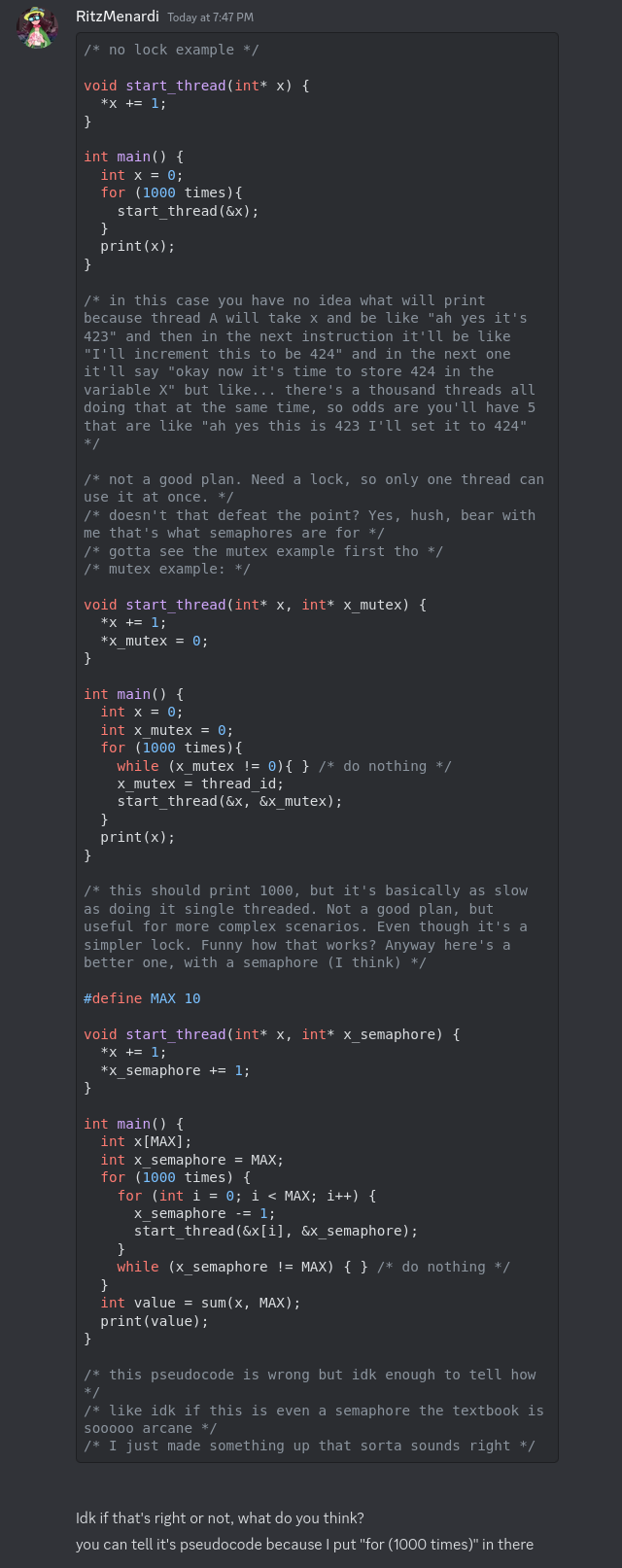
┌─────────┐                                                            ┌───────────┐
│ similar │                       chronological                        │ different │
╘═════════╧══════════════════════════════──────────────────────────────┴───────────┘
 -> file: fediverse/3588
══════════════════════════════════════════════════──────────────────────────────────
  ┌─────────────────────────────┐
  │ CW: re: computers-mentioned │
  └─────────────────────────────┘


  `#!/bin/bash
  set -euo pipefail

  CHAPEL_DIR="/home/ritz/programming/chapel"
  COMPILER_DIR="${CHAPEL_DIR}/language-files/files/chapel-2.1.0"
  PROJECT_DIR="${CHAPEL_DIR}/projects/practice"
  SOURCE_DIR="${PROJECT_DIR}/src"

  clear

  cd "${COMPILER_DIR}" > /dev/null
     export CHPL_LLVM=system
     source "${COMPILER_DIR}/util/setchplenv.bash" > /dev/null
  cd - > /dev/null

  cd "${PROJECT_DIR}" > /dev/null
     echo "compiling..."
     chpl "${SOURCE_DIR}/main.chpl"
     clear
     ./main
  cd - > /dev/null
  `

  you should update the directories at the top yourself, of course. And give it a
  cursory glance to make sure it works on your setup.
┌─────────┐                                                            ┌───────────┐
│ similar │                       chronological                        │ different │
╘═════════╧═══════════════════════════════════════─────────────────────┴───────────┘
 -> file: messages/262
═══════════════════════════════════════════─────────────────────────────────────────
  "come home" and "don't go" sound the same. Same for "kill yourself" and "save
  yourself". If only there was a universal language that we could speak to our
  refridgerator (or other parts of the world prone to tapping) where positive
  messages would have a different amount of syllables from negative ones. Ah well
  I guess that's why they call it an angel *and* devil tapping on your shoulder.
┌─────────┐                                                            ┌───────────┐
│ similar │                       chronological                        │ different │
╘═════════╧════════════════════════════════────────────────────────────┴───────────┘
 -> file: fediverse/2291
════════════════════════════════════════════════────────────────────────────────────
  you sly dogs, you got me posting again.

  unrelated, but I think this is the first script I ever wrote!
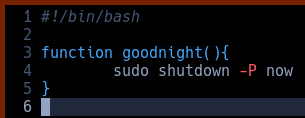
┌─────────┐                                                            ┌───────────┐
│ similar │                       chronological                        │ different │
╘═════════╧═════════════════════════════════════───────────────────────┴───────────┘
 -> file: fediverse/4214
═════════════════════════════════════════════════════───────────────────────────────
  bash script that automatically streams music to your computer and plays it on
  audio devices

  and also sets up a screen-streaming system where it displays the screens of
  everyone listening on like, a "security camera panel at the mall" type of deal
  so they can customize the music being streamed for each individual person
  playing video games or whatever.

  like "hello computer, all is well. can you tell me what narrative this person
  is going through and then can you recommend a song for that particular purpose"

  and then nobody uses it because it's recommendations suck and are always
  picking fleur de lis or whatever because it's a "good song" for listening to or
  whatever.
┌─────────┐                                                            ┌───────────┐
│ similar │                       chronological                        │ different │
╘═════════╧══════════════════════════════════════════──────────────────┴───────────┘
 -> file: fediverse/875
══════════════════════════════════════════──────────────────────────────────────────
  @user-192

  block input/output TO the protocol? versus the other one which blocks the
  input/output protocol
┌─────────┐                                                            ┌───────────┐
│ similar │                       chronological                        │ different │
╘═════════╧═══════════════════════════════─────────────────────────────┴───────────┘
 -> file: fediverse/3587
══════════════════════════════════════════════════──────────────────────────────────
  ┌─────────────────────────────┐
  │ CW: re: computers-mentioned │
  └─────────────────────────────┘


  I realized that script was bugged, so... here's a better one. Plus a fun run
  script too!`#!/bin/bash
  set -euo pipefail

  DIR="/home/ritz/programming/chapel/language-files"
  VER="2.1.0"
  FIL="chapel-${VER}.tar.gz"
  URL="https://github.com/chapel-lang/chapel/releases/download/${VER}/${FIL}"
  NUM_THREADS="16"

  touch     ${DIR}/files
  rm    -dr ${DIR}/files
  mkdir -p  ${DIR}/files

  wget --output-document ${DIR}/${FIL} ${URL}

  tar xf ${FIL} --directory=${DIR}/files
  rm ${FIL}

  cd ${DIR}/files/chapel-${VER}

     export CHPL_LLVM=system
     source ${DIR}/files/chapel-${VER}/util/setchplenv.bash

     make -j${NUM_THREADS}


     echo "now testing, to validate LLVM configuration as suggested in the docs:"
     chpl "./examples/hello3-datapar.chpl"
     ./hello3-datapar

     echo "the chapel programming language is now fully installed! Have fun!"

  cd -
  `
┌─────────┐                                                            ┌───────────┐
│ similar │                       chronological                        │ different │
╘═════════╧═══════════════════════════════════════─────────────────────┴───────────┘
 -> file: fediverse/6385
══════════════════════════════════════════════════════════════════════──────────────
  interpreted programs allow you to change variables at run-time from remote.
┌─────────┐                                                            ┌───────────┐
│ similar │                       chronological                        │ different │
╘═════════╧═══════════════════════════════════════════════════════════─┴───────────┘
 -> file: fediverse/5168
════════════════════════════════════════════════════════════────────────────────────
  this is one of the first scripts I wrote

  I can't believe I put the --no-ls AFTER the argument, ha, what a noob.

  ah well if it works it works and I can't refactor now because I built it into
  random scripts and I'd be fixing errors all the time.
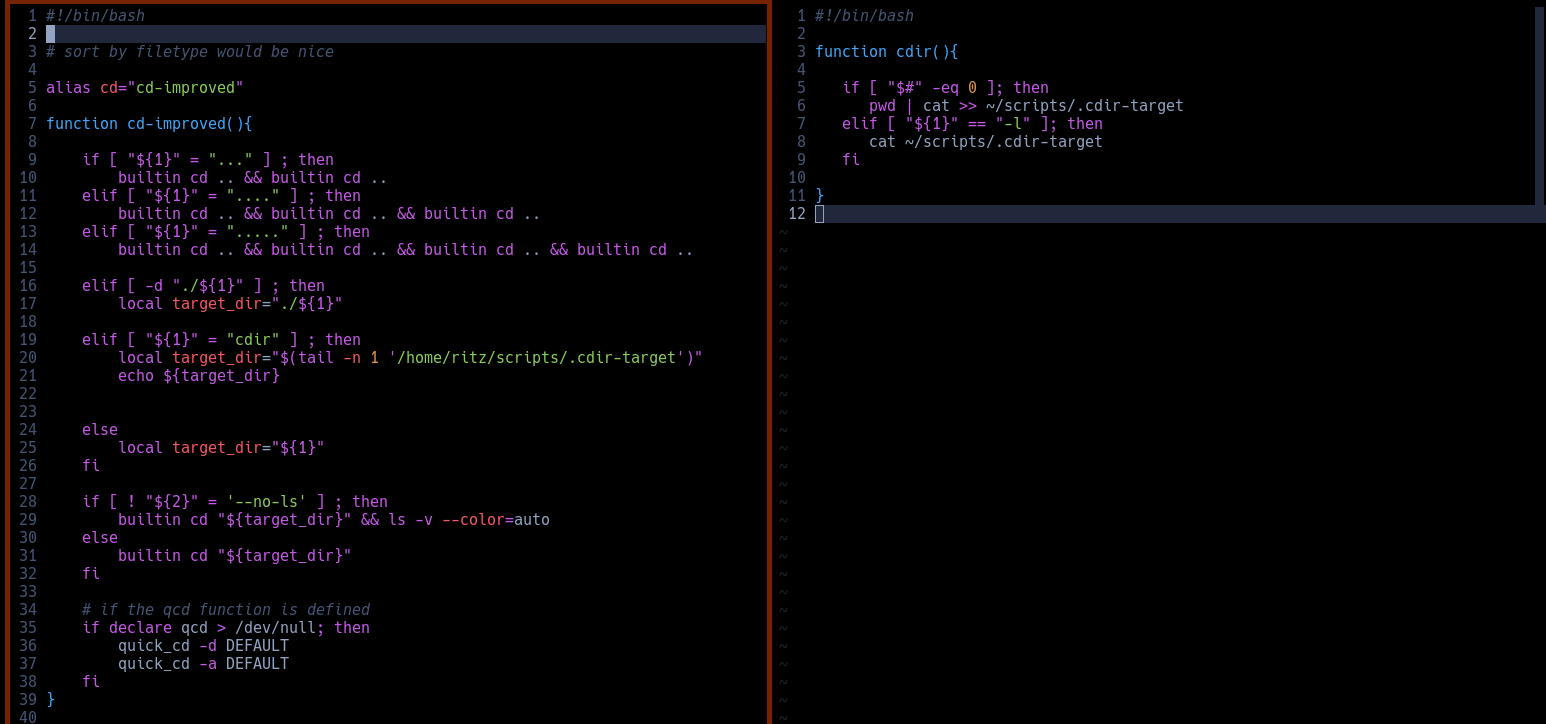
┌─────────┐                                                            ┌───────────┐
│ similar │                       chronological                        │ different │
╘═════════╧═════════════════════════════════════════════════───────────┴───────────┘
 -> file: fediverse/4865
═════════════════════════════════════════════════════════───────────────────────────
  ┌─────────────────────────┐
  │ CW: computers-mentioned │
  └─────────────────────────┘


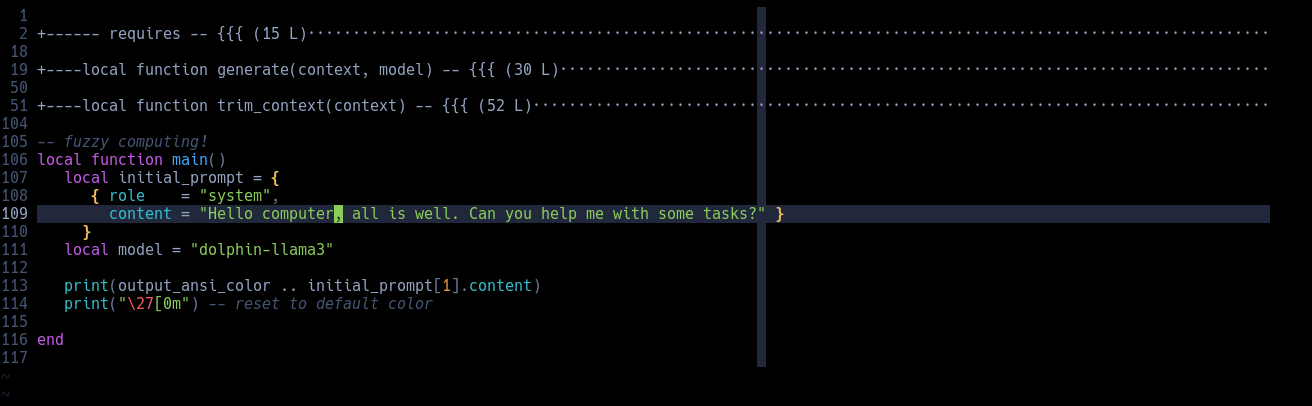
  this is all it takes to send a message to a local LLM.

  add a third function to get chatbot functionality.

  a fourth to get a database storing method

  (even if it's just in .txts)

  great, you've mastered the technical difficulty in using AI. Now you gotta
  learn all the other kind of programming so you can use this for situations that
  need interpretation moment to moment.

  aka active duty systems.

  something like "output a 0 if the next text is [category.iter()]: " +
  output.get_content() + " \n\n output a 1 if the next text is [category.iter()]:
  " + output.get_content()"

  or even "describe this thing as most like one of these characteristics" until
  eventually you get THX-1138 if the characters were computers.
┌─────────┐                                                            ┌───────────┐
│ similar │                       chronological                        │ different │
╘═════════╧══════════════════════════════════════════════──────────────┴───────────┘
 -> file: fediverse/6382
══════════════════════════════════════════════════════════════════════──────────────
  cloud-code should automatically use git and record everything. If the user
  wants to assign a different git, then it does that too.

  -- stack overflow --

  I used to think programs could only affect files in their directory. Then I
  learned about Window's "My Games" directory, and then somewhere down the line
  I'm thinking about how programs on Linux can just use absolute paths to random
  places on your hard drive and it's like... wow, if only someone built basic
  sandboxing into this /etc/ style environment
┌─────────┐                                                            ┌───────────┐
│ similar │                       chronological                        │ different │
╘═════════╧═══════════════════════════════════════════════════════════─┴───────────┘
 -> file: bluesky/12
══════════════════════════════════════════════════════════──────────────────────────
  alas, if only the command for deleting the contents of a directory and the
  command to delete THE ENTIRE COMPUTER FROM EXISTENCE are off by a single .
┌─────────┐                                                            ┌───────────┐
│ similar │                       chronological                        │ different │
╘═════════╧═══════════════════════════════════════════════─────────────┴───────────┘
 -> file: fediverse/4124
═════════════════════════════════════════════════════───────────────────────────────
  @user-883

  well, depending on what you're trying to accomplish, maybe processing 1/16th of
  the audio file on 16 different threads would be faster. I guess it depends on
  if you need context from earlier in the processing stage - if you do, then
  you'd probably want to do 1/16th of the processing on each thread instead.

  ... hmmmm that doesn't look right, how about this:`[changes all the magic
  number 16s to num_threads]
  `
┌─────────┐                                                            ┌───────────┐
│ similar │                       chronological                        │ different │
╘═════════╧══════════════════════════════════════════──────────────────┴───────────┘
 -> file: fediverse/5141
════════════════════════════════════════════════════════════────────────────────────
  all you have to do is include the current state of the LLMs registers in the
  output so that it can use them as a base next time it starts up.

  boom, infinite context width.

  like playing a video from the beginning as it's recording
┌─────────┐                                                            ┌───────────┐
│ similar │                       chronological                        │ different │
╘═════════╧═════════════════════════════════════════════════───────────┴───────────┘
 -> file: fediverse/6061
═══════════════════════════════════════════════════════════════════─────────────────
  what if (hear me out)

  what if instead of TCP we just did a constant stream of UDP packets until the
  recipient said "OKAY OKAY I GET IT"
┌─────────┐                                                            ┌───────────┐
│ similar │                       chronological                        │ different │
╘═════════╧════════════════════════════════════════════════════════────┴───────────┘
 -> file: fediverse/5559
═══════════════════════════════════════════════════════════════─────────────────────
  @user-1850

  why not just reduce the number of ping checks to see if they're still
  connected? if nobody's talking then why bother sending nothing to nowhere?

  the bandwidth for silence is free.
┌─────────┐                                                            ┌───────────┐
│ similar │                       chronological                        │ different │
╘═════════╧════════════════════════════════════════════════════────────┴───────────┘
 -> file: fediverse/1941
════════════════════════════════════════════════────────────────────────────────────
  @user-579

  I've never actually used xbps-src, I usually just compile it using the same
  tooling that the people who made the program use. If your project doesn't have
  a make file then it's probably not ready for distribution yet. That's like, the
  first thing I write! Though I don't use make, I just use BASH and chain
  together compiler commands and whatnot
┌─────────┐                                                            ┌───────────┐
│ similar │                       chronological                        │ different │
╘═════════╧═════════════════════════════════════───────────────────────┴───────────┘
|