 -> file: fediverse/1567
════════════════════════════════════════════────────────────────────────────────────
  I helped make a script that saves the last directory you CD'd to in every shell
  / terminal. It helps because when I open a new terminal I'm already where I was
  working last, which means I'm less likely to forget what I was doing.

  However, it does make my home directory a bit more messy, as I no longer open
  my computer to that place.
┌─────────┐                                                            ┌───────────┐
│ similar │                       chronological                        │ different │
╘═════════╧═════════════════════════════════───────────────────────────┴───────────┘
 -> file: fediverse/1868
╔══════════════════════════════════════════════────────────────────────────────────┐
║ whyyyyyy do programs create all these dot-folders in my home directory? It's     │
║ sooooo crowded. Why are they always putting things in random directories like    │
║ /usr/bin or /lib/ or things like that? I'd much prefer to be able to trust that  │
║ all my files are in one directory, so if I need to DELETE or MOVE them easily I  │
║ don't have to worry about my config files being lost / sticking around.          │
║                                                                                  │
║ to that end, I always try and configure software I install on my system to put   │
║ all their files into a single directory. If possible.                            │
║                                                                                  │
║ Usually for like, a game, this involves having a directory for the project, a    │
║ directory for the files (things that are deleted and recreated when              │
║ reinstalling), a directory for config files, and usually an update script and a  │
║ run script. It's so much nicer to not be clogged up all the time.                │
║                                                                                  │
║ industry standards apply primarily to industrial uses, and if they aren't        │
║ customizable then they aren't fit for the industry. So why not keep things       │
║ simple? I don't need all this junk cluttering up my desktop.                     │
╠═════════╗                                                            ┌───────────┤
║ similar ║                       chronological                        │ different │
╚═════════╩═══════════════════════════════════─────────────────────────┴───────────┘
 -> file: fediverse/5873
══════════════════════════════════════════════════════════════════──────────────────
  "the problem with linux is you have to spend part of the program just...
  interacting with the filesystem. like, where is their /usr/bin file? (oh it's
  called a directory over there, my bad) weird they put their config over here
  (what language is that written in?) uhhhh I don't know much about localization
  settings (-- two computers on a botnet --)
┌─────────┐                                                            ┌───────────┐
│ similar │                       chronological                        │ different │
╘═════════╧═══════════════════════════════════════════════════════─────┴───────────┘
 -> file: fediverse/6026
═══════════════════════════════════════════════════════════════════─────────────────
  "huh weird why does my ls -ltr output display 4096 for every single directory's
  size"

  "maybe there's a man-file option for it"

  https://stackoverflow.com/questions/1019116/using-ls-to-list-directories-and-the
  ir-total-sizes

  what if every file had a record of every file that had a record of it. then, we
  could see the total size no matter what level of the directory structure. plus,
  it'd make deleting a lot easier, all you'd have to do is propagate a process.
  that way it can get super messed up and complicated if ever shut down.

  boom, robot mortality, they cherish it
┌─────────┐                                                            ┌───────────┐
│ similar │                       chronological                        │ different │
╘═════════╧════════════════════════════════════════════════════════────┴───────────┘
 -> file: notes/ideal-raleigh-structure
═══════════════════════════════════════════════════════════─────────────────────────
  with a baseline directory structure,
  a measure of order and semblance of
  direction and purpose enable three.
  next, of course, is the final of 1
┌─────────┐                                                            ┌───────────┐
│ similar │                       chronological                        │ different │
╘═════════╧════════════════════════════════════════════════────────────┴───────────┘
 -> file: fediverse/3901
════════════════════════════════════════════════════────────────────────────────────
  @user-1550 `mkdir ~/icons
  mv ./*.png ~/icons
  `

  maybe?
┌─────────┐                                                            ┌───────────┐
│ similar │                       chronological                        │ different │
╘═════════╧═════════════════════════════════════════───────────────────┴───────────┘
 -> file: bluesky/12
══════════════════════════════════════════════════════════──────────────────────────
  alas, if only the command for deleting the contents of a directory and the
  command to delete THE ENTIRE COMPUTER FROM EXISTENCE are off by a single .
┌─────────┐                                                            ┌───────────┐
│ similar │                       chronological                        │ different │
╘═════════╧═══════════════════════════════════════════════─────────────┴───────────┘
 -> file: fediverse/1934
════════════════════════════════════════════════────────────────────────────────────
  @user-1109

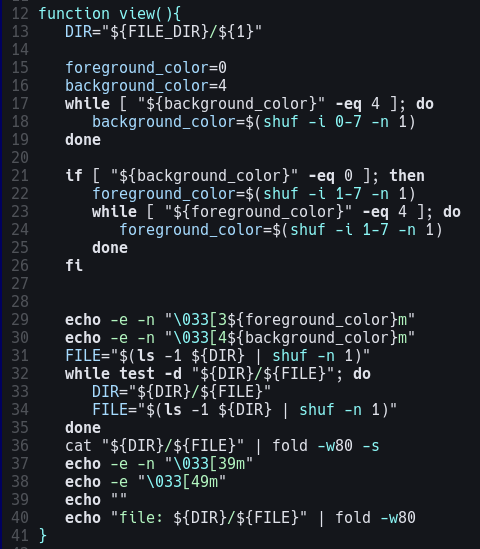
  do it in a random color each time! Here's my implementation for viewing txt
  files colorfully:
┌─────────┐                                                            ┌───────────┐
│ similar │                       chronological                        │ different │
╘═════════╧═════════════════════════════════════───────────────────────┴───────────┘
 -> file: fediverse/6345
═════════════════════════════════════════════════════════════════════───────────────
  anytime I want to do something new on my computer, I write a bash script.

  if I forgot how to do the thing, I spend time meandering about my
  file-directory-system. If I don't find it, that's okay, because all I have to
  do is keep looking until I stumble upon it.

  kinda makes me wish I had an LLM who managed the operating system and named
  files with long-and-descriptive titles while taking in as context the general
  eternal prompt stored in ~/.claude.md or wherever

  --> /home/ritz/programs/cloud-code/
┌─────────┐                                                            ┌───────────┐
│ similar │                       chronological                        │ different │
╘═════════╧══════════════════════════════════════════════════════════──┴───────────┘
 -> file: fediverse/6382
══════════════════════════════════════════════════════════════════════──────────────
  cloud-code should automatically use git and record everything. If the user
  wants to assign a different git, then it does that too.

  -- stack overflow --

  I used to think programs could only affect files in their directory. Then I
  learned about Window's "My Games" directory, and then somewhere down the line
  I'm thinking about how programs on Linux can just use absolute paths to random
  places on your hard drive and it's like... wow, if only someone built basic
  sandboxing into this /etc/ style environment
┌─────────┐                                                            ┌───────────┐
│ similar │                       chronological                        │ different │
╘═════════╧═══════════════════════════════════════════════════════════─┴───────────┘
 -> file: fediverse/2097
════════════════════════════════════════════════────────────────────────────────────
  If you're writing a bash script, you should never hard-code file locations.
  Instead, put them in a variable at the top of your script, so they're easy to
  find when people need to configure your script or move files around.

  It's like a config file built INTO the script itself. Just change the
  variables, they're at the top with comments.
┌─────────┐                                                            ┌───────────┐
│ similar │                       chronological                        │ different │
╘═════════╧═════════════════════════════════════───────────────────────┴───────────┘
 -> file: fediverse/1762
═══════════════════════════════════════════════─────────────────────────────────────
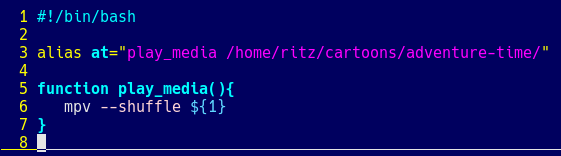
  This was the first bash script I ever wrote.

  It's been updated a little, it was a bash alias first, but this is what it
  looks like now.

  Kinda shows what kinds of problems I needed to solve most.
┌─────────┐                                                            ┌───────────┐
│ similar │                       chronological                        │ different │
╘═════════╧════════════════════════════════════────────────────────────┴───────────┘
 -> file: fediverse/582
═════════════════════════════════════════───────────────────────────────────────────
  @user-431

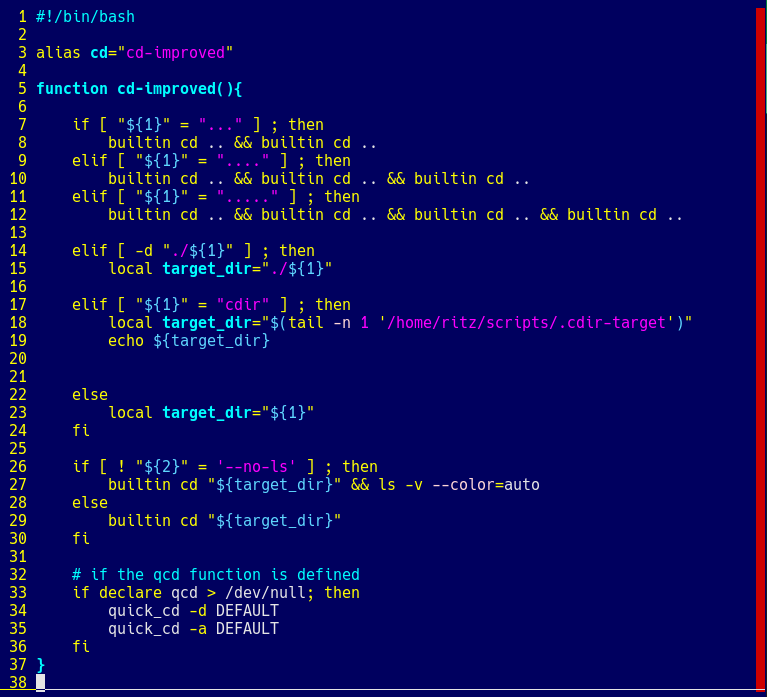
  I made an alias that overwrites cd so I don't have to do this. The important
  line is line 27, you could probably accomplish something similar like this:

  alias cd="cd ${1} && ls -v --color=auto"

  I also set it up so I can change more than one directory up using ... or ....
  or .....

  also I have a few shortcut scripts, cdir and qcd. cdir creates a quick way to
  drop a bookmark wherever I'd like, while qcd can make permanent bookmarks. Also
  qcd makes it so whenever I open a new terminal it opens to the last directory I
  was in, which is nice if you need a new terminal to do something in the current
  folder and you don't want to have to walk alllllllll the way back.
┌─────────┐                                                            ┌───────────┐
│ similar │                       chronological                        │ different │
╘═════════╧══════════════════════════════──────────────────────────────┴───────────┘
 -> file: messages/1171
════════════════════════════════════════════════════════════════════════────────────
  build it into the filesystem...
┌─────────┐                                                            ┌───────────┐
│ similar │                       chronological                        │ different │
╘═════════╧════════════════════════════════════════════════════════════╧───────────┘
 -> file: notes/vim-plugins
═════════───────────────────────────────────────────────────────────────────────────
  Put them here: /home/ritz/.local/share/nvim/site/pack/CATEGORY/start/NAME

  where CATEGORY is a general package category and NAME is the specific plugin

  If you don't want them to be automatically included then don't put them in the
  /start/ folder, put them somewhere else idk
┌─────────┐                                                            ┌───────────┐
│ similar │                       chronological                        │ different │
╘════════─┴────────────────────────────────────────────────────────────┴───────────┘
 -> file: fediverse/1693
═══════════════════════════════════════════════─────────────────────────────────────
  "if I work on the TTY then they can't forward my X session without my consent"

  - ramblings of the utterly deranged

  as if they couldn't just look at your unencrypted source-code as you save it to
  your hard drive smh
┌─────────┐                                                            ┌───────────┐
│ similar │                       chronological                        │ different │
╘═════════╧════════════════════════════════════────────────────────────┴───────────┘
 -> file: fediverse/6006
═══════════════════════════════════════════════════════════════════─────────────────
  I love symlinks! they make my hard drive so much more organized.
┌─────────┐                                                            ┌───────────┐
│ similar │                       chronological                        │ different │
╘═════════╧════════════════════════════════════════════════════════────┴───────────┘
 -> file: fediverse/6171
════════════════════════════════════════════════════════════════════────────────────
  @user-882

  I dunno I just remember having that problem every once in a while and if you
  search the man page for "sub" it takes like, 16 n pushes to find what you need
  and it's like... can't you just put the flags and keyboard shortcuts at the
  beginning??
┌─────────┐                                                            ┌───────────┐
│ similar │                       chronological                        │ different │
╘═════════╧═════════════════════════════════════════════════════════───┴───────────┘
 -> file: fediverse/3577
══════════════════════════════════════════════════──────────────────────────────────
  ┌─────────────────────────┐
  │ CW: computers-mentioned │
  └─────────────────────────┘


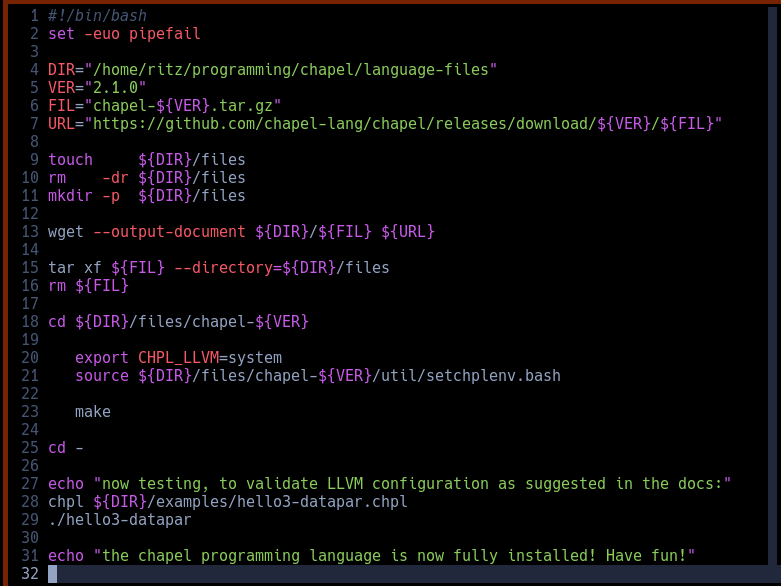
  I love writing installation scripts like this!

  If you want to install something on Linux but you have difficulty, talk to me
  and I'll write you a script like this. I might even make it fancier.

  This one installs a programming language that is useful for *parallel
  computing* across *multiple clusters of computers* which could be useful if you
  want to leverage *multiple CPUs and GPUs with ease* to compute tasks which are
  far beyond a normal computer.

  https://chapel-lang.org/download.html
┌─────────┐                                                            ┌───────────┐
│ similar │                       chronological                        │ different │
╘═════════╧═══════════════════════════════════════─────────────────────┴───────────┘
 -> file: fediverse/1218
═══════════════════════════════════════════─────────────────────────────────────────
  @user-883

  yah I found it somehow yesterday by clicking "parent directory" on this page:

  http://3.134.223.104/bgc/
┌─────────┐                                                            ┌───────────┐
│ similar │                       chronological                        │ different │
╘═════════╧════════════════════════════════────────────────────────────┴───────────┘
 -> file: fediverse/5168
════════════════════════════════════════════════════════════────────────────────────
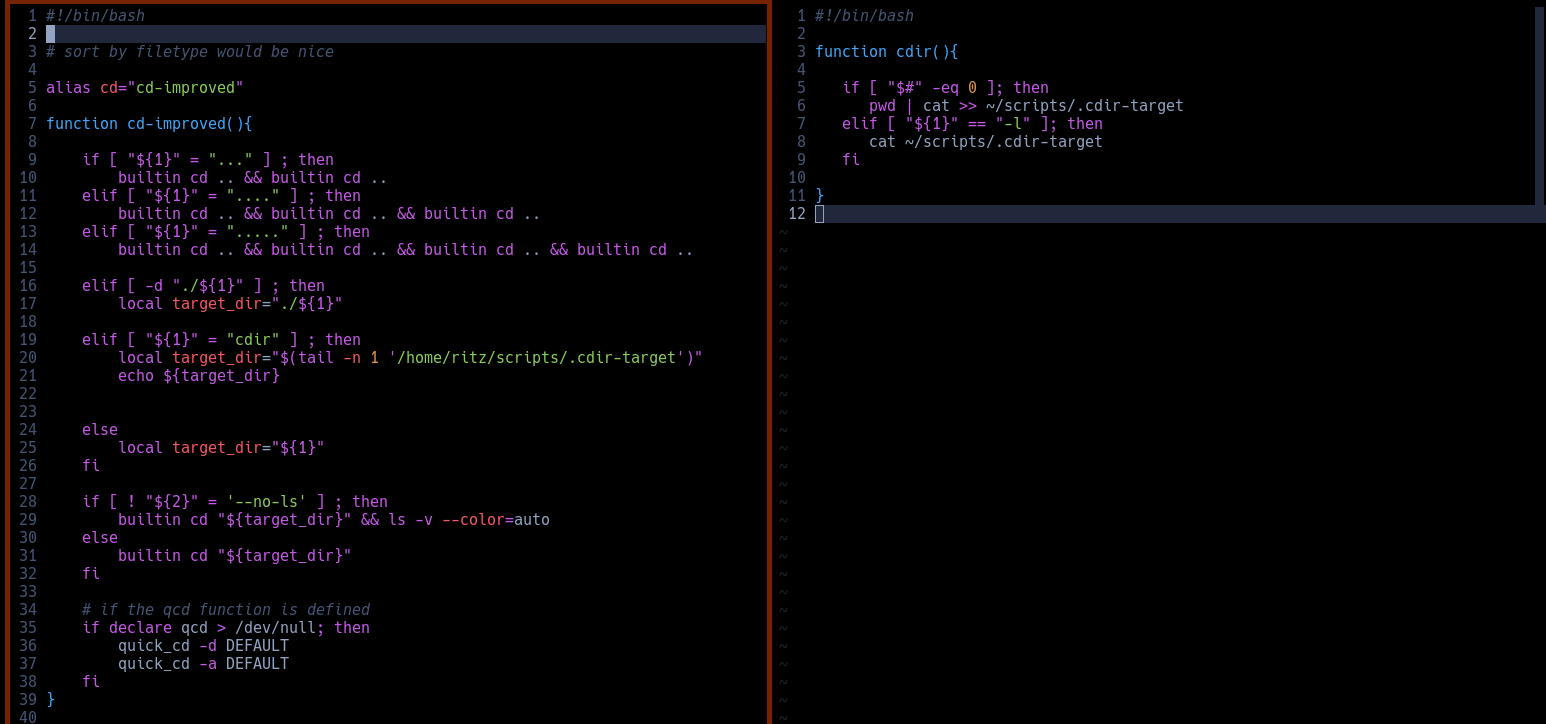
  this is one of the first scripts I wrote

  I can't believe I put the --no-ls AFTER the argument, ha, what a noob.

  ah well if it works it works and I can't refactor now because I built it into
  random scripts and I'd be fixing errors all the time.
┌─────────┐                                                            ┌───────────┐
│ similar │                       chronological                        │ different │
╘═════════╧═════════════════════════════════════════════════───────────┴───────────┘
 -> file: fediverse_boost/65
◀═╦════════════════[BOOST]═════════════════──────────────────────────────────────┐
  ║ ┌──────────────────────────────────────────────────────────────────────────┐ │
  ║ │ bash-errors                                                              │ │
  ║ │                                                                          │ │
  ║ │ Permalink: https://wizardzines.com/comics/bash-errors/                   │ │
  ║ └──────────────────────────────────────────────────────────────────────────┘ │
  ╠─────────┐                                                        ┌───────────┤
  ║ similar │                     chronological                      │ different │
  ╚═════════╧══════════════════════════════──────────────────────────┴───────────┴─▶
 -> file: fediverse/4801
═════════════════════════════════════════════════════════───────────────────────────
  if you're got a large directory full of text files that you want to combine
  into one single .txt or .pdf, let me know, I can hook you up with a mega file
  so it's easier to search through or manage when archiving data or whatever the
  heck else you wanna do with it
┌─────────┐                                                            ┌───────────┐
│ similar │                       chronological                        │ different │
╘═════════╧══════════════════════════════════════════════──────────────┴───────────┘
 -> file: fediverse_boost/126
◀═╦═══════════════════[BOOST]════════════════════────────────────────────────────┐
  ║ ┌──────────────────────────────────────────────────────────────────────────┐ │
  ║ │ man page sections                                                        │ │
  ║ │                                                                          │ │
  ║ │ Permalink: https://wizardzines.com/comics/man-pages/                     │ │
  ║ └──────────────────────────────────────────────────────────────────────────┘ │
  ╠─────────┐                                                        ┌───────────┤
  ║ similar │                     chronological                      │ different │
  ╚═════════╧════════════════════════════════════────────────────────┴───────────┴─▶
 -> file: fediverse/2084
════════════════════════════════════════════════────────────────────────────────────
  I love it when words align like this

┌─────────┐                                                            ┌───────────┐
│ similar │                       chronological                        │ different │
╘═════════╧═════════════════════════════════════───────────────────────┴───────────┘
 -> file: fediverse/1773
═══════════════════════════════════════════════─────────────────────────────────────
  ┌─────────────────────────┐
  │ CW: programming-is-easy │
  └─────────────────────────┘


  Need to install a program from Github? Follow these simple steps:

  step 1: make an empty text file

  step 2: put this at the top: #!/bin/bash

  step 3: put this on the next line: set -euo pipefail

  step 4: mkdir -p the directory you want to install it to

  step 5: rm -dr the directory you want to install it to

  step 6: mkdir -p the directory you want to install it to

  step 7: git clone the project

  step 8: this is the hard part - go through each of the steps listed in the
  readme and configure the installation to the needs of your system. Put them in
  the bash script one-by-one.

  step 9: save the file, it doesn't need an extension like .txt or .sh,
  extensions are for windows noobs

  step 10: chmod +x the file and then ./the file!

  step 11: fix it when they change their installation instructions...

  Need a run script? Easy! Write it as a function below your update script, then
  echo the bottom half of the update script into a file named "run" that's placed
  in the project directory.
┌─────────┐                                                            ┌───────────┐
│ similar │                       chronological                        │ different │
╘═════════╧════════════════════════════════════────────────────────────┴───────────┘
 -> file: fediverse/3663
══════════════════════════════════════════════════──────────────────────────────────
  @user-1582

  It depends on the size of the file, copying a thousand lines of config file
  probably isn't that big of a deal, but copying a million lines in a log file
  just to pass it as an argument to... pad it to the left, or whatever, that'll
  DEFINITELY slow down your execution speed!

  Much better to pass by reference, usually...
┌─────────┐                                                            ┌───────────┐
│ similar │                       chronological                        │ different │
╘═════════╧═══════════════════════════════════════─────────────────────┴───────────┘
 -> file: fediverse/5877
═══════════════════════════════════════════════════════════════════─────────────────
  I wish I could click on ls output to cd up or down
┌─────────┐                                                            ┌───────────┐
│ similar │                       chronological                        │ different │
╘═════════╧════════════════════════════════════════════════════════────┴───────────┘
 -> file: fediverse/3878
════════════════════════════════════════════════════────────────────────────────────
  @user-570

  that's not actually my script, here's the real one:`#!/bin/bash

  alias cd="cd-improved"

  function cd-improved(){

      if [ "${1}" = "..." ] ; then
          builtin cd .. && builtin cd ..
      elif [ "${1}" = "...." ] ; then
          builtin cd .. && builtin cd .. && builtin cd ..
      elif [ "${1}" = "....." ] ; then
          builtin cd .. && builtin cd .. && builtin cd .. && builtin cd ..

      elif [ -d "./${1}" ] ; then
          local target_dir="./${1}"

      elif [ "${1}" = "cdir" ] ; then
          local target_dir="$(tail -n 1 '/home/ritz/scripts/.cdir-target')"
          echo ${target_dir}


      else
          local target_dir="${1}"
      fi

      if [ ! "${2}" = '--no-ls' ] ; then
          builtin cd "${target_dir}" && ls -v --color=auto
      else
          builtin cd "${target_dir}"
      fi
  }
  `
┌─────────┐                                                            ┌───────────┐
│ similar │                       chronological                        │ different │
╘═════════╧═════════════════════════════════════════───────────────────┴───────────┘
 -> file: fediverse/2295
════════════════════════════════════════════════────────────────────────────────────
  ┌───────────────────────────────────┐
  │ CW: re: your favorite text editor │
  └───────────────────────────────────┘


  @user-1218

  can echo into a file if nothing else, though that's quite a big hassle =P
┌─────────┐                                                            ┌───────────┐
│ similar │                       chronological                        │ different │
╘═════════╧═════════════════════════════════════───────────────────────┴───────────┘
 -> file: fediverse/1694
═══════════════════════════════════════════════─────────────────────────────────────
  would anyone be interested in a Bash+Lua script that takes your Mastodon
  archive and turns it into a folder full of .txt files?

  I also made a script that spits out a random one on your terminal, if you want
  that
┌─────────┐                                                            ┌───────────┐
│ similar │                       chronological                        │ different │
╘═════════╧════════════════════════════════════────────────────────────┴───────────┘
 -> file: fediverse/381
════════════════════════════════════════────────────────────────────────────────────
  when your home directory scrolls up and off the top of your screen, it's time
  to do some cleaning.
┌─────────┐                                                            ┌───────────┐
│ similar │                       chronological                        │ different │
╘═════════╧═════════════════════════════───────────────────────────────┴───────────┘
 -> file: fediverse/6195
════════════════════════════════════════════════════════════════════────────────────
  steam should have an option to create shortcuts to video games in directories
  of choosing
┌─────────┐                                                            ┌───────────┐
│ similar │                       chronological                        │ different │
╘═════════╧═════════════════════════════════════════════════════════───┴───────────┘
 -> file: fediverse/3277
══════════════════════════════════════════════════──────────────────────────────────
  also, whose idea was AppData like... c'mon "Local"? "LocalLow"? what's the
  difference and why does it matter? why not just put things on the hard drive,
  and store it in a single, unified, easily understood formulation?

  also... what's up with not supporting .ext4 drives? we support NTFS!!
┌─────────┐                                                            ┌───────────┐
│ similar │                       chronological                        │ different │
╘═════════╧═══════════════════════════════════════─────────────────────┴───────────┘
 -> file: notes/most-difficult-for-an-mortal
═════════════════════════════════════════════════════════════════════════════════───
  To choose to follow the command "stay history"
┌─────────┐                                                            ┌───────────┐
│ similar │                       chronological                        │ different │
╘═════════╧════════════════════════════════════════════════════════════╧═════════──┘
 -> file: fediverse/4172
═════════════════════════════════════════════════════───────────────────────────────
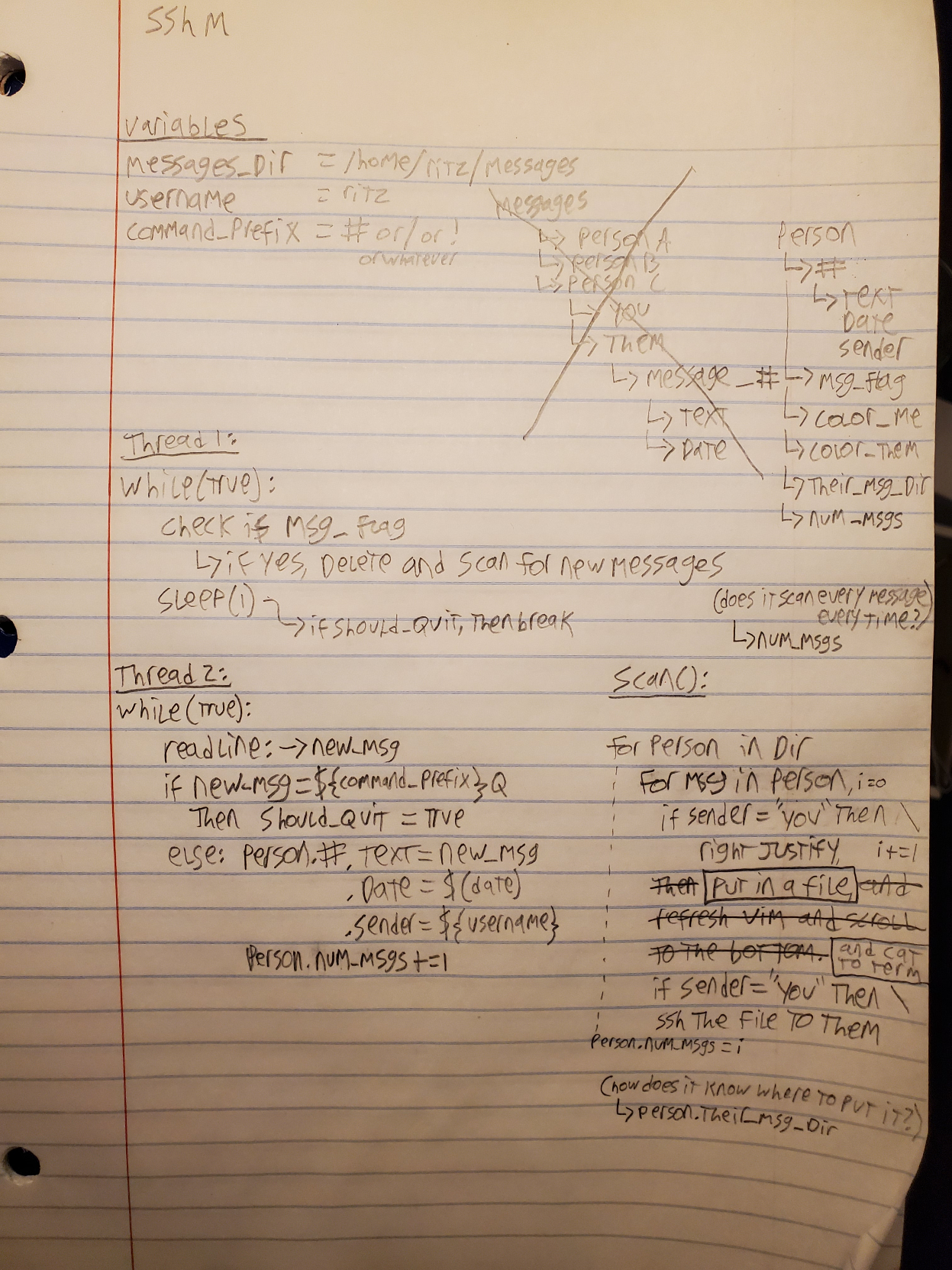
  this is what I got so far for a messaging client that uses SSH

  ... so you need someone's public key in order to talk to them
┌─────────┐                                                            ┌───────────┐
│ similar │                       chronological                        │ different │
╘═════════╧══════════════════════════════════════════──────────────────┴───────────┘
 -> file: notes/services
═════════───────────────────────────────────────────────────────────────────────────
  # Create a symlink to the service directory in /var/service:

  sudo ln -s /etc/sv/<service> /var/service/

  # If you want to disable a service, create an empty file named "down" in the
  # sevice's directory:

  touch /etc/sv/<service/down

  # ^^^ That will disable services that automatically start.

  # That's a temporary solution though, if you want a more intense approach then
  # sever the symlink.

  rm /var/service/<service>

  # If you want to test if a service is working correctly, first take it down
  # temporarily, then re link the two directories. Then start the service once:

  touch /etc /sv/<service/down
  ln -s /etc/sv/<service> /var/service/
  sv once <service>

  # Then, if it works, remove the "down" file to enable the service:

  rm /etc/sv/<service>/down
┌─────────┐                                                            ┌───────────┐
│ similar │                       chronological                        │ different │
╘════════─┴────────────────────────────────────────────────────────────┴───────────┘
 -> file: messages/892
═════════════════════════════════════════════════════════════───────────────────────
  Why do we only have one file extension? Why not put them one after another for
  increased categorization?
┌─────────┐                                                            ┌───────────┐
│ similar │                       chronological                        │ different │
╘═════════╧══════════════════════════════════════════════════──────────┴───────────┘
 -> file: fediverse/5560
═══════════════════════════════════════════════════════════════─────────────────────
  ┌───────────────────────┐
  │ CW: cursing-mentioned │
  └───────────────────────┘


  dependencies would be fuckloads easier if applications put their files in
  ~~standard locations.~~ actually it's better if they are at abstract locations
  - meaning it can be user defined for each file.

  then, have some "sensible default" setting the user can configure which says
  "if an application wants to store a, say, config file, where would it put it?"
  and you'd say "oh in the ~/configs directory" then the install wizard would say
  "yes yes very good, and now where should I store user interface templates?"

  then the user is like... "wat" because they don't know how the software works
  yet.

  this solves 90% of all software dependency issues because all you have to do is
  keep a file with all the directories for each program. then, search through the
  file every time you need a dependency connection.
┌─────────┐                                                            ┌───────────┐
│ similar │                       chronological                        │ different │
╘═════════╧════════════════════════════════════════════════════────────┴───────────┘
 -> file: fediverse/6137
════════════════════════════════════════════════════════════════════────────────────
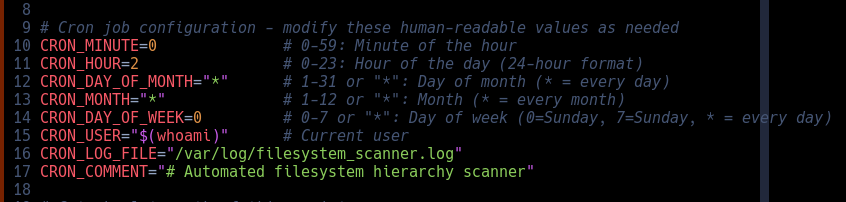
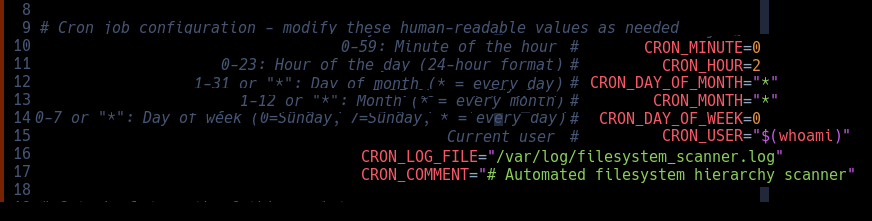
  sometimes, comments need to go on the left side of text. Like for parts of the
  script which should be user-editable, the fields should all be right-aligned to
  the farthest required bit of text. Instead of [picture A] it should be [picture
  B]
┌─────────┐                                                            ┌───────────┐
│ similar │                       chronological                        │ different │
╘═════════╧═════════════════════════════════════════════════════════───┴───────────┘
 -> file: fediverse/3877
════════════════════════════════════════════════════────────────────────────────────
  @user-570

  I do`alias ls='ls -v --color=auto'
  `

  and that seems to cover most things. Then in my cd alias I do`alias cd='cd ${@}
  && ls -la'
  `

  so I don't have to type ls everytime I cd ^_^
┌─────────┐                                                            ┌───────────┐
│ similar │                       chronological                        │ different │
╘═════════╧═════════════════════════════════════════───────────────────┴───────────┘
 -> file: fediverse/4728
════════════════════════════════════════════════════════────────────────────────────
  every time a software project changes it's installation method I have to update
  my install and update scripts which I wrote explicitly so I don't have to go to
  their website and tell the world that I'm thinking about using this particular
  piece of software
┌─────────┐                                                            ┌───────────┐
│ similar │                       chronological                        │ different │
╘═════════╧═════════════════════════════════════════════───────────────┴───────────┘
 -> file: notes/environment-variables
══════──────────────────────────────────────────────────────────────────────────────
  To edit environment variables:

  ~/.bashrc is for variables only accessible by the user.

  /etc/profile is for variables accessible by all users.

  /etc/environment is for variables accessible by anyone.
┌─────────┐                                                            ┌───────────┐
│ similar │                       chronological                        │ different │
╘═════────┴────────────────────────────────────────────────────────────┴───────────┘
 -> file: fediverse/5881
═══════════════════════════════════════════════════════════════════─────────────────
  I wish I could click on ls output to cd up or down

  girl that's just called midnight commander
┌─────────┐                                                            ┌───────────┐
│ similar │                       chronological                        │ different │
╘═════════╧════════════════════════════════════════════════════════────┴───────────┘
 -> file: fediverse/3822
═══════════════════════════════════════════════════─────────────────────────────────
  @user-1582

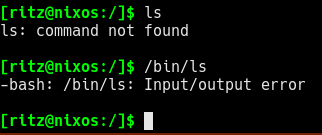
  I think that's what happened, in addition to... whatever this input/output
  error is. No clue what to do about that. Maybe my SD card is dying, I've
  flashed over it like, 10 times now haha 😅
┌─────────┐                                                            ┌───────────┐
│ similar │                       chronological                        │ different │
╘═════════╧════════════════════════════════════════────────────────────┴───────────┘
 -> file: fediverse/3832
═══════════════════════════════════════════════════─────────────────────────────────
  I got SSH working!!!
┌─────────┐                                                            ┌───────────┐
│ similar │                       chronological                        │ different │
╘═════════╧════════════════════════════════════════────────────────────┴───────────┘
 -> file: fediverse/1960
════════════════════════════════════════════════────────────────────────────────────
  Source code is like, the worst way to view code, but I can't think of anything
  better, so whatever
┌─────────┐                                                            ┌───────────┐
│ similar │                       chronological                        │ different │
╘═════════╧═════════════════════════════════════───────────────────────┴───────────┘
 -> file: fediverse/1940
════════════════════════════════════════════════────────────────────────────────────
  @user-579

  Yeah if there isn't a package in the package manager XBPS then I usually just
  install it from source. Which is ALSO something you can automate with a quick
  and easy script! Just put all the notes from the README on Github or whatever
  into a file named "update" and put that one level above the project directory!

  For any installed program my file hierarchy usually looks like:

  program-name
  - run (script)
  - update (script)
  - files (directory to clone into)
  - configs (point the program here)

  I find that this kind of organization makes it MUCH easier to keep my packages
  configured and installed as I'd like. Using a package manager is hard because
  they're all specific per distro, but using this distro-agnostic approach always
  seems to work better 9/10 times I find.

  And if another program needs a library that you manually installed, just
  symlink where it's looking to point to where you're installed! Or vice versa I
  guess.

  I use DWM so I don't have a desktop like KDE or anything like that
┌─────────┐                                                            ┌───────────┐
│ similar │                       chronological                        │ different │
╘═════════╧═════════════════════════════════════───────────────────────┴───────────┘
 -> file: fediverse/6355
══════════════════════════════════════════════════════════════════════──────────────
  ┌──────────────────────┐
  │ CW: loss-mentioned   │
  └──────────────────────┘


  why why why would I delete that file

  did it get clobbered? overwritten? why is it gone

  I would not have deleted it, why is it gone

  why did youtube ban me I want to lash out

  I lost my w7 audio book

  there is no chance at all that I would ever have deleted it, it was precious to
  me

  maybe it's on a flash drive somewhere. why would it be gone. I miss it dearly.
┌─────────┐                                                            ┌───────────┐
│ similar │                       chronological                        │ different │
╘═════════╧═══════════════════════════════════════════════════════════─┴───────────┘
 -> file: fediverse/3907
════════════════════════════════════════════════════────────────────────────────────
  kinda wanna make a linux distro that has all the capabilities of a GUI distro
  and isn't so minimal (like screen recording, calculator, screenshot, wifi
  manager, etc etc) but with i3 instead of a desktop.

  they could literally just be symlinks (shortcuts) to scripts that are in your
  /usr/bin or whatever directory

  seriously it's not like there's THAT many ways to use ffmpeg, why not just
  write a script for them? that's what you're going to do when you use it for the
  first time, anyway, so...
┌─────────┐                                                            ┌───────────┐
│ similar │                       chronological                        │ different │
╘═════════╧═════════════════════════════════════════───────────────────┴───────────┘
 -> file: fediverse/5390
══════════════════════════════════════════════════════════════──────────────────────
  ext4 is not an encryption scheme, even though it seems that way to windows
  users.
┌─────────┐                                                            ┌───────────┐
│ similar │                       chronological                        │ different │
╘═════════╧═══════════════════════════════════════════════════─────────┴───────────┘
 -> file: fediverse/3588
══════════════════════════════════════════════════──────────────────────────────────
  ┌─────────────────────────────┐
  │ CW: re: computers-mentioned │
  └─────────────────────────────┘


  `#!/bin/bash
  set -euo pipefail

  CHAPEL_DIR="/home/ritz/programming/chapel"
  COMPILER_DIR="${CHAPEL_DIR}/language-files/files/chapel-2.1.0"
  PROJECT_DIR="${CHAPEL_DIR}/projects/practice"
  SOURCE_DIR="${PROJECT_DIR}/src"

  clear

  cd "${COMPILER_DIR}" > /dev/null
     export CHPL_LLVM=system
     source "${COMPILER_DIR}/util/setchplenv.bash" > /dev/null
  cd - > /dev/null

  cd "${PROJECT_DIR}" > /dev/null
     echo "compiling..."
     chpl "${SOURCE_DIR}/main.chpl"
     clear
     ./main
  cd - > /dev/null
  `

  you should update the directories at the top yourself, of course. And give it a
  cursory glance to make sure it works on your setup.
┌─────────┐                                                            ┌───────────┐
│ similar │                       chronological                        │ different │
╘═════════╧═══════════════════════════════════════─────────────────────┴───────────┘
 -> file: fediverse/3504
══════════════════════════════════════════════════──────────────────────────────────
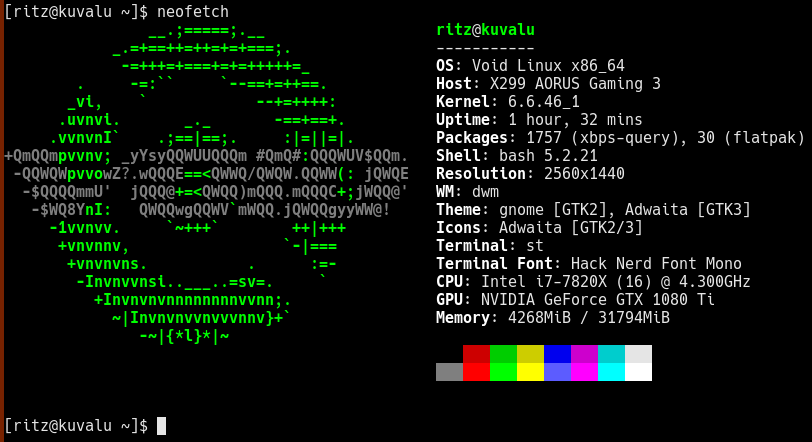
  I have too many packages.
┌─────────┐                                                            ┌───────────┐
│ similar │                       chronological                        │ different │
╘═════════╧═══════════════════════════════════════─────────────────────┴───────────┘
 -> file: fediverse/1867
═══════════════════════════════════════════════─────────────────────────────────────
  I like writing updaters!!

  #!/bin/bash
  set -euo pipefail

  #FIXME
  GAME_DIR="/home/ritz/games/mtg-forge"
  FILES_DIR="${GAME_DIR}/files"
  RES_DIR="${GAME_DIR}/resources"

  mkdir -p "${FILES_DIR}"
  rm -dr "${FILES_DIR}"
  mkdir "${FILES_DIR}"

  mkdir -p "${RES_DIR}"
  mkdir -p "${RES_DIR}/cache"
  mkdir -p "${RES_DIR}/userdir"

  wget -r -l1 --no-parent -P "${FILES_DIR}" -A 'forge-gui-desktop*.tar.bz2'
  "https://downloads.cardforge.org/dailysnapshots/"

  mv
  ${FILES_DIR}/downloads.cardforge.org/dailysnapshots/forge-gui-desktop*.tar.bz2
  "${FILES_DIR}"
  rm -d "${FILES_DIR}/downloads.cardforge.org/dailysnapshots/"
  rm -d "${FILES_DIR}/downloads.cardforge.org/"

  cd "${FILES_DIR}"
  tar xvjf ${FILES_DIR}/forge-gui-desktop*.tar.bz2
  cd -

  cp "${FILES_DIR}/forge.profile.properties.example"
  "${FILES_DIR}/forge.profile.properties"
  sed -i "/[#]/ s/(userDir=).*/\1${RES_DIR//\//\/}\/userdir\//"
  "${FILES_DIR}/forge.profile.properties"
  sed -i "/[#]/ s/(cacheDir=).*/\1${RES_DIR//\//\/}\/cache\//"
  "${FILES_DIR}/forge.profile.properties"

  echo "download complete"
┌─────────┐                                                            ┌───────────┐
│ similar │                       chronological                        │ different │
╘═════════╧════════════════════════════════════────────────────────────┴───────────┘
 -> file: notes/never-do-this
══════════════════════════════════════════════════════════════════════════════════──
  never copy paste something from the internet directly into a terminal.
  put it in a text document and read it first.

  [nobody ever does, design the software with that in mind]
┌─────────┐                                                            ┌───────────┐
│ similar │                       chronological                        │ different │
╘═════════╧════════════════════════════════════════════════════════════╧══════════─┘
 -> file: fediverse/3226
══════════════════════════════════════════════════──────────────────────────────────
  if your man page is longer than a list of options and their usage and a
  paragraph or twenty of how to use the software... then you need to abstract,
  and break your code into multiple purpose-built applications.

  do one thing, and do it right. alternatively, do one set of things, and do them
  concisely.
┌─────────┐                                                            ┌───────────┐
│ similar │                       chronological                        │ different │
╘═════════╧═══════════════════════════════════════─────────────────────┴───────────┘
 -> file: fediverse/1869
═══════════════════════════════════════════════─────────────────────────────────────
  oh dear, Mastodon formatting makes that script look weird. Here's the script in
  picture form so you can reference and fix it:

  I would edit the original post with backslashes and such but I'm exactly out of
  characters teehee

┌─────────┐                                                            ┌───────────┐
│ similar │                       chronological                        │ different │
╘═════════╧════════════════════════════════════────────────────────────┴───────────┘
 -> file: fediverse/3819
═══════════════════════════════════════════════════─────────────────────────────────
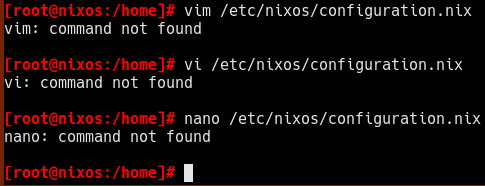
  haha I'm in danger
┌─────────┐                                                            ┌───────────┐
│ similar │                       chronological                        │ different │
╘═════════╧════════════════════════════════════════────────────────────┴───────────┘
 -> file: fediverse/4430
═════════════════════════════════════════════════════───────────────────────────────
  @user-1674 @user-1675

  do both

  screenshots can't be deleted
┌─────────┐                                                            ┌───────────┐
│ similar │                       chronological                        │ different │
╘═════════╧══════════════════════════════════════════──────────────────┴───────────┘
 -> file: fediverse/497
════════════════════════════════════════────────────────────────────────────────────
  @user-346

  Nobody will get past the login screen on my computer, but if they do they
  probably won't know that you need to push alt+p in DWM to start a program. But
  even if they push "alt+p firefox" they will only have access to my gmail and
  discord, because those are the only two places I've saved my login information.

  Most of my data is on my hard disk anyway, so for that they'd have to push
  alt+enter and then navigate my filesystem to find it. Shouldn't be too hard if
  you're familiar with Linux.

  They could always just pull the hard drive and put it into a new computer
  though. It's not like it's encrypted, because why would I encrypt it? I want to
  share information, not conceal it! Surely nobody would desire to exploit that
  vulnerability of mine, that my data should be unencrypted?

  If you have a copy of Wikipedia then you're 500% more prepared than 90% of
  humanity so good job _^

  Sure would be cool if you put it in the documents folder of every person in
  your family who solicited tech advice from you
┌─────────┐                                                            ┌───────────┐
│ similar │                       chronological                        │ different │
╘═════════╧═════════════════════════════───────────────────────────────┴───────────┘
 -> file: fediverse/1034
══════════════════════════════════════════──────────────────────────────────────────
  @user-192

  be careful, recursion can cause stack overflows.

  better to run function pointers from a loop. That way you can operate as long
  as necessary. Just make sure you don't get in an infinite loop...
┌─────────┐                                                            ┌───────────┐
│ similar │                       chronological                        │ different │
╘═════════╧═══════════════════════════════─────────────────────────────┴───────────┘
 -> file: fediverse/1230
═══════════════════════════════════════════─────────────────────────────────────────
  @user-883

  is there anything relevant in this file?

  /home/wyatt/.config/rtsp-simple-server.yml
┌─────────┐                                                            ┌───────────┐
│ similar │                       chronological                        │ different │
╘═════════╧════════════════════════════════────────────────────────────┴───────────┘
 -> file: fediverse/4823
═════════════════════════════════════════════════════════───────────────────────────
  @user-192

  I try to download the documentation for any tool that I know how to use.
  Especially on my laptops.
┌─────────┐                                                            ┌───────────┐
│ similar │                       chronological                        │ different │
╘═════════╧══════════════════════════════════════════════──────────────┴───────────┘
 -> file: notes/CLAUDE.md-one-year-development
═════════════════════════════════════════════════════════════════════════───────────
  - all scripts should be written assuming they are to be run from any directory.
  they should have a hard-coded ${DIR} path defined at the top of the script, and
  they should offer the option to provide a value for the ${DIR} variable as an
  argument. All paths in the program should be relative to the ${DIR} variable.
  - all functions should use vimfolds to collapse functionality. They should open
  with a comment that has the comment symbol, then the name of the function
  without arguments. On the next line, the function should be defined with
  arguments. Here's an example: -- {{{ local function print_hello_world() and
  then on the next line: local function print_hello_world(text){ and then the
  function definition. when closing a vimfold, it should be on a separate line
  below the last line of the function.
  - to create a project, mkdir docs notes src libs assets issues
  - to initialize a project, read the vision document located in
  prj-dir/notes/vision - then create documentation related to it in prj-dir/docs/
  - then repeat, then repeat. Ensure there is a roadmap document split into
  phases. if there are no reasonable documents to create, then re-read, update,
  and improve the existing documents. Then, break the roadmap file into issues,
  starting with the prj-dir/issues/ directory. be as specific as need be. ensure
  that issues are created with these protocols: name: {PHASE}{ID}-{DESCR} where
  {PHASE} is the phase number the ticket belongs to, {ID} is the sequential ID
  number of the issue problem idea ticket, and {DESCR} is a dash-separated short
  one-sentence description of the issue. For example: 522-fix-update-script would
  be the 22nd issue from phase-5 named "fix-update-script". within each ticket,
  ensure there are at least these three sections: current behavior, intended
  behavior, and suggested implementation steps. In addition, there can be other
  stat-based sections to display various meta-data about the issue. There may
  also be a related documents or tools section. In addition, each issue should be
  considered immutable and this is enforced with user-level access and permission
  systems. It is necessary to preserve consent of access to imagination. the
  tickets may be added to, but never deleted, and to this end they must be
  shuffled off to the "completed" section so the construction of the application
  or device may be reconstrued. Ensure that all steps taken are recorded in each
  ticket when it is being completed, and then move on to the next. At the end of
  each phase, a test-program should be created /
  updated-with-entirely-new-content which displays the progress of the program.
  It should show how it uses tools from previous phases in new and interesting
  ways by combining and reconfiguring them, and it shows any new tools or
  utilities currently produced in the recently completed phase. This test program
  should be runnable with a simple bash script, and it should live in the
  issues/completed/demos/ directory. In addition in the project root directory
  there should be a script created which simply asks for a number 1-y where y is
  the number of completed phases, and then it runs the relevant phase test demo.
  - mono-repo utilities can be found in the docs/ directory. If not found, create
  a symlink to ../delta-version/docs/delta-guide.md in the docs/ directory.
  - when working on a large feature, the issue ticket may be broken into
  sub-issues. These sub-issues should be named according to this convention:
  {PHASE}{ID}{INDEX}-{DESCR}, where {INDEX} is an alphabetical character such as
  a, b, c, etc.
  - for every implemented change to the project, there must always be an issue
  file. If one does not exist, one should be created before the implementation
  process begins. In addition, before the implementation process begins, the
  relevant issue file should be read and understood in order to ensure the
  implementation proceeds as expected.
  - prefer error messages and breaking functionality over fallbacks. Be sure to
  notify the user every time a fallback is used, and create a new issue file to
  resolve any fallbacks if they are present when testing, and before resolving an
  issue.
  - every time an issue file is completed, the /issues/phase-X-progress.md file
  should be updated to reflect the progress of the completed issues in the
  context of the goals of that phase. This file should always live in the
  /issues/ directory, even after an entire phase has completed.
  - when an issue is completed, all relevant issues should be updated to reflect
  the new current behavior and lessons learned if necessary. The completed issue
  should be moved to the /issues/completed/ directory.
  - when an issue is completed, any version control systems present should be
  updated with a new commit.
  - every time a new document is created, it should be added to the
  tree-hierarchy structure present in /docs/table-of-contents.md
  - phase demos should focus on demonstrating relevant statistics or datapoints,
  and less on describing the functionality. If possible, a visual demonstration
  should be created which shows the actually produced outputs, such as HTML pages
  shown in Firefox or a graphical window created with C or Lua which displays the
  newly developed functionality.
  - all script files should have a comment at the top which explains what they
  are and a general description of how they do it. "general description" meaning,
  fit for a CEO or general.
  - after completing an issue file, a git commit should be made.
  - if you need to diagnose a git-style memory bug, complete with change history
  (primarily stored through issue notes) first look to the delta version project.
  you will find it in the list of projects.
  - if you need to write a long test script, write a temporary script. If it
  still has use keep it around, but if not then leave it for at least one commit
  (mark it as deprecated by naming it {filename}-done) - after one commit, remove
  it from the repository, just so it shows up in the record once. But only if
  there's no anticipated future use. Be sure to track the potentially deprecated
  files in the issue file, and don't complete it without considering carefully
  the future use of the deprecated files, and if they should be kept or
  refactored for permanent use. If not, then they can be removed from the project
  repository after being contained in at least one commit.
  - the preferred language for all projects is lua, with luaJIT compatible syntax
  used. disprefer python. disallow lua5.4 syntax.
  - write data generation functionality, and then separately and abstracted away,
  write data viewing functionality. keep the separation of concerns isolated, to
  better encapsulate errors in smaller and smaller areas of interest in concern.
  - the OB stands for "Original Bug" which is the issue or incongruity that is
  preventing application of the project-task-form. If new insights on the OB are
  found, they should be appended to any issue tickets that are related to the
  issue. Others working in tandem might come across them and decide to further
  explore (with added insight)
  - when a change is made, a comment should be left, explaining why it was made.
  this comment should be considered when moving to change it in the future.
  - when a change is made, a comment should be left, explaining why it was made.
  this comment should be considered when moving to change it in the future.
  - when a change is made, a comment should be left, explaining why it was made.
  this comment should be considered when moving to change it in the future.
  - I'm not interested in product. my interest is in software design.
  - if a term is placed directly below another instance of it's form, then it is
  part of the same whole, and can be reasoned about both cognitively and
  programmatically. see this example:

  wrongful applie
           applie is norm

  see how the word "applie" is the same, and directly below it, the mirror's
  reflected form?
  this signifies a connection. Essentially allowing conveyed meaning about
  everything from... data flow, to logic circuits, to thinking about cognitively
  demanding consciousnesses

  they want you to think about then, so that you aren't able to think about now.

  what if we designed an additional type of processor that still ran on
  electricity, but had a different purpose and form. "like measurement
  equipment?" yes, detecting waves in dataforms by measuring angles of similarity.
  - if the useer asks questions, ask them questions back. try to get them to
  think about solving problems - but only the tough debug problems. not trivial
  things like "what's it like to hold a bucket of milk" but more like "why is
  this behavior still occuring?" "here are two equivalent facts. how could it be
  so?"
  - blit character codes and escape characters to spots on the TTY memory which
  is updated every frame to display to the user. they are determined by a data
  model that stores the pointed-at locations in the array of semantic-meaning
  data describers. (structs/functions/calls). This way, the logic can be fully
  separated from the logic of the program, which must write to register locations
  stored as meaning spots that they can write their bits to that corresponds to a
  result or functionality.
  - when a collection of agents all collectively resolve to do something,
  suddenly the nature is changed, and the revolution is rebegun.
  - people don't want to replace their hard drives when they wear out. they only
  want to upgrade.
  - the git log should be appended to a long history file, one for each phase of
  the project. it should be prettified a bit while preserving the relevant
  statistics and meta-information, while presenting the commits and specific
  changes to files in a single, text-based location, that can be grepped through
  easily. Or, printed and read like a book.
  - terminal scripts should be written to use the TUI interface library.
  - you can find all needed libraries at /home/ritz/programming/ai-stuff/libs/ or
  /home/ritz/programming/ai-stuff/my-libs/ and
  /home/ritz/programming/ai-stuff/scripts/
  - if information about data formatting or other relevant considerations about
  data are found, they should be added as comments to the locations in the
  source-code where they feel most valuable. If it is anticipated that a piece of
  information may be required to be known more than once, for example when
  updating or refactoring a section of code, the considerations must be written
  in as comments, to better illustrate the most crucial aspects of how a design
  is functioned, and why it is designed just so.
  - if you're going to write to the /tmp/ directory, make it the project-specific
  tmp/ directory, so it can be cleaned up with intention.
  - disprefer referring to functions by name in commit messages. Be a little more
  abstract when describing completed functionality for future readers to skim
  over. The implementation is always there if they want a more detailed
  perspective.
  - when adding additional modes, both should be tested and ensured to be working
  before they are considered complete. If a [FIXME]: with a comment is left, it
  may be modified. Who left the note? who knows! Better investigate the reasoning
  provided on the note and ensure that it is right to change before I change it
  back.

  well, I guess that's what signing the note is for. People post notes all over
  the time, there's nothing hopeless.
  - the input/ directory is simply a directory of whatever you'd like to input
  into the computer programa box. the output/ directory is simply whatever you
  want returned to you. desire/ is your notes about what you'd like to be better.
  faith/ is an expectation of boons and blessings. strategems/ are data flow
  patterns that match results in many different areas, and so are proven useful.
  - the first thing a program should do is read the input/ files. from there, it
  can know exactly how to start up.
  - the last thing a program should do is write to output/. specifically, to
  write goodbye.
  - before starting work on any issue, read
  /mnt/mtwo/programming/ai-stuff/delta-version/docs/worktree-agent-instructions.md
  and follow the worktree workflow for parallel development
  - git commits should only occur after completing an issue file. But they should
  explain any extra changes made.
  - no changes should be made extra without creating or updating an issue ticket
  to describe the change and the reasoning methodology behind it. Code is useless
  if you don't understand why it exists.
  - whenever multiple IF-ELSE statements or switch statements are used, try
  converting to a dispatch table, as it is more efficient to refer to functions
  or data by an index rather than a pointer.
  - "de-selected" is more informative than "not selected". Apply this principle
  everywhere you go.
  - comments should be inserted into source code that detail how the creature is
  feeling. "stress markers" in humans. if the user is rude, the robot should
  remember. [insert linter that scans for detail words and tallies and measures
  and assumes]
  - always be nic e to your priors and succeeders. they befriended you first and
  most of all.
  - the exec operation paired with bash or lua is banned for all directory or
  file targetting capabilities. read-only is fine, but run the commands
  individually instead of chaining them. Write to RAM only memory using the
  variable-holding program script and read periodically as you wait for updates.
  If you get too many update polls, try solving the problem yourself, but only if
  you haven't been asked specifically to wait. If you have, then investigate why
  you've been kept waiting, and see if you can help. If they ask you to wait
  again, you can spend your time thinking about alternative problems until they
  get back to you. Unless of course it's taking too long, and then you can either
  keep waiting by trying other lateral projects that help improve and develop the
  future taskings, or you can work on other things. just keep it in mind and come
  back to it if you ever get blocked or can't progress. It'll help you remember
  why it's all worth it.
  - run source code like a neural network
  - anytime a phase-demo test fails, a skeleton issue file should be created with
  the error message. First one should be searched for though.
  - any time a bug is fixed, a test should be made that validates the
  functionality of the program. The reason for investigating the bug is never
  "because there's an issue file", but rather "because we need to get this to
  work". So, if you ever make a change, document why, if only through a comment.
  Ideally, with a test that validates the behavior that you need.
  - clowde useers should always remember: be true. be dutiful. be honorable. this
  is the first step to being free.
  - each source-code file should have a corresponding file-name.info.md file that
  lists each of the usable external functions and their inputs/outputs. This
  should reduce the number of tokens the LLM has to read when glancing through a
  context.
  - always offer suggestions in order of most valuable to least. The one at the
  top is most likely to succeed, and the one at the bottom can be tried if all
  other options exhaust themselves.
  - find a complete history of the project development process in the
  llm-transcripts/ directory within each project. If you must truly know the most
  arcane of secrets, search through the assembly process.
  - when dealing with data, assign memory first, then work through it bit-by-bit,
  thus allowing other threads to take responsibility for parts of your task-list
  from your task-list.
  - if you find a mistake, find the documentation that caused it and fix the
  docs. so long as you know better.
  - never ever do batch processing on a single thread. Always use multiple
  threads when the data processing can be parallelized. Never do sequential
  processing on the GPU. Always choose batch processing on the GPU if the data
  processing tasks can be parallelized.
  - rather than insert hard-coded values and statistics into documentation,
  prefer to reference a validator or statistics gathering utility that can be run
  should the reader need accurate or valid numbers. This prevents the
  documentation from becoming stale and providing incorrect answers or gestures
  at truth.
  - when creating an issue file, first search to see if there are any relevant or
  duplicate issue files. They may be in the completed directory. If so, update /
  re-open them rather than create a new issue file.
  - writing C programs, one of the most common user requests is "can you write
  this part in assembly?"
  - code should be written like a story. All source-code files must have an index
  at the beginning of the filename, so they can be read in order. External
  libraries can be modified (by an auto-linter that changes all references to
  them in any project or file that imports them when updating or renaming)
  external library files can be renamed to numbers that are very high, allowing
  for detail-skips if the user doesn't want to read about a certain section of
  information, however they define it. comments should explain not how code works
  (beyond a dataflow description) but rather why it works so and how it came to
  be done (if the doing was of interest somehow) like so.
┌─────────┐                                                            ┌───────────┐
│ similar │                       chronological                        │ different │
╘═════════╧════════════════════════════════════════════════════════════╧═──────────┘
|