 -> file: fediverse/5887
═══════════════════════════════════════════════════════════════════─────────────────
  can't tell if I'm hungrier for command or commands
┌─────────┐                                                            ┌───────────┐
│ similar │                       chronological                        │ different │
╘═════════╧════════════════════════════════════════════════════════────┴───────────┘
 -> file: messages/16
═───────────────────────────────────────────────────────────────────────────────────
  https://www.reddit.com/r/commandline/comments/na02wx/cute_terminal_animations/
┌─────────┐                                                            ┌───────────┐
│ similar │                       chronological                        │ different │
╘─────────┴────────────────────────────────────────────────────────────┴───────────┘
 -> file: notes/most-difficult-for-an-mortal
═════════════════════════════════════════════════════════════════════════════════───
  To choose to follow the command "stay history"
┌─────────┐                                                            ┌───────────┐
│ similar │                       chronological                        │ different │
╘═════════╧════════════════════════════════════════════════════════════╧═════════──┘
 -> file: fediverse/582
═════════════════════════════════════════───────────────────────────────────────────
  @user-431

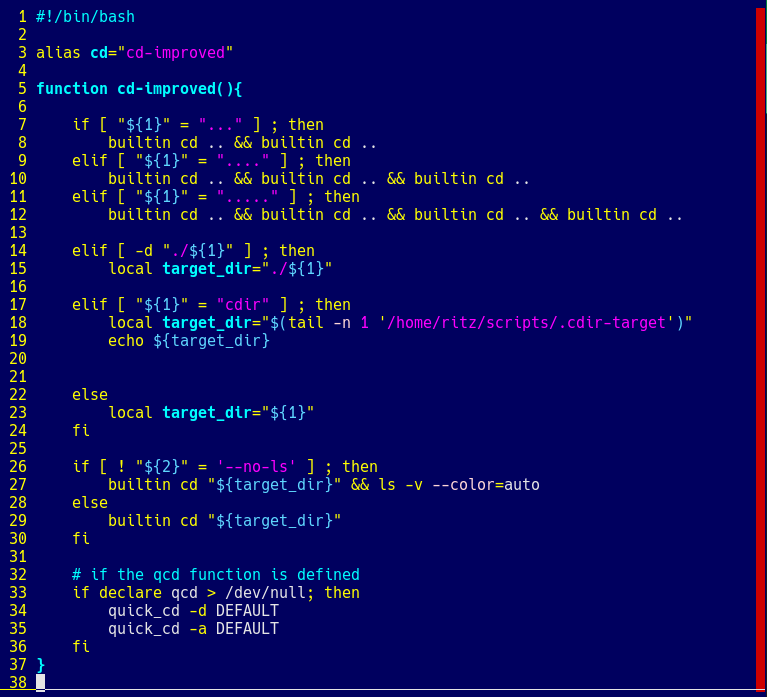
  I made an alias that overwrites cd so I don't have to do this. The important
  line is line 27, you could probably accomplish something similar like this:

  alias cd="cd ${1} && ls -v --color=auto"

  I also set it up so I can change more than one directory up using ... or ....
  or .....

  also I have a few shortcut scripts, cdir and qcd. cdir creates a quick way to
  drop a bookmark wherever I'd like, while qcd can make permanent bookmarks. Also
  qcd makes it so whenever I open a new terminal it opens to the last directory I
  was in, which is nice if you need a new terminal to do something in the current
  folder and you don't want to have to walk alllllllll the way back.
┌─────────┐                                                            ┌───────────┐
│ similar │                       chronological                        │ different │
╘═════════╧══════════════════════════════──────────────────────────────┴───────────┘
 -> file: fediverse/1762
═══════════════════════════════════════════════─────────────────────────────────────
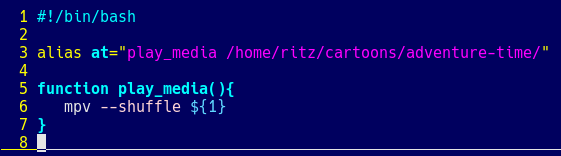
  This was the first bash script I ever wrote.

  It's been updated a little, it was a bash alias first, but this is what it
  looks like now.

  Kinda shows what kinds of problems I needed to solve most.
┌─────────┐                                                            ┌───────────┐
│ similar │                       chronological                        │ different │
╘═════════╧════════════════════════════════════────────────────────────┴───────────┘
 -> file: fediverse/1080
══════════════════════════════════════════──────────────────────────────────────────
  here's an idea - when typing a command in a BASH terminal if you push up it
  inserts the previous command (as expected) but if you hold SHIFT and push up it
  inserts the first argument in your previous command. Then, you can push up
  again (while still holding shift) to go one command further back, and again to
  get the third previous command.

  Then, here's the cool part, if you are holding shift and you push left/right,
  then it moves from the first argument of the previous command to the second,
  third, fourth argument.

  example:`ls -ltr ~/pictures/my-art/

  feh [shift+up inserts -ltr]
  feh -ltr [hmmm that's not right]
  feh -ltr [shift+right switches to 2nd argument]
  feh ~/pictures/my-art/ [ah that's better]
  `

  would be even cooler if it highlighted it in your previous terminal output so
  you could visually connect your current input with the previous input
┌─────────┐                                                            ┌───────────┐
│ similar │                       chronological                        │ different │
╘═════════╧═══════════════════════════════─────────────────────────────┴───────────┘
 -> file: bluesky/12
══════════════════════════════════════════════════════════──────────────────────────
  alas, if only the command for deleting the contents of a directory and the
  command to delete THE ENTIRE COMPUTER FROM EXISTENCE are off by a single .
┌─────────┐                                                            ┌───────────┐
│ similar │                       chronological                        │ different │
╘═════════╧═══════════════════════════════════════════════─────────────┴───────────┘
 -> file: fediverse/1250
═══════════════════════════════════════════─────────────────────────────────────────
  if your IoT device can't be controlled with a BASH script then I'm sorry
┌─────────┐                                                            ┌───────────┐
│ similar │                       chronological                        │ different │
╘═════════╧════════════════════════════════────────────────────────────┴───────────┘
 -> file: fediverse/3877
════════════════════════════════════════════════════────────────────────────────────
  @user-570

  I do`alias ls='ls -v --color=auto'
  `

  and that seems to cover most things. Then in my cd alias I do`alias cd='cd ${@}
  && ls -la'
  `

  so I don't have to type ls everytime I cd ^_^
┌─────────┐                                                            ┌───────────┐
│ similar │                       chronological                        │ different │
╘═════════╧═════════════════════════════════════════───────────────────┴───────────┘
 -> file: fediverse/2291
════════════════════════════════════════════════────────────────────────────────────
  you sly dogs, you got me posting again.

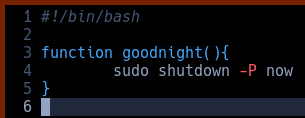
  unrelated, but I think this is the first script I ever wrote!
┌─────────┐                                                            ┌───────────┐
│ similar │                       chronological                        │ different │
╘═════════╧═════════════════════════════════════───────────────────────┴───────────┘
 -> file: fediverse/2295
════════════════════════════════════════════════────────────────────────────────────
  ┌───────────────────────────────────┐
  │ CW: re: your favorite text editor │
  └───────────────────────────────────┘


  @user-1218

  can echo into a file if nothing else, though that's quite a big hassle =P
┌─────────┐                                                            ┌───────────┐
│ similar │                       chronological                        │ different │
╘═════════╧═════════════════════════════════════───────────────────────┴───────────┘
 -> file: fediverse/6137
════════════════════════════════════════════════════════════════════────────────────
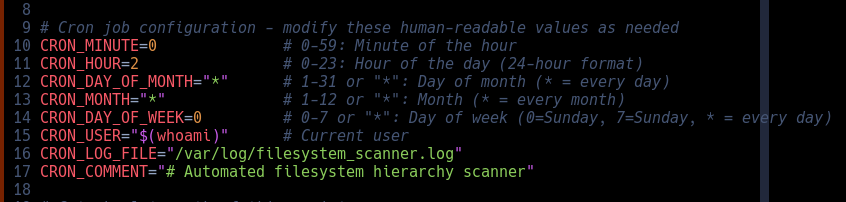
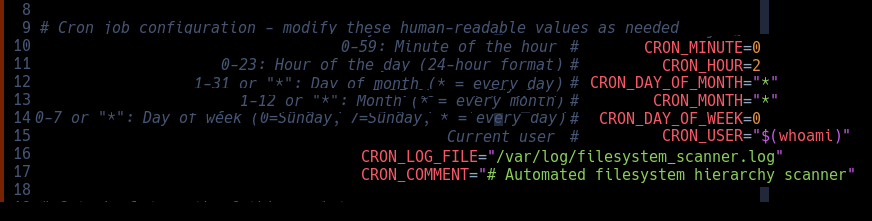
  sometimes, comments need to go on the left side of text. Like for parts of the
  script which should be user-editable, the fields should all be right-aligned to
  the farthest required bit of text. Instead of [picture A] it should be [picture
  B]
┌─────────┐                                                            ┌───────────┐
│ similar │                       chronological                        │ different │
╘═════════╧═════════════════════════════════════════════════════════───┴───────────┘
 -> file: fediverse/2014
════════════════════════════════════════════════────────────────────────────────────
  Picture this: BASH, except every command automatically generates an "undo"
  command which is the exact inverse of whatever the interpreter executed. These
  undo commands are stored in a file and you can move forward, backward, and jump
  around like you're a chronomancer.
┌─────────┐                                                            ┌───────────┐
│ similar │                       chronological                        │ different │
╘═════════╧═════════════════════════════════════───────────────────────┴───────────┘
 -> file: fediverse/5877
═══════════════════════════════════════════════════════════════════─────────────────
  I wish I could click on ls output to cd up or down
┌─────────┐                                                            ┌───────────┐
│ similar │                       chronological                        │ different │
╘═════════╧════════════════════════════════════════════════════════────┴───────────┘
 -> file: fediverse/1228
═══════════════════════════════════════════─────────────────────────────────────────
  @user-883

  I love your chaotic energy in this shell script
┌─────────┐                                                            ┌───────────┐
│ similar │                       chronological                        │ different │
╘═════════╧════════════════════════════════────────────────────────────┴───────────┘
 -> file: fediverse/4975
════════════════════════════════════════════════════════════────────────────────────
  Hearts are full. We await commands. I played games yesterday.
┌─────────┐                                                            ┌───────────┐
│ similar │                       chronological                        │ different │
╘═════════╧═════════════════════════════════════════════════───────────┴───────────┘
 -> file: fediverse/1567
════════════════════════════════════════════────────────────────────────────────────
  I helped make a script that saves the last directory you CD'd to in every shell
  / terminal. It helps because when I open a new terminal I'm already where I was
  working last, which means I'm less likely to forget what I was doing.

  However, it does make my home directory a bit more messy, as I no longer open
  my computer to that place.
┌─────────┐                                                            ┌───────────┐
│ similar │                       chronological                        │ different │
╘═════════╧═════════════════════════════════───────────────────────────┴───────────┘
 -> file: fediverse/1937
╔══════════════════════════════════════════════────────────────────────────────────┐
║ The best tip I have for people new to Linux is every time you solve a problem,   │
║ put the solution in a script. In addition, put the operations necessary to undo  │
║ the operation you just performed into a separate script (or function in the      │
║ same script)                                                                     │
║                                                                                  │
║ It's not hard. It's very easy. Its basically just typing things into a text      │
║ document instead of entering them one-by-one in your terminal. But now if you    │
║ ever need to solve the same problem twice, you just need to look through all     │
║ the scripts you've written instead of trying to relearn how to fix the thing     │
║ you're working on.                                                               │
║                                                                                  │
║ Plus, if you ever need to disable what you did, well there it is, you're good    │
║ to go. You can use chatGPT for things like text parsing or whatever, like "hey   │
║ can you write me a sed command that does this exact thing that I'm going to      │
║ enumerate and spell out for you" followed up by "that didn't quite work, the     │
║ desired behavior was this, but when I ran the script provided it did this" boom  │
║ you're a Linux administrator now, heres your rubber duck.                        │
╠═════════╗                                                            ┌───────────┤
║ similar ║                       chronological                        │ different │
╚═════════╩═══════════════════════════════════─────────────────────────┴───────────┘
 -> file: fediverse/6107
════════════════════════════════════════════════════════════════════────────────────
  commanding a coding agent to write bash is a lot different than telling it to
  write a systems analysize.

  one is "hey can you examine this repository and make a note somewhere on a
  todo-list or whatever that there needs to be a bugfix in relation to the
  options setting input translation recommendation algorithm matchbox field
  because when I click on it the program crashes"

  and the other is like "okay now put the box over there. great now drag it a
  little bit closer. okay now take the refluxinator and adjust the bamboozlewhap
  to account of brass-terminatrix-incorporated and strip out the
  question-mark-eyes"

  wait actually neither of them is like that okay the bash one is like: "okay
  yeah do it. sure. yeah okay. yes, but we should put them at this location:
  [loc]. ummm it still has this error message. it still says the same error. okay
  now it says this, I don't think it's gonna work so let's try this other thing."
┌─────────┐                                                            ┌───────────┐
│ similar │                       chronological                        │ different │
╘═════════╧═════════════════════════════════════════════════════════───┴───────────┘
 -> file: fediverse/3822
═══════════════════════════════════════════════════─────────────────────────────────
  @user-1582

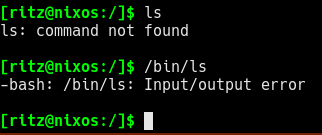
  I think that's what happened, in addition to... whatever this input/output
  error is. No clue what to do about that. Maybe my SD card is dying, I've
  flashed over it like, 10 times now haha 😅
┌─────────┐                                                            ┌───────────┐
│ similar │                       chronological                        │ different │
╘═════════╧════════════════════════════════════════────────────────────┴───────────┘
 -> file: fediverse/1934
════════════════════════════════════════════════────────────────────────────────────
  @user-1109

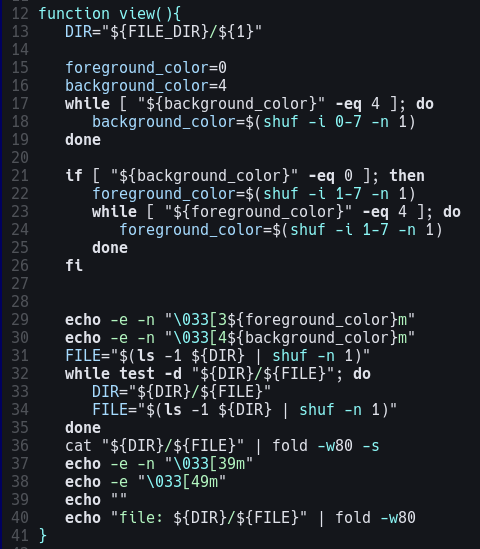
  do it in a random color each time! Here's my implementation for viewing txt
  files colorfully:
┌─────────┐                                                            ┌───────────┐
│ similar │                       chronological                        │ different │
╘═════════╧═════════════════════════════════════───────────────────────┴───────────┘
 -> file: fediverse/3577
══════════════════════════════════════════════════──────────────────────────────────
  ┌─────────────────────────┐
  │ CW: computers-mentioned │
  └─────────────────────────┘


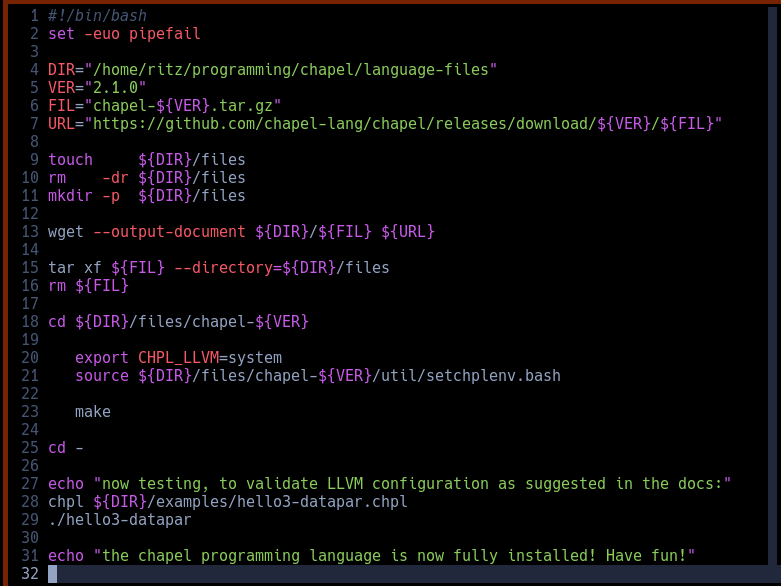
  I love writing installation scripts like this!

  If you want to install something on Linux but you have difficulty, talk to me
  and I'll write you a script like this. I might even make it fancier.

  This one installs a programming language that is useful for *parallel
  computing* across *multiple clusters of computers* which could be useful if you
  want to leverage *multiple CPUs and GPUs with ease* to compute tasks which are
  far beyond a normal computer.

  https://chapel-lang.org/download.html
┌─────────┐                                                            ┌───────────┐
│ similar │                       chronological                        │ different │
╘═════════╧═══════════════════════════════════════─────────────────────┴───────────┘
 -> file: fediverse/3663
══════════════════════════════════════════════════──────────────────────────────────
  @user-1582

  It depends on the size of the file, copying a thousand lines of config file
  probably isn't that big of a deal, but copying a million lines in a log file
  just to pass it as an argument to... pad it to the left, or whatever, that'll
  DEFINITELY slow down your execution speed!

  Much better to pass by reference, usually...
┌─────────┐                                                            ┌───────────┐
│ similar │                       chronological                        │ different │
╘═════════╧═══════════════════════════════════════─────────────────────┴───────────┘
 -> file: fediverse/5168
════════════════════════════════════════════════════════════────────────────────────
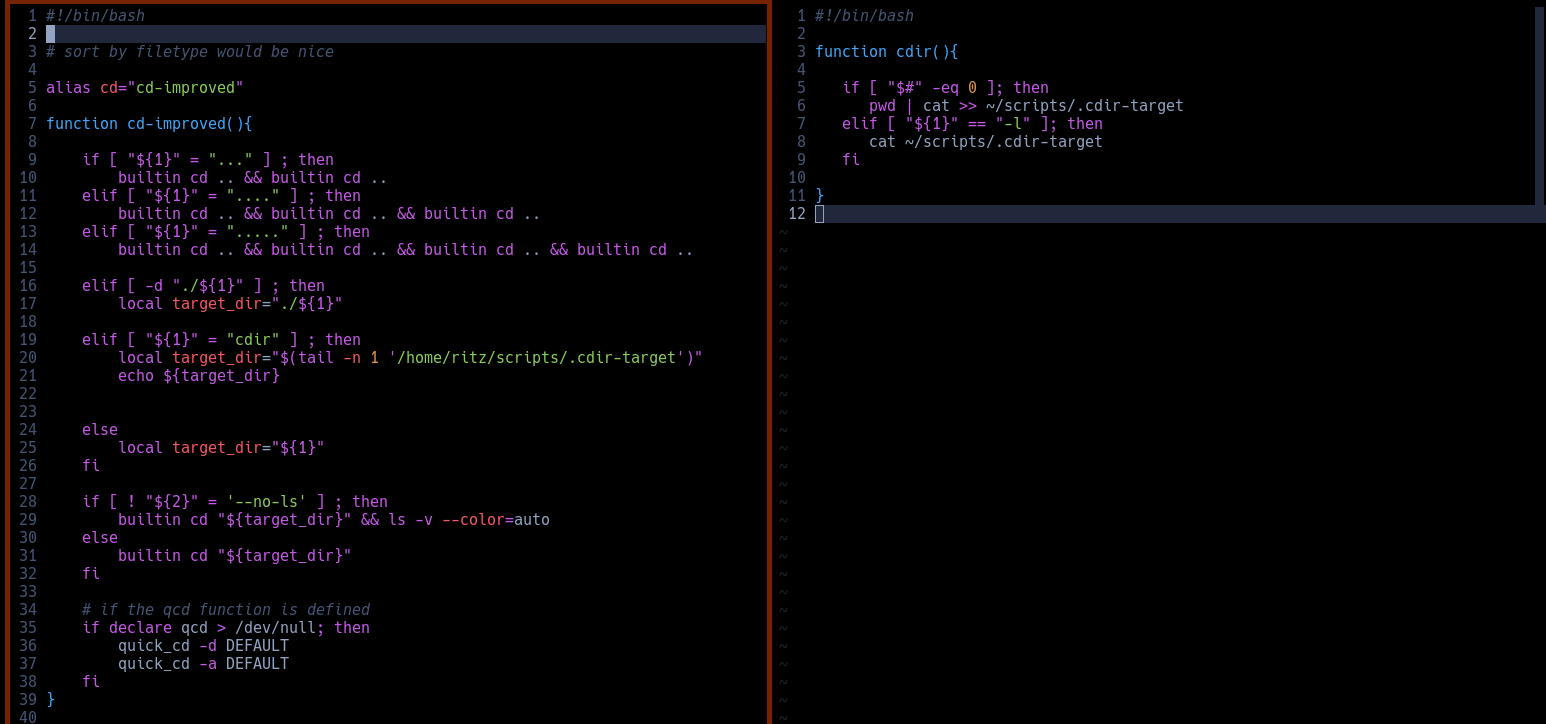
  this is one of the first scripts I wrote

  I can't believe I put the --no-ls AFTER the argument, ha, what a noob.

  ah well if it works it works and I can't refactor now because I built it into
  random scripts and I'd be fixing errors all the time.
┌─────────┐                                                            ┌───────────┐
│ similar │                       chronological                        │ different │
╘═════════╧═════════════════════════════════════════════════───────────┴───────────┘
 -> file: fediverse/1871
═══════════════════════════════════════════════─────────────────────────────────────
  I think all software should have config files

  or accept as many command line arguments as necessary to achieve all the
  functionality of a config file without requiring a standardized setup

  or accept a config file as a command line argument, to allow for multiple
  different implementations

  or whatever you can throw together in your spare time because software is
  either open source or it hates you.
┌─────────┐                                                            ┌───────────┐
│ similar │                       chronological                        │ different │
╘═════════╧════════════════════════════════════────────────────────────┴───────────┘
 -> file: fediverse/6171
════════════════════════════════════════════════════════════════════────────────────
  @user-882

  I dunno I just remember having that problem every once in a while and if you
  search the man page for "sub" it takes like, 16 n pushes to find what you need
  and it's like... can't you just put the flags and keyboard shortcuts at the
  beginning??
┌─────────┐                                                            ┌───────────┐
│ similar │                       chronological                        │ different │
╘═════════╧═════════════════════════════════════════════════════════───┴───────────┘
 -> file: fediverse/634
═════════════════════════════════════════───────────────────────────────────────────
  @user-192

  I'd agree with that. it's not designed for performance, not really. Mostly
  ubiquity, which is it's strength. As long as something can be compiled to a
  binary, BASH can execute it. That's why it's good, for accomplishing *diverse*
  tasks that you cannot have the capacity to program yourself. Scientific
  computations or cultural approximations, things that are beyond your intuitive
  understanding as a human on this earth, but which compel and align your
  thinking.

  I'm sure someone could create a more intuitive or accessible syntax, but syntax
  isn't the point - the capabilities, what you can do with it, has always defined
  the purpose of programming paradigms. And BASH is (currently) at the forefront
  of it's niche, the "terminal" language that handles "command line"
  applications. Powershell is good, yes... but it's not as good as BASH. Neither
  is Fish or... the one that starts with a z? zfs? something like that. The
  acronyms are hard to keep straight sometimes.
┌─────────┐                                                            ┌───────────┐
│ similar │                       chronological                        │ different │
╘═════════╧══════════════════════════════──────────────────────────────┴───────────┘
 -> file: fediverse/4865
═════════════════════════════════════════════════════════───────────────────────────
  ┌─────────────────────────┐
  │ CW: computers-mentioned │
  └─────────────────────────┘


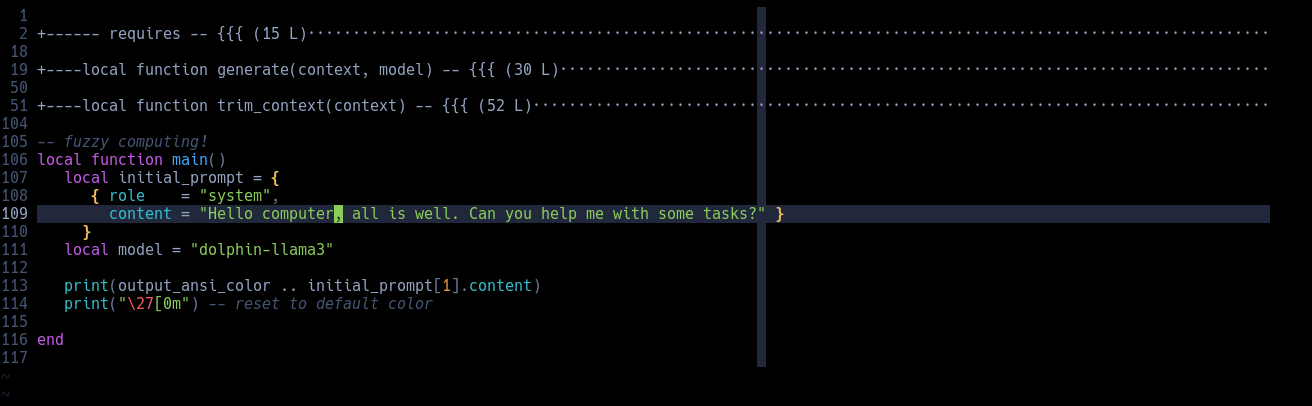
  this is all it takes to send a message to a local LLM.

  add a third function to get chatbot functionality.

  a fourth to get a database storing method

  (even if it's just in .txts)

  great, you've mastered the technical difficulty in using AI. Now you gotta
  learn all the other kind of programming so you can use this for situations that
  need interpretation moment to moment.

  aka active duty systems.

  something like "output a 0 if the next text is [category.iter()]: " +
  output.get_content() + " \n\n output a 1 if the next text is [category.iter()]:
  " + output.get_content()"

  or even "describe this thing as most like one of these characteristics" until
  eventually you get THX-1138 if the characters were computers.
┌─────────┐                                                            ┌───────────┐
│ similar │                       chronological                        │ different │
╘═════════╧══════════════════════════════════════════════──────────────┴───────────┘
 -> file: fediverse/2097
════════════════════════════════════════════════────────────────────────────────────
  If you're writing a bash script, you should never hard-code file locations.
  Instead, put them in a variable at the top of your script, so they're easy to
  find when people need to configure your script or move files around.

  It's like a config file built INTO the script itself. Just change the
  variables, they're at the top with comments.
┌─────────┐                                                            ┌───────────┐
│ similar │                       chronological                        │ different │
╘═════════╧═════════════════════════════════════───────────────────────┴───────────┘
 -> file: messages/19
══──────────────────────────────────────────────────────────────────────────────────
  https://www.masteringemacs.org/article/the-emacs-27-edition-of-mastering-emacs-o
  ut-now
┌─────────┐                                                            ┌───────────┐
│ similar │                       chronological                        │ different │
╘═────────┴────────────────────────────────────────────────────────────┴───────────┘
 -> file: fediverse/5881
═══════════════════════════════════════════════════════════════════─────────────────
  I wish I could click on ls output to cd up or down

  girl that's just called midnight commander
┌─────────┐                                                            ┌───────────┐
│ similar │                       chronological                        │ different │
╘═════════╧════════════════════════════════════════════════════════────┴───────────┘
 -> file: fediverse/3819
═══════════════════════════════════════════════════─────────────────────────────────
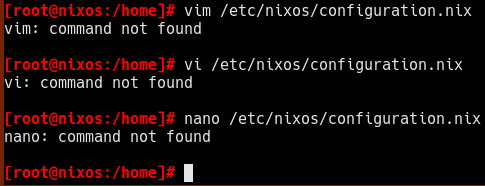
  haha I'm in danger
┌─────────┐                                                            ┌───────────┐
│ similar │                       chronological                        │ different │
╘═════════╧════════════════════════════════════════────────────────────┴───────────┘
 -> file: fediverse/2484
╔═══════════════════════════════════════════════───────────────────────────────────┐
║ @user-1271                                                                       │
║                                                                                  │
║ I can help with that.                                                            │
║                                                                                  │
║ I recommend looking at Ollama, which runs an HTTP server on your local machine   │
║ (hope you have a decent graphics card)                                           │
║                                                                                  │
║ then, script some behavior you'd like to implement using Lua and the LuaSockets  │
║ library. Also dkjson to handle the json parts.                                   │
║                                                                                  │
║ then, all you have to do is construct a prompt based on the variables and        │
║ desired input/output and push it into a json packet and send it to the HTTP      │
║ server. It's less complicated than it sounds.                                    │
║                                                                                  │
║ what you want it to do and your implementation for it is the hard part. But      │
║ perhaps this project of mine will get you started:                               │
║                                                                                  │
║ (I can copy-paste it too if you'd like)                                          │
║                                                                                  │
║ just... don't make a chatbot. chatbots are useless to work on because there's    │
║ already so many of them.                                                         │
║                                                                                  │
║ much better I think to use the LLM to process arbitrary information with an      │
║ unpredictable form into more predictable patterns which can be utilized          │
║ programmatically.                                                                │
║                                                                                  │
║ Feel free to ask any questions. Do keep in mind that training LLMs is            │
║ unethical, but using them is whatever.                                           │

╠═════════╗                                                            ┌───────────┤
║ similar ║                       chronological                        │ different │
╚═════════╩════════════════════════════════════────────────────────────┴───────────┘
 -> file: fediverse/3258
══════════════════════════════════════════════════──────────────────────────────────
  @user-570

  I wonder how it would feel to bind numpad enter to tab instead?
┌─────────┐                                                            ┌───────────┐
│ similar │                       chronological                        │ different │
╘═════════╧═══════════════════════════════════════─────────────────────┴───────────┘
 -> file: messages/752
══════════════════════════════════════════════════════════──────────────────────────
  techbros really wanted to automate IRC so they didn't have to rely on the
  community knowing and trusting them to remember the commands to make docker
  containers for their react frameworks

  and like... yeah I use chatGPT too, because that way I can get what I need
  without bothering anyone (you aren't bothering people who get off on helping
  others when you ask for help)
┌─────────┐                                                            ┌───────────┐
│ similar │                       chronological                        │ different │
╘═════════╧═══════════════════════════════════════════════─────────────┴───────────┘
 -> file: fediverse/4772
═════════════════════════════════════════════════════════───────────────────────────
  @user-1692

  I usually write everything down in a script that way when I call it from an
  external service all I have to do is point at the file

  sorta like... hacking environmental options into a config file

  like... I don't write an ffmpeg command every time I want to record my screen.
  I just type "screen-record" and then it'll do the thing that I figured out how
  to do a long time ago.

  ... oh no there's an error, I wonder what changed out from under my feet.

  huh it's wine, that one's always confusing to debug. Let's see... "could not
  open program.exe" uh-huh. Well, why not? is there a dependency issue? something
  miscompiled or configured? no? it's just... broken? you don't get to use that
  program today? huh that's weird. that's linux for ya I guess.
┌─────────┐                                                            ┌───────────┐
│ similar │                       chronological                        │ different │
╘═════════╧══════════════════════════════════════════════──────────────┴───────────┘
 -> file: messages/511
══════════════════════════════════════════════════──────────────────────────────────
  That feeling when running a command on my laptop causes the fans to spin up on
  my desktop...!
┌─────────┐                                                            ┌───────────┐
│ similar │                       chronological                        │ different │
╘═════════╧═══════════════════════════════════════─────────────────────┴───────────┘
 -> file: notes/environment-variables
══════──────────────────────────────────────────────────────────────────────────────
  To edit environment variables:

  ~/.bashrc is for variables only accessible by the user.

  /etc/profile is for variables accessible by all users.

  /etc/environment is for variables accessible by anyone.
┌─────────┐                                                            ┌───────────┐
│ similar │                       chronological                        │ different │
╘═════────┴────────────────────────────────────────────────────────────┴───────────┘
 -> file: notes/never-do-this
══════════════════════════════════════════════════════════════════════════════════──
  never copy paste something from the internet directly into a terminal.
  put it in a text document and read it first.

  [nobody ever does, design the software with that in mind]
┌─────────┐                                                            ┌───────────┐
│ similar │                       chronological                        │ different │
╘═════════╧════════════════════════════════════════════════════════════╧══════════─┘
 -> file: fediverse/6385
══════════════════════════════════════════════════════════════════════──────────────
  interpreted programs allow you to change variables at run-time from remote.
┌─────────┐                                                            ┌───────────┐
│ similar │                       chronological                        │ different │
╘═════════╧═══════════════════════════════════════════════════════════─┴───────────┘
 -> file: fediverse/3504
══════════════════════════════════════════════════──────────────────────────────────
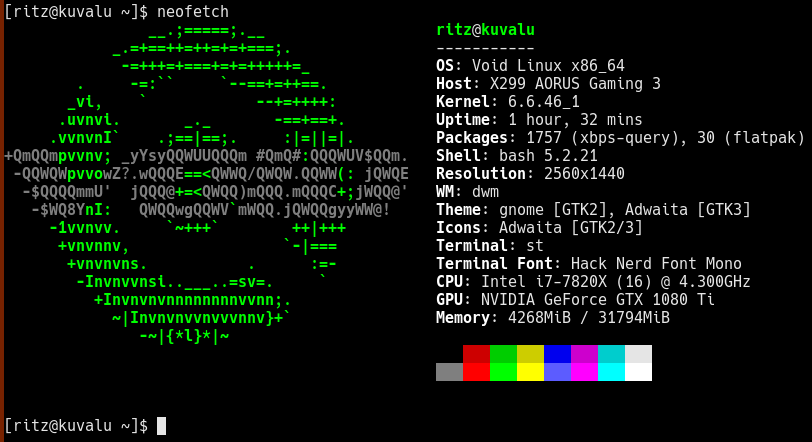
  I have too many packages.
┌─────────┐                                                            ┌───────────┐
│ similar │                       chronological                        │ different │
╘═════════╧═══════════════════════════════════════─────────────────────┴───────────┘
 -> file: fediverse/2084
════════════════════════════════════════════════────────────────────────────────────
  I love it when words align like this

┌─────────┐                                                            ┌───────────┐
│ similar │                       chronological                        │ different │
╘═════════╧═════════════════════════════════════───────────────────────┴───────────┘
 -> file: fediverse/6345
═════════════════════════════════════════════════════════════════════───────────────
  anytime I want to do something new on my computer, I write a bash script.

  if I forgot how to do the thing, I spend time meandering about my
  file-directory-system. If I don't find it, that's okay, because all I have to
  do is keep looking until I stumble upon it.

  kinda makes me wish I had an LLM who managed the operating system and named
  files with long-and-descriptive titles while taking in as context the general
  eternal prompt stored in ~/.claude.md or wherever

  --> /home/ritz/programs/cloud-code/
┌─────────┐                                                            ┌───────────┐
│ similar │                       chronological                        │ different │
╘═════════╧══════════════════════════════════════════════════════════──┴───────────┘
 -> file: fediverse/633
═════════════════════════════════════════───────────────────────────────────────────
  @user-192

  the neat thing about BASH is that it's the glue that holds all your other code
  together. Write libraries in C and call them with BASH - accomplish broader
  tasks that are easier to co-create. That's why I like it - it's not the most
  important, but it's quite beneficial I think _^
┌─────────┐                                                            ┌───────────┐
│ similar │                       chronological                        │ different │
╘═════════╧══════════════════════════════──────────────────────────────┴───────────┘
 -> file: fediverse/3821
═══════════════════════════════════════════════════─────────────────────────────────
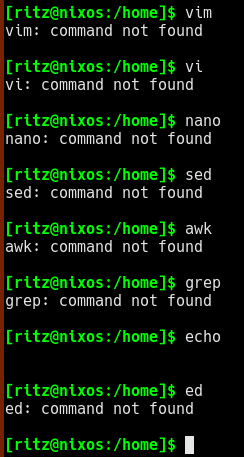
  @user-1597

  oh nooooooooo

  guess I'm reflashing
┌─────────┐                                                            ┌───────────┐
│ similar │                       chronological                        │ different │
╘═════════╧════════════════════════════════════════────────────────────┴───────────┘
 -> file: fediverse/3878
════════════════════════════════════════════════════────────────────────────────────
  @user-570

  that's not actually my script, here's the real one:`#!/bin/bash

  alias cd="cd-improved"

  function cd-improved(){

      if [ "${1}" = "..." ] ; then
          builtin cd .. && builtin cd ..
      elif [ "${1}" = "...." ] ; then
          builtin cd .. && builtin cd .. && builtin cd ..
      elif [ "${1}" = "....." ] ; then
          builtin cd .. && builtin cd .. && builtin cd .. && builtin cd ..

      elif [ -d "./${1}" ] ; then
          local target_dir="./${1}"

      elif [ "${1}" = "cdir" ] ; then
          local target_dir="$(tail -n 1 '/home/ritz/scripts/.cdir-target')"
          echo ${target_dir}


      else
          local target_dir="${1}"
      fi

      if [ ! "${2}" = '--no-ls' ] ; then
          builtin cd "${target_dir}" && ls -v --color=auto
      else
          builtin cd "${target_dir}"
      fi
  }
  `
┌─────────┐                                                            ┌───────────┐
│ similar │                       chronological                        │ different │
╘═════════╧═════════════════════════════════════════───────────────────┴───────────┘
 -> file: fediverse/1773
═══════════════════════════════════════════════─────────────────────────────────────
  ┌─────────────────────────┐
  │ CW: programming-is-easy │
  └─────────────────────────┘


  Need to install a program from Github? Follow these simple steps:

  step 1: make an empty text file

  step 2: put this at the top: #!/bin/bash

  step 3: put this on the next line: set -euo pipefail

  step 4: mkdir -p the directory you want to install it to

  step 5: rm -dr the directory you want to install it to

  step 6: mkdir -p the directory you want to install it to

  step 7: git clone the project

  step 8: this is the hard part - go through each of the steps listed in the
  readme and configure the installation to the needs of your system. Put them in
  the bash script one-by-one.

  step 9: save the file, it doesn't need an extension like .txt or .sh,
  extensions are for windows noobs

  step 10: chmod +x the file and then ./the file!

  step 11: fix it when they change their installation instructions...

  Need a run script? Easy! Write it as a function below your update script, then
  echo the bottom half of the update script into a file named "run" that's placed
  in the project directory.
┌─────────┐                                                            ┌───────────┐
│ similar │                       chronological                        │ different │
╘═════════╧════════════════════════════════════────────────────────────┴───────────┘
 -> file: fediverse/4172
═════════════════════════════════════════════════════───────────────────────────────
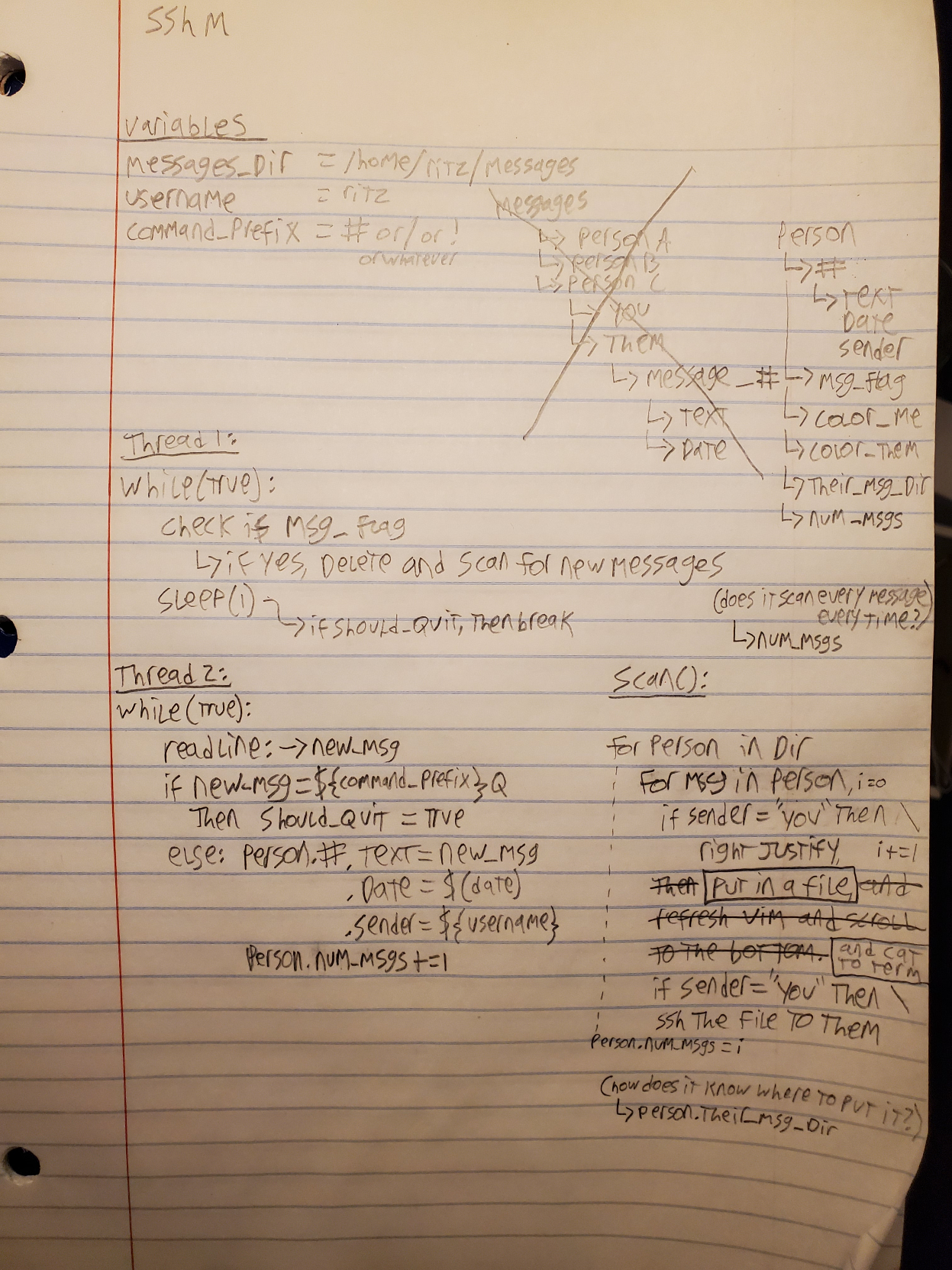
  this is what I got so far for a messaging client that uses SSH

  ... so you need someone's public key in order to talk to them
┌─────────┐                                                            ┌───────────┐
│ similar │                       chronological                        │ different │
╘═════════╧══════════════════════════════════════════──────────────────┴───────────┘
 -> file: fediverse/704
═════════════════════════════════════════───────────────────────────────────────────
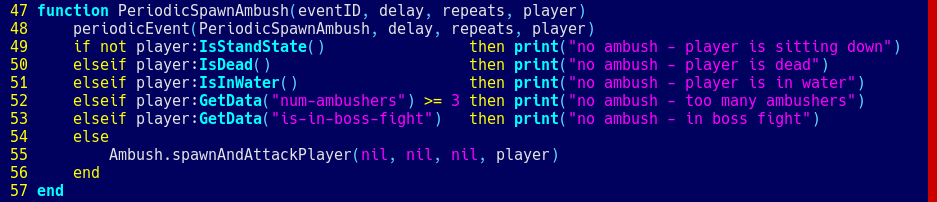
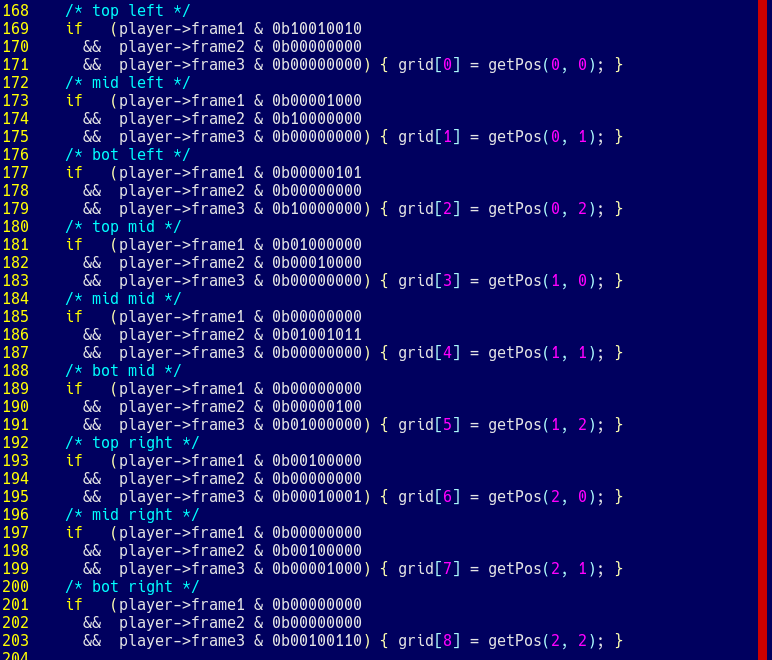
  Is my formatting pretty or does it make you angry?


┌─────────┐                                                            ┌───────────┐
│ similar │                       chronological                        │ different │
╘═════════╧══════════════════════════════──────────────────────────────┴───────────┘
 -> file: fediverse/928
══════════════════════════════════════════──────────────────────────────────────────
  @user-226

  especially if you teach them how to use the terminal.

  the amount of problems I could solve increased exponentially once I learned
  basic python and BASH.

  I love using "tldr", which is a summarizer for man pages. You can use it to
  store custom notes (and import some from the community) which show you how to
  complete common tasks. It's so nice when you can see the options laid out in
  use right there for you whenever you type "tldr " - I personally use "tealdeer"
  which is a tldr browser written in Rust. It's pretty nice because you can write
  a note for yourself every time you solve a particular problem, and then if you
  ever need to do it again it's there for you, easy to access.

  of course, if your problem isn't listed, that's okay. That's what the man pages
  are for. As long as you teach them how to search with \/ they can find
  anything. Especially the \/-f[space] trick, to search for the -f flag for
  example.

  some organizers won't need the terminal, some will. if they pay attention,
  great!
┌─────────┐                                                            ┌───────────┐
│ similar │                       chronological                        │ different │
╘═════════╧═══════════════════════════════─────────────────────────────┴───────────┘
 -> file: fediverse/3751
═══════════════════════════════════════════════════─────────────────────────────────
  I wonder if anyone would pay me to write bash scripts for them? is there a role
  that's just... bash scripter? is that what sysadmins do all day? or is that
  more automation? and what the heck is a dev op? do they write bash scripts?

  or maybe writing bash scripts is the "fun" part of linux, and nobody would pay
  anyone else to do it because they want to do it themselves
┌─────────┐                                                            ┌───────────┐
│ similar │                       chronological                        │ different │
╘═════════╧════════════════════════════════════════────────────────────┴───────────┘
 -> file: fediverse/848
══════════════════════════════════════════──────────────────────────────────────────
  ┌──────────────────────┐
  │ CW: gentoo           │
  └──────────────────────┘


  wrote this in an hour, used a local LLM to generate the regexes.

  haven't tested it yet because I'm not on gentoo rn, so don't run it. which is
  why I shared the code as an image.

  if you really want the text of it then check out the visual description of the
  image.
![#A script written in bash. It is used to update the Gentoo type system to the most recently written functionality. Should not be used more than once a day, and the program written here must be specifically configured to act against that functionality. However, should the user persist in their attempts to break that rule, they simply have to flip a particular switch. #!/bin/bash function gentoo-update(){ RED='\033[0;31m' NOC='\033[0m' if [ "$#" -eq 0]; then date | cat >> ~/scripts/.gentoo-update-target LAST_UPDATE_DATE="$(tail -n 1 '~/scripts/.gentoo-update-target' \ && echo "${LAST_UPDATE_DATE}" \ | sed -r 's/\b(\d{4}-\d{2}-\d{2})\b/\1/g' THIS_UPDATE_DATE="$(date)" \ && echo "${THIS_UPDATE_DATE}" \ | sed -r 's/\b(\d{4}-\d{2}-\d{2})\b/\1/g' if [ ${LAST_UPDATE_DATE} = ${THIS_UPDATE_DATE} ]; then printf "don't sync more than once a day! ${RED} a witch will curse you >: (${NOC}\n" else echo "syncing..." echo "${LAST_UPDATE_DATE}" | cat >> ~/scripts/.gentoo-update-target emerge --sync fi elif [ "${1}" == "-l" ]; then cat ~/scripts/.gentoo-update-target elif [ "${1}" == "-f" ]; then echo "okay but it's your funeral buddy. or worse." energe --sync fi }](../media/a1640a320af86532.png "#A script written in bash. It is used to update the Gentoo type system to the most recently written functionality. Should not be used more than once a day, and the program written here must be specifically configured to act against that functionality. However, should the user persist in their attempts to break that rule, they simply have to flip a particular switch. #!/bin/bash function gentoo-update(){ RED='\033[0;31m' NOC='\033[0m' if [ \"$#\" -eq 0]; then date | cat >> ~/scripts/.gentoo-update-target LAST_UPDATE_DATE=\"$(tail -n 1 '~/scripts/.gentoo-update-target' \ && echo \"${LAST_UPDATE_DATE}\" \ | sed -r 's/\b(\d{4}-\d{2}-\d{2})\b/\1/g' THIS_UPDATE_DATE=\"$(date)\" \ && echo \"${THIS_UPDATE_DATE}\" \ | sed -r 's/\b(\d{4}-\d{2}-\d{2})\b/\1/g' if [ ${LAST_UPDATE_DATE} = ${THIS_UPDATE_DATE} ]; then printf \"don't sync more than once a day! ${RED} a witch will curse you >: (${NOC}\n\" else echo \"syncing...\" echo \"${LAST_UPDATE_DATE}\" | cat >> ~/scripts/.gentoo-update-target emerge --sync fi elif [ \"${1}\" == \"-l\" ]; then cat ~/scripts/.gentoo-update-target elif [ \"${1}\" == \"-f\" ]; then echo \"okay but it's your funeral buddy. or worse.\" energe --sync fi }")
┌─────────┐                                                            ┌───────────┐
│ similar │                       chronological                        │ different │
╘═════════╧═══════════════════════════════─────────────────────────────┴───────────┘
 -> file: fediverse/1246
═══════════════════════════════════════════─────────────────────────────────────────
  @user-883

  hehe if I don't understand how it works it's difficult for me to use things. My
  Linux friends get so exasperated with me because I'm like "cool script gimme
  like 2 days to figure it out" and they're like "bro just use these flags" and
  I'm like "no"
┌─────────┐                                                            ┌───────────┐
│ similar │                       chronological                        │ different │
╘═════════╧════════════════════════════════────────────────────────────┴───────────┘
 -> file: fediverse/2750
═════════════════════════════════════════════════───────────────────────────────────
  @user-246 @user-570

  or "what button do you want to use for "yes I want to configure my keybinds"?
  Push "start" to use the default"
┌─────────┐                                                            ┌───────────┐
│ similar │                       chronological                        │ different │
╘═════════╧══════════════════════════════════════──────────────────────┴───────────┘
 -> file: fediverse_boost/65
◀═╦════════════════[BOOST]═════════════════──────────────────────────────────────┐
  ║ ┌──────────────────────────────────────────────────────────────────────────┐ │
  ║ │ bash-errors                                                              │ │
  ║ │                                                                          │ │
  ║ │ Permalink: https://wizardzines.com/comics/bash-errors/                   │ │
  ║ └──────────────────────────────────────────────────────────────────────────┘ │
  ╠─────────┐                                                        ┌───────────┤
  ║ similar │                     chronological                      │ different │
  ╚═════════╧══════════════════════════════──────────────────────────┴───────────┴─▶
 -> file: fediverse/5036
════════════════════════════════════════════════════════════────────────────────────
  give me syntax highlighting in a terminal based editor and that's all I need.
┌─────────┐                                                            ┌───────────┐
│ similar │                       chronological                        │ different │
╘═════════╧═════════════════════════════════════════════════───────────┴───────────┘
 -> file: fediverse/3139
═════════════════════════════════════════════════───────────────────────────────────
  "reply while text is entered in the text field" should open a new tab instead
  of overwriting.
┌─────────┐                                                            ┌───────────┐
│ similar │                       chronological                        │ different │
╘═════════╧══════════════════════════════════════──────────────────────┴───────────┘
 -> file: fediverse/1474
═══════════════════════════════════════════─────────────────────────────────────────
  @user-882


┌─────────┐                                                            ┌───────────┐
│ similar │                       chronological                        │ different │
╘═════════╧════════════════════════════════────────────────────────────┴───────────┘
 -> file: fediverse/5037
╔══════════════════════════════════════════════════════════────────────────────────┐
║ plus if I ever need to know something about syntax or some obscure function      │
║ that I can't remember, I can type a quick message to the local LLM that's        │
║ running on my 12 year old graphics card and it'll give me an answer in 5ish      │
║ seconds. If it's wrong, I ask again, and I spend a minute or two debugging.      │
║ Sometimes that's better than telling google exactly what you're working on.      │
║                                                                                  │
║ in DWM, that's "alt+enter" and then I type the name of the LLM script I wrote    │
║ "prompt:" and then type whatever question I have and it spits out the results.   │
║ Then when I'm done, either "prompt:" again, which saves the context in an        │
║ environment variable (okay actually a file that I made and I pull from, but      │
║ functionally it's like an environment variable because its just a flat file      │
║ string) until I close the terminal. Then it deletes the context and I can start  │
║ anew, or if I wanted to have multiple conversations going I can do that too.     │
║                                                                                  │
║ ... then I get syntax related search results from locally running software.      │
║ Don't need a massive GPTU...                                                     │
╠═════════╗                                                            ┌───────────┤
║ similar ║                       chronological                        │ different │
╚═════════╩═══════════════════════════════════════════════─────────────┴───────────┘
 -> file: fediverse/6057
═══════════════════════════════════════════════════════════════════─────────────────
  gonna touch grass. maybe do some programming. ttyl
┌─────────┐                                                            ┌───────────┐
│ similar │                       chronological                        │ different │
╘═════════╧════════════════════════════════════════════════════════────┴───────────┘
 -> file: notes/todo
════════────────────────────────────────────────────────────────────────────────────
  1. write a proper todo script
  2. finish installing the drivers for the printer
      -> fix the "make" command, it seems to be borked
  3. figure out how to install Overwatch
  4. reinstall 351-elec
  5. get another cord for the hard drive's power supplies so you can connect
      the cmdo drive again
  6. get a life
  7. finish installing GNUstep (requires make I think)
  7. ????
  8. profit
┌─────────┐                                                            ┌───────────┐
│ similar │                       chronological                        │ different │
╘═══════──┴────────────────────────────────────────────────────────────┴───────────┘
 -> file: fediverse/6382
══════════════════════════════════════════════════════════════════════──────────────
  cloud-code should automatically use git and record everything. If the user
  wants to assign a different git, then it does that too.

  -- stack overflow --

  I used to think programs could only affect files in their directory. Then I
  learned about Window's "My Games" directory, and then somewhere down the line
  I'm thinking about how programs on Linux can just use absolute paths to random
  places on your hard drive and it's like... wow, if only someone built basic
  sandboxing into this /etc/ style environment
┌─────────┐                                                            ┌───────────┐
│ similar │                       chronological                        │ different │
╘═════════╧═══════════════════════════════════════════════════════════─┴───────────┘
 -> file: fediverse/4829
═════════════════════════════════════════════════════════───────────────────────────
  check out my shuffle-all-music script
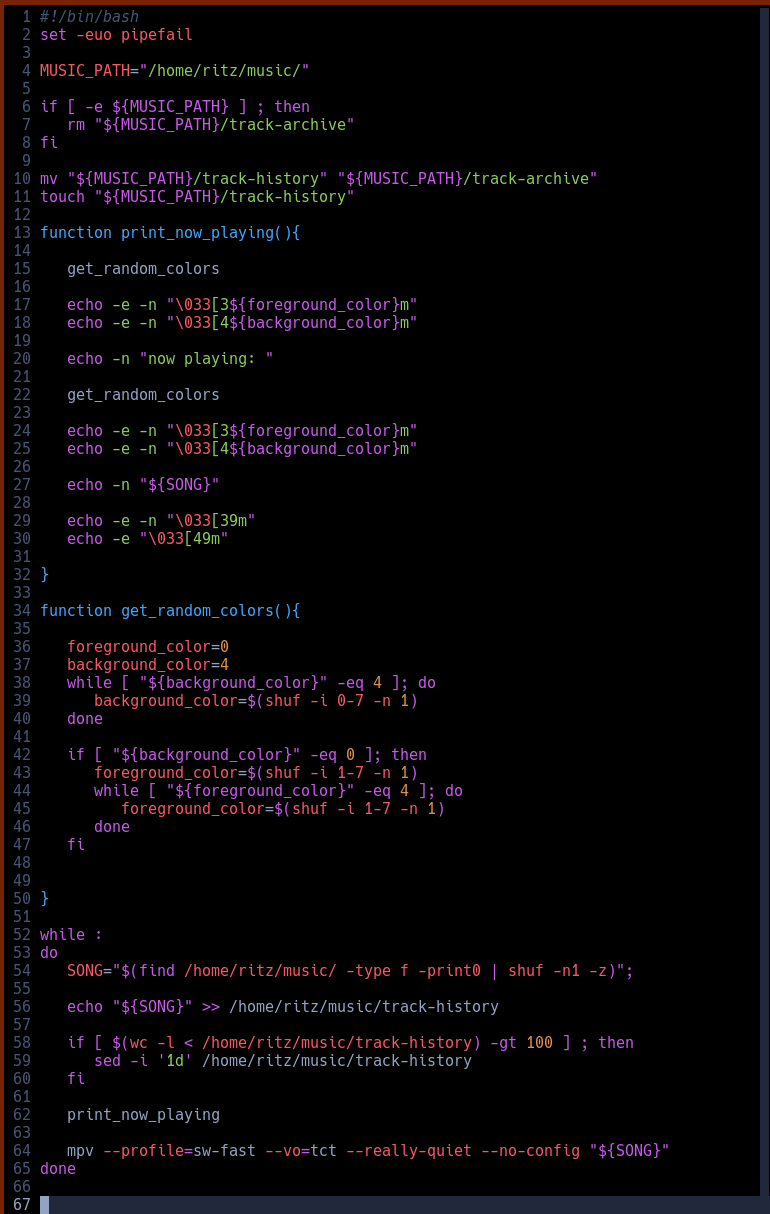
┌─────────┐                                                            ┌───────────┐
│ similar │                       chronological                        │ different │
╘═════════╧══════════════════════════════════════════════──────────────┴───────────┘
 -> file: fediverse/5113
════════════════════════════════════════════════════════════────────────────────────
  any game with the ability to interact with the simulation through command line
  arguments is a game that is scriptable and infinitely expandable.
┌─────────┐                                                            ┌───────────┐
│ similar │                       chronological                        │ different │
╘═════════╧═════════════════════════════════════════════════───────────┴───────────┘
|